Give Yourself the Gift of Modernizing Your IT Infrastructure: Lower Your Tax Bill with Section 179
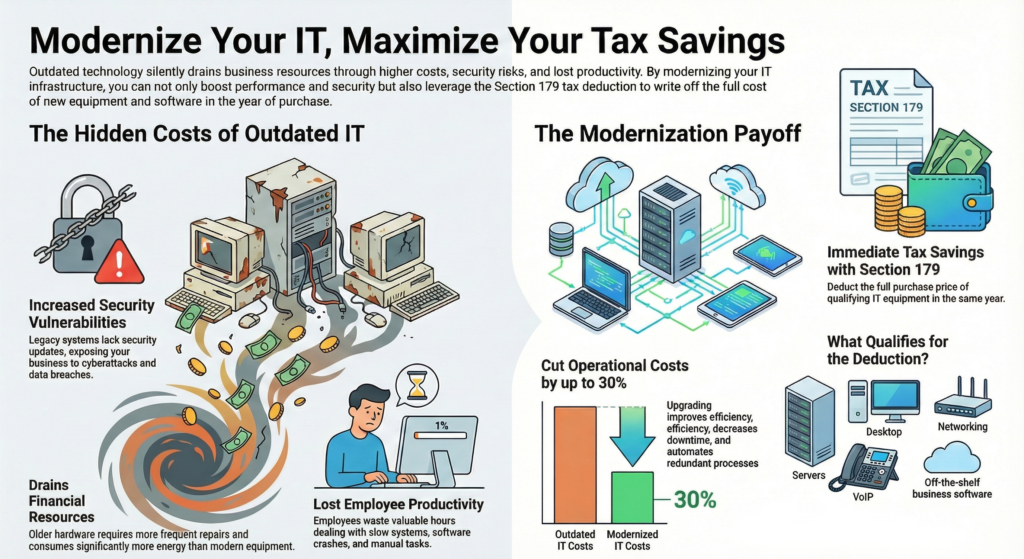
Your business could save thousands of dollars this tax season while upgrading the technology that keeps your operations running. Section 179 lets businesses deduct the full purchase price of qualifying IT equipment and software in the year of purchase, turning necessary upgrades into immediate tax savings. Many companies continue using outdated hardware and software without realizing how much it costs them in lost productivity, security risks, and higher maintenance expenses.
The end of 2025 presents a perfect opportunity to modernize IT infrastructure while capturing tax benefits. Old computers, aging networks, and unsupported software put businesses at risk every day. Section 179 covers essential equipment like PCs, servers, networks, and phones, plus security software like antivirus and endpoint protection tools.
Working with IT professionals helps identify which systems need replacement and ensures upgrades deliver real business value. The modernization process doesn't have to be overwhelming when businesses have expert guidance to assess their current infrastructure and plan strategic improvements.
Key Takeaways
- Section 179 allows businesses to deduct the full cost of qualifying IT equipment and software purchases in the same tax year
- Upgrading outdated hardware and software improves security, performance, and reduces long-term operational costs
- Professional IT assessments help identify critical upgrades and ensure technology investments align with business needs
Why Modernize Your IT Infrastructure Now?
Aging technology drains resources through increased maintenance costs, security vulnerabilities, and reduced productivity. Companies that modernize their IT infrastructure can cut operational costs by up to 30% while gaining the flexibility needed to adapt to market changes and support growth.
The Hidden Costs of Outdated Hardware and Software
Legacy systems create technical debt that compounds over time. Older hardware requires more frequent repairs and consumes more energy than modern equipment. Software that no longer receives security updates leaves businesses vulnerable to cyberattacks and data breaches.
The true cost extends beyond maintenance bills. Employees waste hours dealing with slow systems and software crashes. Outdated technology also limits what a business can do. Companies cannot adopt new tools or integrate with modern platforms when their infrastructure cannot support them.
Many businesses do not realize how much money they lose to inefficiency. A server that takes twice as long to process requests doubles the time employees spend waiting. Software that lacks automation features forces staff to complete manual tasks that modern systems handle automatically.
Modernization as a Competitive Advantage
Modern IT infrastructure helps businesses respond faster to customer needs and market opportunities. Companies with updated systems can process transactions quicker, analyze data in real time, and launch new services without technical roadblocks.
Cloud computing and current software versions enable remote work and collaboration across locations. This flexibility attracts better talent and allows businesses to operate beyond traditional office hours. Organizations stuck on legacy systems struggle to offer these capabilities.
Customers expect fast response times and seamless digital experiences. Businesses with modern infrastructure can meet these expectations while competitors with outdated systems fall behind. The gap between companies that invest in IT infrastructure and those that delay continues to widen each year.
Aligning IT with Business Objectives
IT infrastructure should support what a business wants to achieve, not hold it back. When technology works properly, teams can focus on core business objectives instead of troubleshooting system problems.
Cost reduction through modernization goes beyond lower maintenance bills. Updated systems reduce operational costs by improving efficiency, decreasing downtime, and eliminating redundant processes. Section 179 tax deductions make these upgrades more affordable by allowing businesses to deduct the full purchase price of qualifying equipment in the year of purchase.
Strategic IT investments position businesses for growth. Modern infrastructure scales with business needs, whether that means adding users, expanding storage, or integrating new applications. Companies that align their technology with business objectives gain the foundation needed to pursue new revenue streams and enter new markets.
Understanding Section 179: Tax Savings for IT Upgrades
Section 179 deduction allows businesses to write off the full purchase price of qualifying equipment and software in the same tax year instead of spreading costs over multiple years. This tax incentive helps companies reduce their tax liability while investing in necessary technology upgrades.
What Qualifies for Section 179 Deduction?
The tax code defines qualifying property as tangible goods purchased for business use. Computers and office equipment rank among the most common items businesses deduct under Section 179. The equipment must be placed in service during the current tax year to qualify for the deduction.
Business owners can claim Section 179 deductions on items used more than 50% of the time for business purposes. Software qualifies when it supports business operations or protects company data. Off-the-shelf software packages can be deducted immediately under Section 179 rules.
The IRS requires that businesses purchase or finance the equipment rather than lease it. Property must be new or used, and it must stay in service within the United States.
Bonus Depreciation vs. Section 179
Both Section 179 and bonus depreciation offer immediate tax benefits, but they work differently. Section 179 has an annual limit on total deductions, while bonus depreciation applies to unlimited equipment purchases. Businesses can use both methods in the same tax year to maximize savings.
Section 179 deduction reduces taxable income but cannot create a loss. Bonus depreciation allows companies to deduct costs even if it results in a net operating loss. This makes bonus depreciation useful for businesses making large capital investments.
The Section 179 limit for 2025 covers most small to medium-sized business purchases. Companies that exceed this threshold can apply bonus depreciation to remaining costs. Both options require equipment to be placed in service before the tax year ends.
Eligible Equipment and Software
Hardware includes servers, desktop computers, laptops, networking equipment, and phone systems. Printers, scanners, and other peripherals also qualify when used primarily for business.
Software categories that qualify include:
- Antivirus and security programs
- Endpoint protection systems
- Business management tools
- Accounting software
- Customer relationship management platforms
Machinery and office equipment used in daily operations meet Section 179 requirements. The deduction covers both new purchases and used equipment acquired from other businesses. Equipment financed through loans or payment plans qualifies as long as the business takes ownership.
Maximizing Tax Benefits Before Year-End
Timing purchases before December 31st ensures businesses can claim deductions on their current tax return. Equipment must be delivered and placed in service before the tax year ends to qualify. Simply ordering equipment does not meet IRS requirements.
Business owners should review their current tax liability to determine optimal purchase amounts. Companies with higher taxable income gain more immediate benefit from Section 179 deductions. Consulting with an accountant helps identify the right balance between Section 179 and bonus depreciation.
Accelerating planned technology upgrades into the current year captures tax savings sooner. Businesses should assess which computers, office equipment, or software needs replacement soon. Making these purchases before year-end converts necessary expenses into valuable tax incentives.
Planning Your IT Infrastructure Modernization
A successful modernization plan starts with understanding what needs to change and why. Organizations must evaluate their current systems, create a clear strategy that aligns with business goals, and prepare their teams for the transition ahead.
Assessing Current IT Needs and Technical Debt
The first step requires a complete review of existing hardware, software, and network systems. Organizations should identify equipment nearing end-of-life, performance bottlenecks, and security vulnerabilities that create risk.
Technical debt accumulates when businesses delay necessary upgrades. This creates hidden costs through:
- Frequent system failures and downtime
- Higher maintenance expenses
- Security gaps that expose sensitive data
- Reduced productivity from slow performance
Remote work has changed IT needs significantly. Companies must evaluate whether current systems support distributed teams effectively. This includes assessing virtual private networks, collaboration tools, and cloud access capabilities.
Key areas to examine:
| Category | Focus Points |
|---|---|
| Hardware | Server age, storage capacity, device performance |
| Software | License status, compatibility, security updates |
| Network | Bandwidth, reliability, remote access |
| Security | Protection gaps, compliance requirements |
Building a Modernization Strategy
A modernization strategy defines what to upgrade, when to upgrade it, and how changes support business objectives. The strategy should start with clear goals rather than jumping straight to technology solutions.
Organizations must align IT modernization with business needs. If a company plans digital transformation initiatives or needs better data integration, the infrastructure strategy should enable those goals directly.
The strategy should prioritize investments based on impact and urgency. Critical systems that affect daily operations or create security risks need immediate attention. Less urgent upgrades can follow a phased timeline that spreads costs across multiple budget cycles.
Section 179 deductions make it financially practical to replace multiple systems in the same tax year. This allows organizations to accelerate their modernization timeline while reducing the tax burden.
Change Management and Implementation
Technology changes fail when organizations ignore the human element. Employees need clear communication about what will change, why it matters, and how it affects their daily work.
Change management starts before implementation begins. IT leaders should identify key stakeholders, communicate the modernization plan, and address concerns early. This builds support and reduces resistance when changes occur.
Training ensures staff can use new systems effectively. Organizations should schedule hands-on sessions, provide documentation, and offer ongoing support as employees adjust to updated technology.
Implementation works best in phases rather than attempting everything at once. This approach limits disruption, allows teams to learn new systems gradually, and provides opportunities to fix problems before they affect the entire organization.
Choosing the Right Equipment and Software Solutions
Modern businesses need reliable technology that matches their daily work demands and protects against security threats. The right combination of hardware, software, and cloud services creates a foundation for growth while keeping operations secure and efficient.
Hardware Essential to Daily Operations
Computers and servers form the backbone of most business operations. Desktop PCs need enough processing power and memory to run business applications without slowdowns. Laptops give employees flexibility to work from different locations while maintaining productivity.
Network equipment connects everything together. Routers, switches, and wireless access points must handle current data loads and allow for future growth. Phone systems now integrate with computers through VoIP technology, reducing costs and adding features like video conferencing.
Servers store critical business data and run essential applications. Some businesses need on-site servers for specific requirements, while others shift these functions to cloud solutions. Office equipment like printers and scanners should connect seamlessly to the network and support mobile printing.
Modern Business Software and Security
Antivirus software protects individual computers from malware and ransomware attacks. Endpoint protection goes further by monitoring all devices that connect to the business network. These tools catch threats before they spread and damage systems or steal data.
Business software includes accounting programs, customer relationship management tools, and project management platforms. Cloud-based versions of these applications reduce upfront costs and allow automatic updates. Security software must work alongside business applications without slowing them down.
Automation software reduces manual tasks and human error. It connects different business systems so data flows automatically between them. This saves time and lets employees focus on work that requires human judgment.
Cloud Solutions: Public, Private, and Hybrid
Cloud computing shifts IT resources from on-site equipment to internet-based services. Public cloud services like AWS and Microsoft Azure offer computing power, storage, and applications on a pay-as-you-go basis. This approach reduces the need for expensive on-site servers and eliminates many maintenance tasks.
Private cloud keeps data and applications on dedicated infrastructure, either on-site or hosted by a provider. This option gives businesses more control over security and compliance requirements. It costs more than public cloud but works well for sensitive data.
Hybrid cloud combines both approaches. Businesses keep critical systems in private cloud while using public cloud for other needs. This strategy balances security, cost, and flexibility. Cloud adoption requires planning to move data safely and train staff on new systems.
Strengthening Security and Reducing IT Risks
Outdated IT systems create significant security vulnerabilities that expose businesses to cyber threats and data breaches. Regular vulnerability assessments, timely security patches, and strong cybersecurity practices protect critical business assets and ensure proper data management and governance.
Cybersecurity Best Practices
Organizations need to implement multiple layers of protection to defend against evolving threats. Strong password policies require employees to use complex combinations and change credentials regularly. Multi-factor authentication adds an extra security barrier that prevents unauthorized access even when passwords are compromised.
Employee training programs help staff recognize phishing attempts and social engineering tactics. Regular security awareness sessions reduce human error, which remains one of the leading causes of security incidents.
Essential cybersecurity measures include:
- Regular data backups stored in secure, off-site locations
- Firewall configurations that monitor incoming and outgoing traffic
- Antivirus and endpoint protection software on all devices
- Access controls that limit user permissions based on job roles
- Network segmentation to contain potential breaches
Businesses should also maintain an incident response plan that outlines specific steps to take when security events occur.
Vulnerability Assessment and Security Patches
Vulnerability assessments identify weaknesses in systems before attackers can exploit them. These evaluations scan networks, applications, and hardware for known security flaws and misconfigurations. Organizations should conduct assessments quarterly or after significant infrastructure changes.
Security patches fix vulnerabilities discovered in operating systems and software applications. Delayed patching leaves systems exposed to known exploits that cybercriminals actively target.
IT teams need to establish patch management schedules that prioritize critical updates. Automated patch deployment tools reduce the time between vulnerability discovery and remediation. Testing patches in controlled environments before full deployment prevents compatibility issues that could disrupt operations.
Legacy systems that no longer receive security updates present ongoing risks. These outdated platforms lack protection against new threats and should be replaced through IT modernization initiatives.
Protecting Against Data Breaches
Data breaches expose sensitive business and customer information, resulting in financial losses and reputational damage. Encryption protects data both in transit and at rest, making stolen information unusable without decryption keys.
Strong data management policies define how information is collected, stored, and disposed of properly. Organizations should classify data based on sensitivity levels and apply appropriate security controls to each category. Governance frameworks establish accountability for data protection and ensure compliance with industry regulations.
Key protection strategies include:
- Limiting data collection to only what is necessary for business operations
- Implementing data loss prevention tools that monitor and block unauthorized transfers
- Conducting regular security audits to verify compliance with data protection policies
- Restricting third-party vendor access to sensitive systems
Real-time monitoring systems detect suspicious activity patterns that may indicate ongoing attacks. Quick detection and response capabilities minimize the scope and impact of potential breaches.
Working with Tax and IT Professionals
Getting the most from Section 179 deductions requires input from both tax and technology experts. A tax advisor helps navigate deduction rules while IT consultants identify which upgrades will benefit the business most.
The Role of a Tax Advisor in IT Investments
A tax advisor ensures businesses claim Section 179 deductions correctly and maximize their tax savings. They review equipment purchases to confirm they meet IRS requirements for the deduction. Tax advisors calculate the optimal deduction amount based on the business's income and tax situation.
They also advise on timing. Making purchases before December 31 allows businesses to claim deductions for that tax year. A tax advisor helps determine if taking the full deduction immediately makes sense or if spreading it over time works better.
Tax advisors stay current on changes to tax incentives and limits. Section 179 has annual caps that change, and professionals track these updates. They also know which software and hardware qualify and which don't.
Documenting and Filing Deductions
Proper documentation protects deductions during an audit. Businesses need to keep detailed records of all equipment purchases, including:
- Invoices and receipts showing purchase dates and amounts
- Proof of payment through bank statements or credit card records
- Asset descriptions listing make, model, and serial numbers
- Placement records showing when equipment went into service
The tax advisor files Form 4562 with the business's tax return to claim Section 179 deductions. This form lists each piece of qualifying equipment and its cost. The advisor ensures all information matches supporting documents.
Businesses must also track the percentage of business use for each item. Equipment used partially for personal purposes requires adjusted deductions.
Consulting IT Experts for Modernization
IT consultants assess current technology and recommend upgrades that improve operations. They identify outdated hardware that slows productivity or creates security risks. An IT expert determines if servers, computers, or network equipment need replacement.
These professionals also evaluate software needs. They recommend solutions for data backup, cybersecurity, and business operations. IT consultants ensure new systems integrate with existing technology.
Working with IT experts before year-end helps businesses make informed purchases that qualify for immediate deductions. They prioritize upgrades based on budget and business impact. This partnership ensures technology investments serve both operational and tax planning goals.
Operational and Long-Term Benefits of IT Modernization
Modernizing IT infrastructure delivers measurable improvements in daily operations while setting up businesses for sustained growth. Companies gain financial advantages, better user experiences, and the ability to adapt quickly to market changes.
Cost Savings and Improved Scalability
Modern IT infrastructure reduces operating costs through automation and improved efficiency. Businesses spend less time on manual processes and system maintenance when they upgrade from outdated technology.
Key areas of cost reduction include:
- Lower energy consumption from newer, efficient hardware
- Reduced downtime and repair expenses
- Decreased need for manual intervention in routine tasks
- Smaller IT support requirements
Scalability becomes easier with modern systems. Companies can add users, storage, or processing power without major overhauls. This flexibility means businesses only pay for what they need now while maintaining the ability to expand quickly.
Cloud-based solutions and updated infrastructure allow organizations to handle growth without the upfront costs of traditional systems. A company can scale operations during busy periods and scale down during slower times.
Enhanced Customer and Employee Experience
Updated technology improves how customers interact with a business. Faster systems mean quicker response times, better service delivery, and fewer frustrating delays. Modern infrastructure supports the tools customers expect, from mobile access to instant communication.
Employees work more effectively with current technology. New systems load faster, crash less often, and integrate better with other tools. Workers spend less time waiting for programs to respond and more time completing important tasks.
Performance improvements affect:
- Speed: Applications and services run faster
- Reliability: Systems experience fewer crashes and errors
- Accessibility: Staff can work from multiple locations
- Security: Better protection for sensitive data
Driving Digital Transformation for Future Growth
IT modernization creates the foundation for digital transformation. Businesses need current infrastructure to adopt new technologies like artificial intelligence, advanced analytics, and automated workflows.
Companies with modern systems adapt faster to market changes. They can test new services, enter different markets, and respond to customer needs without technology holding them back. Legacy systems often block innovation because they cannot support new applications or integrate with modern tools.
Digital transformation requires infrastructure that supports continuous updates and improvements. Modern systems receive regular security patches and feature updates automatically. This ongoing evolution keeps businesses competitive without requiring complete system replacements every few years.