The Year-End Tech Stack Audit: What NYC Law Firms Must Review
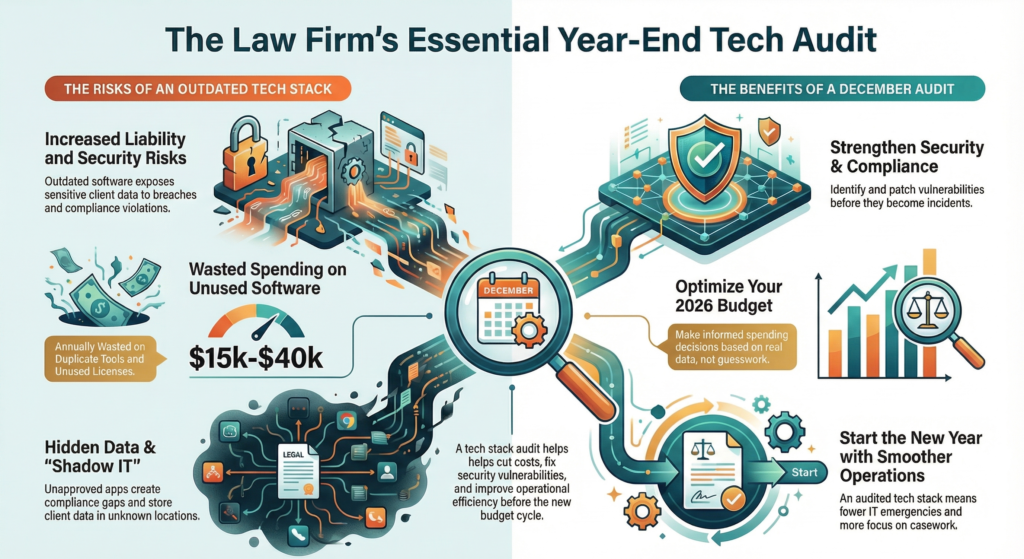
The end of the year creates a small window when NYC law firms can take a hard look at their technology before 2026 starts. Many firms run the same software year after year without checking if it still works well or costs too much. A tech stack audit before January helps law firms cut waste, fix security gaps, and plan their budget around tools that actually support their practice.
December offers the best time to review technology because most firms see less case activity during the holidays. This quiet period lets IT teams patch systems, update software, and fix problems without disrupting daily work. When the audit happens now, firms can use the results to set clear goals and budget plans for the first quarter of 2026.
Law firms that skip this review often discover problems at the worst possible times. Outdated tools can create security risks, unused software licenses drain budgets, and nobody knows if their data backups actually work until disaster strikes. A quick audit this month can prevent these issues and set up smoother operations for the year ahead.
Key Takeaways
- Conducting a year-end tech stack audit helps law firms identify security risks, eliminate wasted spending, and improve operations before 2026
- December provides the ideal timing for audits due to lower case activity and the opportunity to align technology decisions with new budget cycles
- Common audit mistakes include paying for unused software, failing to test backup systems, and losing track of where sensitive client data is stored
The Urgency of Year-End Tech Stack Audits
December represents a critical window for law firms to evaluate their technology infrastructure before budget cycles reset and case loads intensify in the new year. Outdated systems create real risks, while proactive audits unlock opportunities to allocate resources strategically and eliminate operational friction.
Reducing Liability from Outdated Systems
Law firms handle sensitive client data daily, making outdated technology a significant liability risk. Software that no longer receives security patches leaves firms vulnerable to data breaches and cyberattacks.
End-of-support systems create compliance gaps that regulatory bodies can flag during audits. NYC law firms face specific requirements around data privacy and client confidentiality. Operating on deprecated platforms signals negligence if a breach occurs.
Key vulnerability areas include:
- Case management systems running on unsupported versions
- Operating systems past their security update lifecycle
- Antivirus software with expired definitions
- Document storage platforms lacking encryption standards
Legacy tools also slow down workflows and frustrate attorneys who expect modern functionality. This impacts the client experience when file sharing breaks down or communication tools fail during critical moments. A year-end audit identifies these weak points before they become incidents.
Maximizing Budget Planning and Allocations
Most law firms finalize their technology budgets in January. Running an audit in December provides the data needed to make informed spending decisions rather than guessing at needs.
Firms often discover they're paying for duplicate tools or licenses that no one uses. One common scenario involves multiple collaboration platforms where staff defaults to one while the firm continues paying for three. These redundancies drain thousands of dollars annually.
An audit also reveals gaps where small investments could yield significant returns. A firm might lack proper backup systems for remote workers or need endpoint protection upgrades. Identifying these needs before budget meetings ensures adequate funding gets allocated to the right priorities.
The data from an audit strengthens requests to firm leadership. Instead of vague asks for "better technology," decision-makers can present specific ROI projections tied to efficiency gains and risk reduction.
Setting Up for Smoother 2026 Operations
December typically brings lighter case loads at many firms, creating an ideal window to implement changes. Upgrades and reconfigurations that might disrupt operations in March can happen seamlessly during the year-end slowdown.
Starting January with a clean, audited tech stack means fewer mid-quarter emergencies. Teams don't waste time troubleshooting outdated systems or working around broken integrations. Attorneys can focus on casework instead of IT issues.
An audit also establishes baseline metrics for measuring improvement throughout 2026. Firms gain visibility into system performance, user adoption rates, and security posture. This data supports quarterly reviews and helps leadership track whether technology investments deliver expected results.
Essential Components to Evaluate in Your Law Firm Tech Stack
A complete tech stack audit requires examining the core systems that keep your law firm running. The most critical areas include case management platforms, communication tools, document security protocols, and remote access systems.
Case Management Platform Assessment
Law firms need to evaluate whether their case management software still meets current needs. Check if attorneys can easily track deadlines, manage documents, and access client information without workarounds or duplicate data entry.
Review user adoption rates across the firm. If staff members avoid using the platform or create manual workarounds, the system may lack necessary features or require better training.
Examine integration capabilities with other tools. Modern case management platforms should connect with email, billing software, and document management systems. Poor integration forces attorneys to switch between multiple programs and increases the risk of data errors.
Key metrics to check:
- Average time to open a new case file
- Number of manual data entry steps required
- User login frequency
- Support ticket volume related to the platform
Reviewing Communication and Collaboration Tools
NYC law firms often use multiple communication platforms without realizing the overlap. Teams may juggle Zoom, Microsoft Teams, Slack, and traditional phone systems simultaneously.
Audit which tools staff actually use daily versus which ones the firm pays for. Many firms discover they maintain licenses for platforms that fewer than half their attorneys actively use.
Evaluate security settings on each platform. Video conferencing tools need encryption for client calls. Messaging apps require proper data retention policies that comply with attorney-client privilege requirements.
Check if communication tools integrate with your client relationship management system. Attorneys should be able to document client calls and messages without manually copying information between systems.
Document Storage and Security Policies
Document storage requires the most scrutiny during year-end audits. Law firms must know exactly where client files live and who can access them.
Start by mapping all storage locations. This includes local servers, cloud platforms, individual attorney computers, and mobile devices. Many firms discover important files stored in unauthorized locations.
Review access permissions for each storage system. Former employees should have zero access. Current staff should only access files relevant to their cases. Generic shared folders often contain sensitive documents available to too many people.
Critical security checks:
- Encryption status for files at rest and in transit
- Multi-factor authentication requirements
- Automatic logout timeframes
- File sharing links and expiration dates
Test your file recovery process. Know how quickly the firm can restore documents after accidental deletion or a ransomware attack.
Remote Access Controls and Endpoint Protection
Remote work has become standard for NYC law firms, but many access policies haven't kept pace. Every device that connects to firm systems needs proper security controls.
Inventory all endpoints including attorney laptops, home computers, tablets, and smartphones. Each device should run updated antivirus software and have endpoint detection and response tools installed.
Evaluate your VPN configuration. Attorneys working remotely should never access client data without a secure VPN connection. Public WiFi at coffee shops or courthouses creates significant security risks.
Review mobile device management policies. Lost or stolen devices need remote wipe capabilities. Personal devices used for work email require separate security profiles that protect firm data without invading attorney privacy.
Check authentication requirements for remote access. Password-only logins no longer provide adequate protection. Law firms should require multi-factor authentication for any system containing client information.
Backup, Disaster Recovery, and Compliance Readiness
Law firms must prove their backup systems work and meet regulatory requirements. A year-end review reveals whether critical client data can be recovered quickly and whether retention practices align with New York legal standards.
Validating Backup and Disaster Recovery Systems
Most law firms have backup systems in place. The real question is whether those systems actually work when needed.
Year-end is the right time to test recovery capabilities. Firms should verify that case files, client communications, and court documents can be restored within acceptable timeframes. A backup that exists but cannot be restored creates a false sense of security.
Critical validation steps include:
- Running actual restore tests on key systems, not just checking that backup jobs completed
- Confirming that new cloud tools and SaaS platforms added during 2025 are included in the backup scope
- Reviewing disaster recovery documentation to ensure it reflects current systems and staff
- Checking whether backup logs from the past year show any failures or gaps
Many firms discover that collaboration tools like Teams or Slack, cloud storage locations, or newer case management modules fell outside their protection strategy. These gaps expose client data to permanent loss if a ransomware attack or system failure occurs.
Recovery time matters in legal practice. If a firm promises clients certain response times, the tech infrastructure must support that commitment even during a disaster scenario.
Ensuring Compliance with NY Legal and Data Privacy Regulations
New York law firms operate under strict data protection and retention requirements. Backup and recovery practices directly affect compliance readiness.
Attorney disciplinary rules require firms to protect client confidentiality and preserve records for specific periods. If backup systems retain data longer than allowed or fail to protect sensitive information, the firm faces regulatory risk.
Compliance alignment requires:
- Matching retention schedules in backup systems with legal and ethical requirements for case files
- Ensuring that deleted client records are actually removed from backup sets when required
- Maintaining audit trails that show who accessed what data and when, even after recovery events
- Verifying that backup storage locations meet geographic and security standards for client data
Firms should document where official records live and how long each record type is kept. When backup policies conflict with retention rules, expired data may reappear during a restore. This creates compliance exposure during investigations or audits.
Shadow IT compounds the problem. When attorneys store client files on personal drives or unapproved cloud services, those locations bypass both backup protection and compliance controls.
A clear evidence trail connecting backup systems to retention policies and actual business processes demonstrates regulatory readiness.
Common Tech Stack Audit Pitfalls
Law firms often miss critical issues during tech stack reviews that cost them money and put client data at risk. Three problems show up repeatedly: outdated software running on autopilot, paying for tools nobody uses, and mystery applications storing sensitive case files.
Set It and Forget It: The Update Trap
Many law firms install software and never revisit it. Security patches sit uninstalled for months. Features that could improve client experience go unused because nobody knows they exist.
This creates real problems. Outdated case management systems might lack current encryption standards. Video conferencing tools miss security updates that protect client meetings. Document management platforms run old versions with known vulnerabilities.
The gap between installation and review often stretches 12 to 18 months. During that time, vendors release critical updates. Competitors adopt new features that speed up document review or client communication.
Law firms need scheduled check-ins for every tool they use. Monthly security updates should be automatic. Quarterly feature reviews help teams use what they pay for.
Overpaying for Unused Legacy Licenses
License bloat drains budgets fast. A firm might pay for 50 seats when only 32 attorneys actually log in. Associates leave but their accounts stay active. Trial software converts to paid subscriptions that nobody remembers authorizing.
One common example: firms pay for multiple document collaboration tools because different practice groups chose different platforms. Three teams use three separate services when one would work for everyone.
Common overspending areas:
- Duplicate communication platforms (Teams, Slack, and Zoom)
- Old CRM systems running parallel to new ones
- Individual attorney subscriptions to research tools the firm already licenses
- Inactive user accounts for former staff
A firm with 30 attorneys typically finds $15,000 to $40,000 in annual waste during their first real license audit. That money could fund better backup systems or security training.
Shadow IT and Unaccounted Data Locations
Shadow IT happens when attorneys install their own tools without IT approval. An associate downloads a free file-sharing app to send documents to a client. A partner uses personal Dropbox for case files. A paralegal signs up for a project management tool the firm never vetted.
These hidden tools create serious problems. Client data ends up on servers the firm doesn't control or monitor. Security teams can't protect information they don't know exists. Compliance tracking fails because half the tools aren't on any official list.
Law firms face specific risks here. Client confidentiality rules require knowing exactly where privileged information lives. Data breach notification laws mean firms must track every system that touches client data.
The accounts payable department often reveals shadow IT during audits. Mystery charges appear for services nobody authorized. Credit card statements show subscriptions the IT team never approved.
Quick Wins for Immediate Impact
Law firms don't need to wait months to see results from a tech stack audit. A few targeted actions can immediately reduce risk, improve efficiency, and reveal hidden problems that might escalate in 2026.
Running Firmwide Vulnerability Scans
A vulnerability scan identifies weak points in a firm's network before attackers exploit them. These scans check servers, workstations, and connected devices for outdated software, missing security patches, and misconfigured settings.
Law firms handle sensitive client data daily. A single unpatched system can expose privileged communications or case files to breach. Running a scan takes just hours but reveals which systems need immediate attention.
Most firms should run vulnerability scans quarterly at minimum. Year-end is an ideal time because case volume typically drops in December. The scan results create a clear priority list for IT teams to address before the busy Q1 season begins.
Key items a vulnerability scan detects:
- Outdated operating systems or software versions
- Missing critical security patches
- Weak password policies
- Open ports that shouldn't be accessible
- End-of-life software no longer receiving updates
Inventorying and Managing User Accounts
User account audits reveal who has access to what systems and whether those permissions still make sense. Firms often discover former employees still have active accounts or paralegals with partner-level access they don't need.
Start by pulling a complete list of active accounts from each platform the firm uses. Check email systems, case management software, document storage, and billing tools. Compare this list against current staff rosters.
Inactive accounts create security gaps. Attackers target dormant accounts because firms monitor them less closely. Remove access for departed staff immediately and adjust permissions for anyone who changed roles.
Steps for a thorough account inventory:
- Export user lists from all platforms
- Cross-reference against current employee roster
- Disable or delete accounts for former staff
- Review admin-level permissions
- Implement multi-factor authentication where missing
Reviewing Data Backup Success Logs
Backup systems run automatically, but that doesn't mean they're working correctly. Law firms must verify that backups complete successfully and that data can actually be restored when needed.
Check backup logs for the past 90 days. Look for failed backup jobs, incomplete transfers, or error messages that were ignored. Even one missed backup creates a gap in data protection.
Testing restoration is equally important. Many firms discover their backups are corrupted or incomplete only during an actual emergency. Schedule a test restore of a small data set to confirm the backup system functions properly.
Checking MSP and Cloud Uptime Reports
Uptime reports show how reliably a firm's critical systems performed over time. These reports track outages, slowdowns, and service interruptions that affect productivity.
Request uptime reports from managed service providers and cloud vendors for the past quarter. Look for patterns like repeated downtime during business hours or degraded performance that staff may have accepted as normal.
Law firms should expect 99.9% uptime or better for mission-critical systems. Anything lower suggests infrastructure problems or an underperforming vendor. Use these reports to hold service providers accountable or justify switching to more reliable solutions.
Compare reported uptime against staff experiences. If attorneys report frequent connectivity issues but the MSP shows perfect uptime, there's a monitoring gap that needs investigation.
Strengthening Client Relationship Management and Growth
Law firms collect vast amounts of client data across multiple systems, yet many struggle to use this information effectively for relationship building and revenue growth. A year-end audit reveals whether current CRM tools actually support business development or simply store outdated contact lists.
Auditing CRM Data Accuracy and Integration
Inaccurate or disconnected CRM data costs law firms real opportunities. Contact records with outdated phone numbers, incorrect matter associations, or duplicate entries prevent attorneys from making informed relationship decisions.
Firms should verify that their CRM integrates with core systems like billing, document management, and email platforms. When these systems operate in silos, important relationship insights get lost. An attorney might not know that a client from one practice area has connections to prospects in another division.
IT teams need to check which staff members actually access the CRM regularly. Many firms pay for licenses that go unused because the platform requires too many manual updates. Systems that automatically capture relationship data from existing workflows see much higher adoption rates.
Data cleanup should happen now, before the new year. Firms can consolidate duplicate records, update key contacts, and remove outdated information. This work directly impacts how effectively business development teams can target pitches and identify warm introductions.
Identifying Cross-Selling Opportunities
Most law firms leave money on the table because they lack visibility into existing client relationships across practice groups. A thorough tech audit reveals whether current systems can connect these dots or if opportunities stay hidden.
Firms should examine whether their CRM can surface relationships between matters, clients, and attorney networks. The best systems flag when a client using tax services might need employment law support, or when a partner's LinkedIn connection works at a target prospect company.
Analytics tools need to provide actionable intelligence, not just raw data. Business development teams should be able to quickly identify clients who only use one service line but have needs that match other practice areas. These warm leads convert at much higher rates than cold outreach.
Enhancing Client Experience through Workflow Optimization
Clients expect responsive, personalized service that demonstrates an understanding of their history and needs. This level of attention requires CRM tools that integrate seamlessly into daily attorney workflows rather than adding administrative burden.
Firms must evaluate whether lawyers can access relationship information without switching between multiple applications. Systems that embed client intelligence into tools attorneys already use see the highest adoption. When updating records feels like extra work, it simply doesn't happen.
Client portals and communication preferences deserve special attention during year-end reviews. Firms should verify that their systems track how each client prefers to receive updates and documents. Some clients want secure portal access while others prefer traditional email with encrypted attachments.
The audit should also examine whether current workflows allow for timely follow-up on relationship building opportunities. Automated reminders for check-ins, birthday messages, or matter anniversary notes help maintain relationships without requiring manual calendar management.
Timing Your Audit: Why December Matters
December offers law firms a strategic window to assess their technology before the new year begins. Budget planning, reduced caseloads, and the chance to shape Q1 priorities make this month ideal for a thorough tech stack review.
Aligning with January Budget Cycles
Most law firms finalize their budgets in January. Running a tech audit in December gives decision-makers the data they need to make informed spending choices.
Without current information about software licenses, hardware lifecycles, and security gaps, firms often allocate funds based on outdated assumptions. This leads to overspending on tools nobody uses or underfunding critical upgrades.
A December audit reveals exactly what needs replacement, what subscriptions can be canceled, and where security investments should go. Managing partners can walk into budget meetings with specific numbers and priorities instead of rough estimates.
Law firms that wait until January to audit often find themselves rushing to justify expenses or delaying necessary upgrades because budget decisions are already locked in.
Capitalizing on Lower Year-End Workloads
December typically brings fewer active cases and slower client demands for most law firms. This creates time for IT reviews that would disrupt operations during busier months.
Running vulnerability scans, updating software, and testing backup systems requires some downtime or system access. Doing this work when fewer attorneys are working on urgent matters reduces the risk of workflow interruptions.
Staff members also have more availability to participate in the audit process. They can provide feedback on which tools work well and which create problems. IT teams can conduct training sessions or implement new security protocols without competing for attention.
Firms that delay these tasks until spring often struggle to find convenient windows for system maintenance and upgrades.
Using Audit Insights to Guide Q1 Technology Initiatives
Audit results provide a roadmap for the first quarter of the new year. Law firms can use this data to set clear technology goals rather than reacting to problems as they arise.
Common Q1 initiatives include migrating to new case management platforms, strengthening cybersecurity protocols, and improving remote access policies. An audit identifies which projects deliver the most value and which can wait.
The findings also help firms prioritize compliance requirements specific to New York legal standards. Data privacy regulations and client confidentiality rules require specific technical controls. Knowing where gaps exist allows firms to address them before they become violations.
Law firms that complete audits in December can hit the ground running in January with vendor contracts ready, implementation schedules planned, and staff prepared for changes.
Take the Next Step: Book Your Free Tech Stack Snapshot
Law firms don't need to tackle this audit alone. A 30-minute Tech Stack Snapshot provides a clear starting point without the commitment.
During the session, an MSP specialist will review the firm's current technology environment. This includes case management systems, collaboration tools, and security measures. The goal is to identify gaps, redundancies, and risks before 2026 begins.
What the Snapshot covers:
- Quick inventory of critical tools and licenses
- High-level security and compliance check
- Identification of unused or duplicate software
- Backup and disaster recovery validation
- Immediate recommendations for quick wins
This consultation is free and requires no long-term commitment. The firm walks away with actionable insights and a clearer picture of where improvements are needed.
December is the ideal time for this review. Case loads typically slow down during the holidays. Budget discussions for the new year are already underway. Making changes now means the firm starts January with a cleaner, more efficient tech stack.
Many law firms discover they're paying for software no one uses. Others find security vulnerabilities they didn't know existed. Some realize their backup systems haven't been tested in months.
The Tech Stack Snapshot brings these issues to light quickly. It's a practical first step that fits into busy schedules. The firm gains clarity without disrupting daily operations.
To schedule a session before year-end, contact the MSP team directly. Spots fill quickly as firms prepare for 2026. Taking action now prevents problems later.