
Advanced Cybersecurity for New York Law Firms: The Definitive Guide for Compliance & Protection in 2026
Introduction: The Cost of Complacency in the New York Legal Landscape
New York law firms occupy a unique and paradoxical position in the cybersecurity landscape. On one hand, your firm handles some of the most sensitive, high-value information in the world — privileged communications, M&A deal structures, real estate escrow instructions, litigation strategies, and the personal financial data of thousands of clients. On the other hand, many firms operating between 10 and 100 attorneys remain significantly under-protected, running on legacy IT infrastructure, consumer-grade email platforms, and security policies that haven't been meaningfully updated since a pre-pandemic world that no longer exists.
That gap — between the value of what you protect and the maturity of how you protect it — is exactly what cybercriminals are exploiting right now, at scale, in New York City.
Why New York Law Firms Are a Preferred Target
This isn't a coincidence or a generalized threat. NYC-based law firms are specifically and deliberately targeted for several converging reasons:
The Data Is Extraordinarily Valuable. Attorney-client privilege means your files contain information that hasn't reached regulators, courts, or the public yet. For a threat actor, a litigation case file or a pending corporate transaction isn't just ransom bait — it's actionable intelligence. Federal prosecutors have charged hackers who breached law firms specifically to extract non-public information for insider trading schemes, turning stolen legal data into illegal market profits.
Your Clients Are High-Stakes. The moment a firm represents a publicly traded company, a high-net-worth individual, or a party in a major real estate transaction, the firm itself becomes a softer entry point than attacking those clients directly. You are the side door.
New York's Regulatory Environment Is Intensifying. The NY SHIELD Act, NYSBA ethical obligations, and — for firms serving financial institutions — NY DFS Part 500, have created a compliance landscape that is both mandatory and, for many firms, poorly understood. Regulators are no longer treating cybersecurity as an IT issue. They are treating it as a legal and ethical obligation, and enforcement is accelerating.
Hybrid Work Expanded the Attack Surface. Your attorneys are drafting sensitive documents on laptops connected to coffee shop WiFi in the West Village. They're taking calls on personal phones on the 4/5/6 train. They're forwarding files to personal email addresses because the client portal is "too complicated." Every one of these behaviors represents an exploitable vulnerability — and in a firm of 10 to 100 people without a dedicated security team, there is often no one watching.
The Numbers Behind the Risk
The legal sector has become one of the most targeted industries for cybercrime, and the data reflects a threat environment that is worsening, not stabilizing:
- The American Bar Association's most recent Legal Technology Survey found that 29% of law firms reported a security breach at some point — a figure that security experts broadly believe is underreported due to firms' reluctance to disclose incidents.
- The average cost of a data breach in the professional services sector has climbed significantly, with IBM's Cost of a Data Breach Report placing it among the highest of any industry vertical.
- Wire fraud targeting real estate transactions — a staple of New York legal practice — costs victims hundreds of millions of dollars annually, with law firm email compromise serving as the primary entry point.
- Ransomware attacks against law firms have evolved beyond simple encryption. In double extortion schemes, attackers exfiltrate sensitive client data before deploying ransomware, then threaten to publish privileged communications to opposing counsel, journalists, or regulatory bodies unless a second ransom is paid.
What This Guide Will Do Differently
Most cybersecurity content written for law firms offers the same recycled checklist: use strong passwords, enable two-factor authentication, train your employees. That advice isn't wrong — it's just dangerously incomplete for a New York firm operating under specific state regulatory obligations with sophisticated threat actors in their threat model.
This guide is built for the reality your firm actually faces.
We will walk you through the three New York-specific regulatory frameworks your firm must comply with and what each one actually requires of you operationally. We will show you exactly how modern attackers are targeting firms like yours — not abstractly, but with the specific tactics being deployed against NYC legal professionals today. And we will give you a practical, architectural security blueprint that a firm without a full-time IT security staff can actually implement, along with the questions you need to ask every technology vendor your firm relies on.
Complacency in this environment is not a neutral position. Under New York law, it is increasingly a liability.
Let's make sure your firm is on the right side of that line.
Section 1: The New York Regulatory Triad — What Your Firm Is Actually Required to Do
Most cybersecurity conversations inside law firms begin and end with the ABA Model Rules. That's a problem. New York attorneys practice under a layered compliance framework that is materially more demanding than federal baseline standards — and the consequences of non-compliance extend beyond malpractice exposure into regulatory enforcement, civil liability, and in some cases, disciplinary proceedings before the Appellate Division.
Your firm needs to understand three distinct but interconnected frameworks. Together, they define not just what "good cybersecurity" looks like in New York — they define what legally defensible cybersecurity looks like.
1.1 The NY SHIELD Act — Stop Hacks and Improve Electronic Data Security
Signed into law in 2019 and fully effective as of March 2020, the NY SHIELD Act fundamentally changed the data security obligations of any organization — including law firms — that holds private information on New York residents. This is not a law that applies only to technology companies or healthcare providers. If your firm collects, stores, or processes the name, Social Security number, financial account information, biometric data, or login credentials of any New York resident, the SHIELD Act applies to you.
For a Manhattan law firm, that means virtually every client engagement triggers coverage.
Who Is Covered
The SHIELD Act expanded the prior definition of "private information" and — critically — extended its reach to any person or business that owns or licenses computerized data including private information of a New York resident, regardless of whether that business itself is located in New York. A firm headquartered in New Jersey that represents New York clients is covered. A boutique practice in Midtown with fifteen attorneys is covered. Coverage is defined by the data you hold, not the size of your firm.
The Three-Prong Safeguard Requirement
This is where most published guides fail their readers. The SHIELD Act doesn't just require you to notify clients after a breach — it requires you to maintain a reasonable data security program built across three distinct operational pillars. Here is what each pillar actually demands of your firm:
Prong 1: Administrative Safeguards
Administrative safeguards are the governance and human infrastructure of your security program. The SHIELD Act requires that your firm:
- Designate one or more employees to coordinate the information security program. In a firm of 10 to 100 attorneys, this is typically an Office Administrator, COO, or an outsourced IT provider operating under a formal agreement — but the designation must be explicit and documented.
- Identify reasonably foreseeable internal and external risks to the security of private information. This means conducting and documenting a formal risk assessment — not a mental exercise, but a written evaluation of where your data lives, who can access it, and what could go wrong.
- Assess the sufficiency of existing safeguards to control those identified risks.
- Train and manage employees in the practices of your security program. Annual security awareness training is the floor, not the ceiling.
- Select service providers that maintain appropriate safeguards, and require those safeguards by contract. This provision alone has significant implications for how your firm engages with legal technology vendors, cloud providers, and even your own IT support team.
- Adjust the security program as your business changes — when you onboard new practice areas, new technology platforms, or new remote work arrangements.
MSP Advisory: Most firms of your size have never produced a written risk assessment or a documented security program. If you cannot show a regulator a written policy document designating a security coordinator and outlining your risk management process, you are already non-compliant — regardless of how good your technical controls are.
Prong 2: Physical Safeguards
Physical safeguards address the tangible, real-world protection of the devices, media, and facilities where private information is stored or accessed. The SHIELD Act requires that your firm:
- Assess risks of information storage and disposal. How are old hard drives handled when a workstation is retired? How are paper files containing client financial information destroyed? These are not hypothetical questions — they are compliance checkpoints.
- Detect, prevent, and respond to intrusions into physical spaces where data is stored or accessed. This includes server rooms, filing areas, and any location where unescorted visitors could access firm systems or documents.
- Protect against unauthorized access to or use of private information during or after the collection, transportation, and destruction of the data. If an attorney takes a client file home to the Upper East Side, that file is still your compliance responsibility.
- Dispose of private information within a reasonable amount of time after it is no longer needed, using proper destruction methods. For digital media, this means certified drive destruction or verified data wiping — not simply deleting files or discarding old laptops.
MSP Advisory: For NYC firms operating in shared office buildings, co-working arrangements, or hybrid environments, physical security is often the most overlooked pillar. An unlocked workstation in a common area or a shared printer in a WeWork suite can be a physical data exposure event. Your security program needs to account for the realities of how your attorneys actually work.
Prong 3: Technical Safeguards
Technical safeguards are the controls embedded in your technology systems that protect private information from unauthorized access, use, or disclosure. The SHIELD Act requires that your firm:
- Assess network and software design risks. Are your systems architecturally sound? Are there open ports, unpatched software, or unsegmented networks that create exposure?
- Assess information processing, transmission, and storage risks. Where does client data travel within your systems, and how is it protected at each stage?
- Detect, prevent, and respond to attacks or system failures. This requires active monitoring — not just antivirus software running in the background, but tooling that identifies anomalous behavior, unauthorized access attempts, and lateral movement within your network.
- Regularly test and monitor the effectiveness of your key controls, systems, and procedures. Annual penetration testing and quarterly vulnerability scanning are industry-standard minimums for firms of your size.
MSP Advisory: The phrase "regularly test and monitor" is doing significant legal work in this statute. If your firm experiences a breach and cannot demonstrate that you were actively monitoring your systems and periodically testing your defenses, your exposure under the SHIELD Act is substantially greater. Documentation of testing activities is not optional — it is your evidence of reasonable care.
The "Reasonable" Standard and Small Firm Relief
The SHIELD Act does acknowledge firm size. It allows smaller businesses to implement a security program that is "proportionate to the size and complexity of the business." However, this is not a carve-out or an exemption — it is a calibration. A 12-attorney firm in Midtown is not held to the same standard as a 500-person enterprise, but it is absolutely held to a standard. "We're too small to worry about this" is not a legally defensible position in New York.
1.2 NYSBA Ethical Obligations — The Duties Your Bar Membership Demands
While the SHIELD Act governs data security as a matter of state law, the New York State Bar Association (NYSBA) has established ethical obligations that govern attorney conduct around technology and client confidentiality. These obligations carry their own enforcement mechanism: disciplinary proceedings before the Appellate Division.
Most attorneys are familiar with Rule 1.6 of the NY Rules of Professional Conduct, which requires reasonable efforts to prevent unauthorized disclosure of client information. What most attorneys are not familiar with is how the NYSBA has interpreted and extended that obligation through formal Ethics Opinions—opinions that define what "reasonable" actually means in practice.
NYSBA Ethics Opinions 1019 & 709 — Remote Access and Secure Communications
In a hybrid legal environment, your data footprint is no longer confined to a secure office server. The New York State Bar Association (NYSBA) has made it clear that an attorney's ethical duty to safeguard client data applies everywhere they work and however they communicate.
NYSBA Ethics Opinion 1019 directly addresses the security infrastructure of remote work and home offices, issuing a stark warning that serves as the baseline for modern firm governance:
"Lawyers can no longer assume that their document systems are of no interest to cyber-crooks."
The opinion explicitly mandates that any remote access infrastructure used to view, transmit, or store client files must employ reasonable, documented safeguards.
When you pair this remote-access mandate with NYSBA Ethics Opinion 709 (the foundational ruling on internet and electronic communications), the compliance standard for your daily digital workflow becomes clear. While standard email is generally permissible for routine, low-stakes administrative coordination, attorneys are ethically required to assess the sensitivity of each unique matter and apply enhanced protections—including encryption—whenever the circumstances warrant it.
The NYSBA highlights several critical factors that instantly elevate a matter’s sensitivity threshold:
- The Nature of the Matter: Criminal defense, high-net-worth matrimonial disputes, sensitive intellectual property, or volatile corporate and real estate transactions.
- Potential for Interceptive Harm: The direct strategic disadvantage or financial damage to the client if the communication were exposed to opposing counsel or the public.
- The Client’s Expectation of Privacy: Matters involving proprietary business secrets or intensely private personal data.
- Regulatory or Financial Vulnerability: Whether the communication contains information that could expose the client to identity theft, financial fraud, or severe reputational fallout.
What this means operationally for your firm: A routine scheduling email carries a completely different risk profile than an email containing draft settlement terms, an escrow routing number, a client's Social Security number, or active litigation strategy notes. Your attorneys cannot be left to guess when to protect data. Your firm needs a documented communication protocol that explicitly maps out which categories of information require encrypted transmission—and your technology stack must support that protocol with tools that are frictionless enough for your team to actually use.
Ethics Opinions 1019 & 709 in Practice Many mid-sized firms operate under the dangerous assumption that standard, out-of-the-box email satisfies their ethical duties under Rule 1.6(c). While unencrypted standard email may pass muster for low-sensitivity scheduling, it is ethically insufficient for transmitting financial records, personal identifying information (PII), or core case strategies under NYSBA guidance. Secure client portals with end-to-end encryption—supplemented by automated email encryption gateways—are the baseline operational standard your firm must deploy to remain legally defensible.
NYSBA Ethics Opinions 842 & 1020 — The Mandate to Vet and Monitor Technology Vendors
Issued as foundational blueprints for the digital age, Ethics Opinions 842 (governing cloud data storage) and 1020 (governing cloud-based transactional tools) are arguably the most consequential and least-understood ethics rulings affecting how New York law firms manage their technology vendors.
The NYSBA's conclusion is unambiguous: an attorney's duty to protect client information does not end at the boundary of the firm's own local servers. When a firm entrusts client data to a cloud provider, a legal technology platform, or any third-party vendor, the attorney retains an ongoing, non-delegable ethical duty to monitor that vendor's security practices.
This means:
- Initial Due Diligence: Rigorous due diligence is required before onboarding any vendor that will access, store, or transmit client data. You cannot simply sign up for a SaaS legal platform without independently evaluating its security posture.
- Ongoing Monitoring: Vendor oversight is a continuous mandate throughout the life of the relationship. If your document management vendor suffers a breach, the ethical question is not just "were we notified?"—it is "were we monitoring their security practices in a way that would have allowed us to respond appropriately?"
- Contractual Protections: Agreements with vendors must address explicit security obligations. The NYSBA strongly emphasizes requiring vendors to notify the firm of security incidents promptly, maintain reasonable security practices, and certifiably wipe or return data when the contract ends.
Ethics Opinions 842 & 1020 in Practice Every legal technology platform your firm uses—your practice management software, your e-discovery tool, your billing system, your client communication portal—is a potential liability if you haven't vetted its security posture and documented that vetting. Claiming ignorance of a platform's technical security limitations is an explicit compliance failure under New York rules.
The "Reasonable Care" Standard in New York Courts
Beyond the specific Ethics Opinions, New York courts have increasingly applied a fact-specific "reasonable care" standard to how attorneys manage and preserve client data. Several core principles have emerged from recent case law and bar guidance:
- Technology Competence: Firms have a duty to understand the technology they use well enough to protect client data within it.
- Data Preservation: The duty extends to data preservation in litigation contexts—improper handling or exposure of electronically stored information (ESI) can trigger severe judicial sanctions entirely separate from a data breach incident.
- Supervisory Responsibility: Attorneys supervising non-attorney staff bear strict responsibility for ensuring that support staff follow secure data handling practices. A paralegal who emails a client's financial documents to a personal Gmail account creates immediate ethical exposure for the supervising partner.
1.3 NY DFS Part 500 — When Financial Representation Triggers Heightened Obligations
The New York Department of Financial Services Cybersecurity Regulation, known as 23 NYCRR Part 500, is primarily designed for regulated financial entities — banks, insurance companies, mortgage servicers, and similar institutions operating under DFS licensure. Most law firms are not themselves DFS-regulated entities.
However, there is an important and frequently overlooked intersection with legal practice:
If your firm regularly represents DFS-regulated financial institutions, those clients may contractually require your firm to demonstrate compliance with cybersecurity standards that mirror or reference DFS Part 500. As financial institutions conduct vendor risk assessments of their own third-party relationships — including outside counsel — they are increasingly requiring law firms to meet specific security benchmarks as a condition of the engagement.
This means that even if your firm is not directly regulated by DFS Part 500, the firms and institutions you represent may effectively impose its requirements on you through client agreements and vendor assessments.
Key DFS Part 500 requirements that frequently appear in client security questionnaires include:
- Maintaining a written cybersecurity policy
- Implementing multi-factor authentication for all systems accessing client data
- Conducting annual penetration testing and bi-annual vulnerability assessments
- Maintaining an audit trail of all access to sensitive systems
- Encrypting all non-public information both in transit and at rest
- Maintaining a formal incident response plan
- Conducting annual cybersecurity awareness training for all personnel
MSP Advisory: Even if none of your current clients have explicitly required DFS Part 500 alignment, building your security program to meet its standards positions your firm competitively. As cybersecurity due diligence becomes standard practice in outside counsel selection — and it is moving in that direction rapidly across the NYC corporate and financial legal market — firms that can demonstrate a mature, documented security posture will have a measurable advantage in client retention and new business development. Compliance is increasingly becoming a business development asset, not just a risk management exercise.
DFS Part 500 Amendment — What Changed in 2023
It is worth noting that DFS Part 500 was significantly amended in November 2023, introducing materially stricter requirements for covered entities. While these amendments apply directly to regulated financial institutions, they signal the direction that regulators — including those with jurisdiction over professional services — are moving. Key amendments that are shaping the broader compliance landscape include:
- Mandatory annual certification of compliance by a senior officer or board-level executive, creating direct personal accountability at the leadership level
- 72-hour breach notification requirements to DFS for any cybersecurity incident — a window that demands a pre-built, practiced incident response capability, not an ad hoc response assembled after a breach occurs
- Enhanced requirements for privileged account management, specifically addressing the risk of insider threats and compromised administrative credentials
- Formal governance requirements, including board-level oversight of the cybersecurity program and annual reporting to the board on cybersecurity risks and program status
For a law firm advising financial institution clients, understanding these amendments is both a compliance adjacency issue and a client service competency. Your clients are navigating these requirements — your firm should be fluent in them.
Bringing the Triad Together — Your Firm's Compliance Baseline
Understanding these three frameworks in isolation is useful. Understanding how they interact is essential.
Here is how the regulatory triad maps to your firm's operational reality:
| Framework | Enforced By | Primary Risk If Non-Compliant | Applies To Your Firm If... |
| NY SHIELD Act | NY Attorney General | Civil penalties, regulatory action, reputational damage | You hold private data of any NY resident |
| NYSBA Ethics Opinions | Appellate Division / Grievance Committees | Disciplinary proceedings, suspension, disbarment | You are a licensed NY attorney |
| NY DFS Part 500 | NY Dept. of Financial Services | Client contract breach, loss of engagements | You represent DFS-regulated clients |
The critical insight here is that these frameworks reinforce and reference each other. A breach that triggers SHIELD Act notification obligations will almost certainly also implicate your NYSBA ethical duties to notify affected clients. A client security questionnaire rooted in DFS Part 500 standards will ask for evidence of the exact controls the SHIELD Act requires you to maintain. Building your security program against one framework in isolation leaves gaps that the others will expose.
The compliance baseline your firm needs to achieve is not the minimum of any one framework — it is the intersection of all three.
Regulatory Triad Quick-Reference Checklist
Use this as an internal audit starting point before engaging with any of the technical controls covered in the sections that follow.
NY SHIELD Act
- Written information security program exists and is documented
- Security coordinator formally designated
- Risk assessment conducted and documented within the last 12 months
- Employee security training conducted within the last 12 months
- Vendor contracts include explicit data security requirements
- Media and device disposal procedures documented and followed
- System monitoring and regular testing in place and documented
NYSBA Ethical Obligations
- Communication sensitivity protocol documented (per Ethics Opinion 1019)
- Encrypted communication channels available and in use for sensitive matters
- Vendor security vetting process documented (per Ethics Opinions 842 & 1020)
- Ongoing vendor monitoring process in place
- Supervising attorney oversight of staff data handling practices documented
DFS Part 500 Alignment (if applicable)
- Written cybersecurity policy in place
- MFA enforced across all systems accessing client data
- Annual penetration testing scheduled and completed
- Incident response plan written, tested, and current
- Board or senior leadership formally briefed on cybersecurity risk annually
The regulatory framework is now clear. The question becomes: what are the specific threats your firm needs to defend against within this compliance environment?
Section 2: Anatomy of Modern Cyber Threats Targeting New York Law Firms
Understanding your regulatory obligations is the foundation. Understanding exactly how attackers are attempting to breach those obligations — and what they do when they succeed — is what transforms a compliance exercise into an actual security posture.
The threat landscape facing New York law firms in 2026 is not the threat landscape of five years ago. The adversaries targeting your firm are better resourced, more patient, and increasingly augmented by artificial intelligence tools that allow them to operate at a scale and sophistication that was previously available only to nation-state actors. What was once the domain of highly specialized criminal groups is now accessible to mid-tier threat actors operating with commercial AI tooling and purchased access to leaked credential databases.
This section details the specific attack methodologies being deployed against NYC-area law firms right now — not as abstract categories, but as operational playbooks your firm needs to recognize and defend against.
2.1 Deepfake & Voice Spoofing — The Wire Fraud Evolution
Wire fraud targeting law firms is not a new threat. Business Email Compromise (BEC) schemes — where attackers impersonate a senior partner or client to redirect wire transfers — have cost the legal industry hundreds of millions of dollars over the past decade. What has changed is the sophistication of the impersonation itself.
How the Attack Works
Traditional BEC relied on a spoofed email address and a convincing written tone. A moderately alert paralegal or bookkeeper might catch it by checking the sender domain carefully or recognizing an unusual request pattern. Attackers have adapted to that awareness by adding a layer that is significantly harder to question: synthetic voice and video.
Here is a composite of the attack pattern being reported across NYC-area professional services firms:
Stage 1 — Reconnaissance. The attacker identifies the firm through public sources: the NYSBA Attorney Online Directory, the firm's own website, LinkedIn profiles of partners and administrative staff, and public court filings that reveal client relationships and transaction types. This reconnaissance phase may take days or weeks, and it is entirely passive — no system is touched, no alert is triggered.
Stage 2 — Credential or Email Access. Using purchased credentials from dark web marketplaces or a targeted phishing campaign, the attacker gains access to a partner's email account or establishes a lookalike domain (e.g., substituting a zero for the letter "O" in the firm name) that passes casual visual inspection.
Stage 3 — The Synthetic Voice Call. Armed with audio samples scraped from the partner's public speaking appearances, podcast interviews, bar association panel recordings, or even voicemail greetings, the attacker uses commercially available voice synthesis tools to generate a real-time or pre-recorded call to a paralegal, bookkeeper, or office manager. The voice is the partner's. The message is urgent. The wire instructions have changed. This needs to happen today.
Stage 4 — The Transfer. Because the call sounds authentic and the follow-up email appears to come from the right address, the transfer is executed. By the time the discrepancy is identified, the funds have moved through multiple accounts — often internationally — and recovery is unlikely.
Why New York Firms Are Specifically Vulnerable
New York's legal practice environment creates specific conditions that make this attack pattern particularly effective:
- Transaction velocity. NYC real estate closings, corporate deal signings, and settlement disbursements operate under genuine time pressure. "This needs to happen today" is not an unusual instruction in a high-volume New York practice — it is the normal operating environment. Attackers exploit that normalized urgency.
- Public exposure of attorneys. New York attorneys are frequently visible — speaking at CLE events, quoted in legal press, appearing on bar association panels, participating in podcasts and webinars. Every public audio and video appearance is training data for a voice synthesis model.
- Hierarchical firm culture. In many firms of 10 to 100 attorneys, junior staff and administrative personnel are culturally conditioned not to question instructions from senior partners. An attacker impersonating a named partner is exploiting that hierarchy as a social engineering vector.
The Defense
Verification Protocol — Implement Immediately:
- Establish a firm-wide verbal code word or phrase known only to internal staff, required for any wire instruction delivered by phone or voicemail — regardless of how recognizable the voice sounds
- Implement a dual-authorization policy for all outbound wire transfers above a defined threshold, requiring independent confirmation from a second authorized individual through a separate, pre-established channel
- Create a callback verification procedure using a phone number already on file — never a number provided in the instruction itself — before executing any change to wire or payment instructions
- Train all administrative and financial staff to treat urgency as a red flag, not an accelerant. Legitimate emergencies can survive a five-minute verification call. Fraudulent ones cannot.
2.2 AI-Optimized Spear Phishing — When the Attack Knows Your Firm
Standard phishing is a volume game — millions of generic emails cast broadly in the hope that a small percentage of recipients click. Your spam filter catches most of it. Spear phishing is categorically different. It is targeted, researched, and personalized to a specific individual at a specific firm in a way that is designed to defeat both technical filters and human skepticism.
In 2026, AI has made spear phishing dramatically more dangerous by automating the research and personalization process that previously required significant attacker time and skill.
How Attackers Are Using AI Against NY Firms Specifically
NYSBA Registry Scraping. The New York State Bar Association maintains a publicly searchable attorney directory that includes attorney names, registration numbers, admission dates, and in many cases firm affiliations and addresses. Automated scraping tools can harvest this data at scale, building structured profiles of every registered attorney at your firm. This data becomes the foundation of a targeted campaign.
LinkedIn and Web Presence Harvesting. AI-driven reconnaissance tools aggregate an attorney's LinkedIn activity, published articles, court appearances, client announcements, and social media presence into a behavioral profile. The resulting phishing email doesn't just address the recipient by name — it references a case type they work on, a colleague they recently interacted with, or a bar committee they serve on. It reads like an email from someone who knows them.
LLM-Generated Pretexts. Earlier generations of phishing emails were detectable by their grammatical errors and awkward phrasing. Large language models have eliminated that tell entirely. Phishing emails generated by AI are grammatically flawless, tonally appropriate, and contextually convincing. The email impersonating a court clerk regarding a filing deadline, or a colleague requesting a document review, or a software vendor announcing a required security update — all of these are now being generated at scale with AI assistance and targeted at specific individuals using harvested profile data.
Filter Evasion by Design. AI-assisted phishing campaigns are specifically engineered to avoid the signature patterns that email security tools are trained to catch. By varying language patterns, rotating sending infrastructure, and embedding malicious links within otherwise legitimate-looking document workflows — such as a fake DocuSign envelope or a spoofed SharePoint notification — these campaigns are achieving delivery and click rates that significantly exceed what traditional phishing produces.
The Anatomy of a Law Firm Spear Phishing Attack
To make this concrete, here is a realistic attack scenario targeting a mid-size NYC firm:
An associate at a 40-attorney firm in Midtown receives an email that appears to come from a senior partner at a client company. The email references a matter the associate is actively working on — information the attacker scraped from a public court filing. The email asks the associate to review a document shared via a link that mimics the firm's existing cloud storage interface. The associate clicks, enters their Microsoft 365 credentials on what appears to be a standard login page, and returns to their work. Within minutes, the attacker has authenticated access to the associate's email account, the firm's document management system, and potentially the client files stored within it.
The breach may not be discovered for weeks. During that time, the attacker is reading emails, identifying ongoing transactions, mapping firm relationships, and positioning for the next stage of the attack — which may be a wire fraud attempt, a ransomware deployment, or the quiet exfiltration of privileged client data for competitive intelligence purposes.
The Defense
Spear Phishing Defense Protocol:
- Deploy AI-augmented email security tooling — legacy rule-based filters are insufficient against AI-generated phishing. Modern solutions use behavioral analysis to flag anomalous email patterns even when the content itself appears legitimate
- Implement phishing-resistant Multi-Factor Authentication (MFA) across all firm systems. If an attacker captures a credential through a phishing page, MFA using authenticator apps or hardware keys (such as YubiKeys) prevents that credential from being used to access firm systems — SMS-based 2FA does not provide equivalent protection and should be deprecated
- Configure Microsoft 365 or Google Workspace with advanced anti-phishing policies, including impersonation protection for senior partner email addresses and lookalike domain detection
- Conduct quarterly phishing simulation exercises specifically tailored to legal practice scenarios — fake court notifications, spoofed client emails, fraudulent DocuSign requests. Generic simulations that don't reflect the actual pretexts used against law firms produce limited behavioral change
- Establish a one-click reporting mechanism within your email client that allows any staff member to flag a suspicious email to your IT provider for immediate analysis without requiring them to forward or interact with the message further
2.3 Ransomware & Double Extortion — When Encryption Is the Second Problem
Ransomware has been a dominant threat for over a decade, but the version of ransomware targeting law firms in 2026 bears little resemblance to the early file-encrypting malware that could sometimes be defeated with a good backup. Modern ransomware operations targeting professional services firms are run by sophisticated criminal organizations — some with revenue models, internal HR functions, and customer service portals for ransom negotiation — and they have evolved their tactics specifically to defeat the defenses that firms built against earlier generations of the threat.
Double Extortion — The Playbook
The defining evolution of modern ransomware against law firms is double extortion, and understanding it changes the calculus of your entire backup and recovery strategy.
Here is how a double extortion attack against a NYC law firm typically unfolds:
Phase 1 — Initial Access (Weeks to Months Before Discovery). The attacker gains entry through a phishing email, a compromised credential, an unpatched remote access vulnerability, or a supply chain compromise through a legal technology vendor. Critically, they do not immediately announce their presence. They establish persistence quietly, often remaining undetected for an average of weeks to months while they map the network.
Phase 2 — Lateral Movement and Privilege Escalation. Moving quietly through the firm's systems, the attacker identifies the most sensitive data repositories — client files, financial records, communications archives, litigation strategy documents — and escalates their access privileges to reach them. In a firm without network segmentation, this phase can be accomplished rapidly.
Phase 3 — Data Exfiltration (The First Extortion Lever). Before deploying any encryption, the attacker systematically copies the highest-value data to external infrastructure they control. This process may take days and involves transferring gigabytes of privileged client files, communications, and financial records out of the firm's environment. If your monitoring tools are not configured to detect anomalous outbound data transfers, this phase occurs invisibly.
Phase 4 — Encryption Deployment. With the data safely exfiltrated, the attacker deploys the ransomware payload across the firm's systems. Files are encrypted, backups are targeted, and a ransom demand appears. The firm's operations are halted.
Phase 5 — The Double Extortion Demand. The ransom note no longer simply says "pay us and we'll give you your files back." It says: "Pay us, or we will publish your clients' privileged communications, their financial records, their litigation strategies, and their personal information on our public leak site — and we will notify their opposing counsel, the press, and relevant regulators that we have done so."
This is the architecture of the double extortion threat. Even a firm with a perfect backup and recovery capability — one that could restore all encrypted systems within 24 hours — faces a second, independent extortion demand based entirely on the exfiltrated data. The backup doesn't solve the problem. The backup only addresses half of it.
Why Law Firms Are Ideal Double Extortion Targets
The specific nature of what law firms hold makes the extortion threat particularly acute:
- Privileged communications have a defined value to opposing parties in active litigation. The threat to share litigation strategy with opposing counsel is not hypothetical — it is a concrete harm with immediate legal consequences.
- M&A and transaction data held by corporate practices has demonstrable market value. The threat to leak non-public deal information creates regulatory exposure for clients entirely separate from any breach notification obligation.
- Personal and financial data held across practice areas creates client-facing reputational harm that firms are highly motivated to prevent — often more motivated than they are to recover their own systems. Attackers understand this and price their demands accordingly.
- Reputational asymmetry. For a law firm, the disclosure of a breach is not simply a PR problem — it is an existential threat to client trust. Attackers know that a firm's willingness to pay is directly proportional to the sensitivity of what was taken, and law firms consistently hold some of the most sensitive data of any professional services category.
The Ransomware Groups Targeting Legal — What You Need to Know
While naming specific ransomware groups is less operationally useful than understanding their tactics, it is worth noting that the criminal organizations conducting double extortion attacks against professional services firms are not opportunistic amateurs. They operate with:
- Dedicated reconnaissance teams that identify and profile target firms before any attack is initiated
- Negotiation specialists who manage ransom demands with a calibrated understanding of firm size, revenue, and insurance coverage
- Public leak sites — hosted on the dark web — where exfiltrated data is published in staged releases to maximize pressure on firms that delay payment
- Ransomware-as-a-Service (RaaS) models that allow less technically sophisticated criminal actors to deploy professional-grade ransomware tools in exchange for a percentage of the ransom collected
The industrialization of ransomware means that the barrier to targeting your firm is lower than it has ever been, while the sophistication of the attack itself is higher than it has ever been.
The Defense
Ransomware & Double Extortion Defense Protocol:
- Implement immutable, air-gapped backups that ransomware cannot reach or encrypt. Backups stored on the same network as production systems are not backups — they are additional targets. The 3-2-1 backup rule (three copies, two different media types, one offsite) remains the operational standard, with the offsite copy maintained in an immutable format that cannot be altered or deleted by any user or process on the firm's network
- Deploy Data Loss Prevention (DLP) tooling configured to detect and alert on anomalous outbound data transfers. Exfiltrating gigabytes of client files is not a silent operation if your monitoring is calibrated to detect it — the window between exfiltration and encryption deployment is your best opportunity to interrupt the attack
- Implement network segmentation so that a compromise of one system or practice group's environment cannot propagate laterally across the entire firm. An attacker who gains access to one associate's workstation should not, by virtue of that access alone, be able to reach the firm's financial records, partner communications, and client document repositories
- Maintain cyber insurance with coverage terms that specifically address ransomware, double extortion, and breach notification costs — and review those terms annually. The cyber insurance market has tightened significantly, and many policies now include security control prerequisites that your firm must demonstrably meet to maintain coverage
- Conduct a tabletop exercise at least annually that simulates a ransomware event specifically — including the double extortion scenario. Who makes the decision about whether to pay? Who contacts the cyber insurer? Who notifies the NY Attorney General? Who communicates with affected clients? These decisions should not be made for the first time under the pressure of an active attack
2.4 Insider Threats — The Risk Already Inside Your Perimeter
External attackers receive the majority of attention in cybersecurity discussions, but for law firms in the 10 to 100 attorney range, insider threats represent a risk that is structurally underestimated and operationally underprepared for.
Insider threats in the law firm context take three distinct forms:
Malicious Insiders
A departing associate downloads client files to a personal device before their last day. A disgruntled staff member with access to financial systems manipulates billing records or exfiltrates client contact data to sell to a competitor or take to a new firm. These are deliberate, intentional acts — and in the absence of access controls and monitoring, they are often not discovered until significant harm has already occurred.
The lateral mobility typical of small firm IT environments — where a single set of credentials provides broad access to most firm systems — dramatically amplifies the damage a malicious insider can cause. When everyone has access to everything, a single bad actor has access to everything.
Negligent Insiders
Far more common than malicious insiders, negligent insiders cause breaches through careless behavior rather than malicious intent. The attorney who emails a draft settlement agreement to their personal Gmail account to work on it over the weekend. The paralegal who uses their firm laptop on an unsecured public WiFi network at Grand Central without a VPN. The legal assistant who clicks a phishing link and doesn't report it because they're embarrassed. The partner who uses the same password across their firm email, their personal email, and three legal research platforms.
These behaviors are not the result of bad people — they are the result of inadequate security culture, insufficient training, and technology environments that make secure behavior harder than insecure behavior. If the secure option requires more steps than the insecure option, most people will choose the insecure option under time pressure. Your security architecture needs to account for this reality.
Compromised Insiders
The third category is the most technically sophisticated and the hardest to detect: a legitimate user whose credentials have been compromised by an external attacker. From the perspective of your monitoring systems, the attacker is indistinguishable from the employee whose account they have taken over. They log in at normal times, access files that user would normally access, and operate within the patterns that baseline monitoring tools are trained to treat as normal.
This is why behavioral analytics — tools that establish a baseline of normal activity for each user and flag deviations — are increasingly important in the law firm environment. A credential compromise that results in file access at 2:00 AM, a sudden spike in document downloads, or access to matter files entirely outside the user's normal practice area should trigger an alert, even if the login itself authenticated successfully.
The Defense
Insider Threat Defense Protocol:
- Implement Role-Based Access Control (RBAC) that limits each user's system access to what their specific role requires. Attorneys should have access to their own matters. Administrative staff should have access to the systems their role requires. No user should have default access to the entirety of the firm's data environment — including partners
- Enforce offboarding procedures that immediately revoke all system access upon an employee's departure — not at the end of their notice period, not when IT gets around to it, but on the day of departure. Departing employee accounts are among the most commonly exploited entry points in professional services breaches
- Deploy User and Entity Behavior Analytics (UEBA) tooling that monitors for anomalous activity patterns — unusual access times, abnormal data volumes, access to atypical file locations — and alerts your IT provider for immediate investigation
- Conduct periodic access reviews — at minimum quarterly — to audit who has access to what systems and whether that access remains appropriate given any role changes, matter completions, or personnel transitions
- Create a psychologically safe reporting culture in which staff feel empowered to report mistakes — a clicked phishing link, an accidentally sent email, a lost device — without fear of disproportionate consequences. The firms that contain breaches most effectively are not the ones where mistakes never happen — they are the ones where mistakes get reported immediately
2.5 Third-Party and Supply Chain Risk — Your Vendors' Vulnerabilities Are Your Vulnerabilities
The final threat vector that deserves specific attention is one that operates entirely outside your perimeter: the security posture of the legal technology vendors, cloud providers, and managed services partners your firm depends on.
The SolarWinds breach, the MOVEit file transfer exploitation, and dozens of other high-profile supply chain compromises have demonstrated that attackers have recognized a strategic truth: it is often easier to breach one well-positioned vendor and use that access to reach hundreds of their clients than it is to attack each client individually. Legal technology vendors are increasingly attractive supply chain targets precisely because their platforms hold privileged data across dozens or hundreds of law firm clients simultaneously.
The Law Firm Supply Chain Attack Surface
Consider the typical technology stack of a mid-size NYC firm. At any given time, your firm is likely trusting client data to:
- A practice management or matter management platform (Clio, MyCase, Filevine, or similar)
- A document management system (NetDocuments, iManage, or similar)
- A legal research platform (Westlaw, LexisNexis)
- A billing and accounting system (often integrated with the practice management platform)
- A e-signature platform (DocuSign, Adobe Sign)
- A cloud storage or collaboration environment (Microsoft 365, Google Workspace)
- An IT managed services provider — who may have administrative access to all of the above
- Potentially a e-discovery or litigation support platform, a court filing system, and various client communication tools
Each of these relationships represents a potential supply chain risk. If any one of these vendors experiences a breach that exposes client data your firm entrusted to them, your firm faces SHIELD Act notification obligations, NYSBA ethical duties to affected clients, and potential malpractice exposure — regardless of the fact that the breach originated outside your own systems.
As Ethics Opinions 842 & 1020 makes explicit: the vendor being breached does not transfer your ethical responsibility. It is your duty to have vetted that vendor's security posture before entrusting client data to them, and to monitor that posture on an ongoing basis.
The Defense
Supply Chain Defense Protocol:
- Maintain a complete and current inventory of every vendor that has access to client data — including the nature of that access, the data types involved, and the contractual security obligations in place
- Require SOC 2 Type II certification as a baseline security standard for any vendor storing or processing client data. A SOC 2 Type II report demonstrates that an independent auditor has evaluated the vendor's security controls over a sustained period — not just at a point in time
- Include mandatory breach notification clauses in all vendor contracts, specifying the timeframe within which the vendor must notify your firm of any security incident — 24 to 48 hours is the standard your firm should be requiring
- Review vendor security posture annually — not just at onboarding. Request updated SOC 2 reports, ask about any security incidents in the past 12 months, and assess whether the vendor's security investments have kept pace with the evolving threat landscape
- When a vendor experiences a publicly disclosed breach, activate your incident response process immediately — do not wait for the vendor to contact you. Assess what data was potentially exposed, evaluate your notification obligations, and document your response
The Threat Landscape in Summary
The five threat vectors detailed in this section — deepfake wire fraud, AI-optimized spear phishing, ransomware and double extortion, insider threats, and supply chain compromise — are not hypothetical future risks. They are active, documented attack patterns being deployed against New York law firms operating at your firm's size and profile right now.
What connects all five is a common structural vulnerability: the gap between the value of what law firms protect and the maturity of the security controls protecting it. Attackers exploit that gap deliberately and systematically.
The following section translates this threat landscape into an architectural security blueprint — ten specific controls that, implemented together, close the gaps these attack vectors depend on.
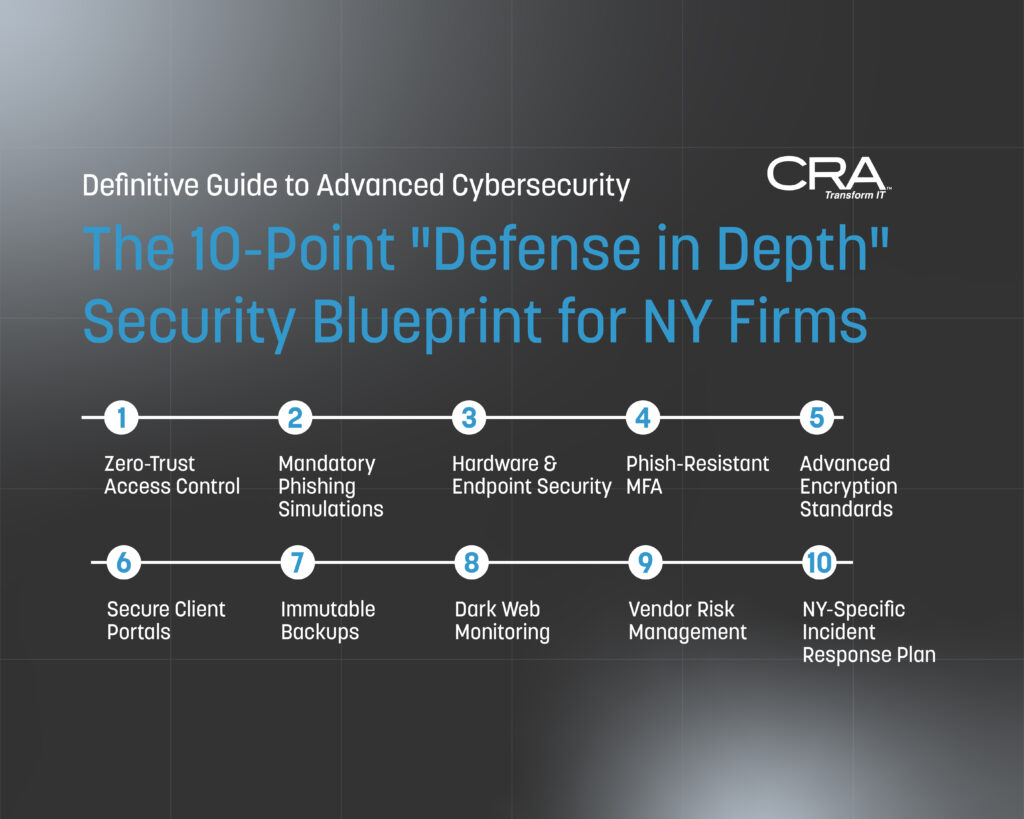
Section 3: The 10-Point Defense in Depth Security Blueprint for New York Law Firms
The threats detailed in Section 2 share a common characteristic: none of them are defeated by a single control. A firm with excellent email security but no MFA is vulnerable to credential stuffing. A firm with strong MFA but no network segmentation hands an attacker broad access the moment they compromise one endpoint. A firm with immutable backups but no DLP solves half the ransomware problem while remaining fully exposed to double extortion.
Defense in depth is the architectural principle that no single security control is sufficient — that meaningful protection requires multiple overlapping layers, each designed to catch what the others miss. For a law firm of 10 to 100 attorneys without a dedicated internal security team, the goal is not to build an enterprise security operations center. The goal is to implement the right ten controls in the right sequence, creating a layered defense that is both operationally sustainable and genuinely effective against the threats your firm faces.
Each control below is mapped to three dimensions:
- The threats it directly mitigates (from Section 2)
- The regulatory obligations it satisfies (from Section 1)
- The implementation priority — so your firm can sequence investments rationally rather than attempting to do everything simultaneously
Control 1: Identity and Access Management — The Foundation of Everything
Threat Mitigation: AI Spear Phishing, Insider Threats, Supply Chain Compromise, Ransomware Regulatory Alignment: NY SHIELD Act (Technical Safeguards), DFS Part 500 (MFA Requirement), NYSBA Ethics Implementation Priority: Immediate
If there is one principle that underlies more successful attacks against law firms than any other, it is this: attackers get in through identities, not through walls. Stolen credentials, compromised accounts, and over-privileged users are the entry point for the majority of breaches affecting firms of your size. Identity and Access Management (IAM) is the control layer that addresses this reality directly.
Multi-Factor Authentication — The Non-Negotiable Baseline
MFA is no longer an optional enhancement to your security posture. It is the single most impactful control available for preventing unauthorized access, and its absence is increasingly treated as negligence per se in both regulatory and insurance contexts. However, not all MFA is created equal, and the distinctions matter operationally.
SMS-based MFA — where a one-time code is sent via text message — is better than no MFA, but it is vulnerable to SIM-swapping attacks, in which an attacker convinces a mobile carrier to transfer a target's phone number to an attacker-controlled SIM card. For a named partner at a visible NYC firm, SIM-swapping is a realistic threat, not a theoretical one.
Authenticator app-based MFA — using applications like Microsoft Authenticator, Google Authenticator, or Duo — is significantly more resistant to SIM-swapping and represents the current operational standard for professional services firms. Time-based one-time passwords generated by an authenticator app are not interceptable via carrier-level attacks.
Hardware security keys — physical devices such as YubiKeys that must be physically present to authenticate — provide the highest level of phishing resistance available. They are specifically resistant to the credential harvesting attacks described in Section 2.2, because even a successful phishing page capture cannot be used without the physical key. For administrative accounts, senior partners, and anyone with privileged access to financial systems, hardware key MFA is the gold standard.
Implementation Guidance:
- Enforce authenticator app MFA as the minimum standard across all firm systems — email, practice management, document management, billing, remote access — without exception
- Deploy hardware keys for all accounts with administrative privileges and all users with access to financial systems or trust accounts
- Audit your current MFA enrollment quarterly and treat any unenrolled account as an open vulnerability requiring immediate remediation
- Disable legacy authentication protocols (Basic Auth in Microsoft 365, for example) that allow applications to bypass MFA entirely — these protocols are a common attacker bypass that persists in many firm environments long after MFA has been deployed
Role-Based Access Control — The Principle of Least Privilege
Every user in your firm's systems should have access to exactly what their role requires — and nothing more. This principle, known as least privilege, is both a security best practice and a SHIELD Act administrative safeguard requirement.
In practice, most firms of your size have accumulated access permissions organically over time — partners have been given broad access because they asked for it, long-tenured staff have retained permissions from roles they no longer occupy, and shared credentials exist because they were convenient when they were created. This accumulated access sprawl is a direct amplifier of both insider threat and external breach impact.
Implementation Guidance:
- Conduct an immediate access audit that maps every user to every system they can currently access and evaluates whether that access is role-appropriate
- Implement formal access tiers — for example: standard user access (email, assigned matter files, general firm resources), elevated access (firm-wide document repositories, billing systems), and administrative access (system configuration, user management, security tooling) — with different authentication and monitoring requirements at each tier
- Establish a formal provisioning and deprovisioning process so that new hires receive only the access their role requires from day one, and departing employees have all access revoked on their last day — automated where possible, verified manually as a checklist item in every offboarding procedure
- Review and recertify all access permissions quarterly, with documented sign-off from the designated security coordinator
Single Sign-On — Security and Usability in Alignment
One of the most common causes of poor security hygiene in law firms is the proliferation of separate credentials across multiple platforms — each requiring its own username and password, each tempting users toward password reuse and weak credential choices. Single Sign-On (SSO) addresses this by centralizing authentication through a single identity provider, reducing the credential surface area while simultaneously improving the user experience.
With SSO properly configured, an attorney authenticates once — with strong MFA — and gains access to all authorized firm applications through that single authenticated session. The security team manages access centrally. When an employee departs, a single deprovisioning action removes access across all connected systems simultaneously.
Implementation Guidance:
- Deploy an identity provider platform — Microsoft Entra ID (formerly Azure AD) or Okta are the dominant options for firms of your size — as the central authentication hub for all firm applications
- Integrate all SaaS legal technology platforms with the SSO provider, prioritizing systems that hold client data
- Configure Conditional Access policies within the identity provider that enforce MFA for all logins, restrict access from unmanaged devices, and flag or block authentication attempts from unexpected geographic locations
Control 2: Email Security Architecture — Defending the Primary Attack Surface
Threat Mitigation: AI Spear Phishing, Deepfake Wire Fraud, Ransomware (Initial Access) Regulatory Alignment: NY SHIELD Act (Technical Safeguards), NYSBA Ethics Opinion 1019 Implementation Priority: Immediate
Email remains the single most common initial access vector for attacks against law firms. Your email environment is not just a communication tool — it is the primary surface through which attackers attempt to gain entry, and the primary channel through which wire fraud and spear phishing attacks are executed. A layered email security architecture is non-negotiable.
The Layers of Effective Email Security
Email Authentication Protocols. Before any content-level filtering, your domain needs to be configured with the three foundational email authentication standards that prevent attackers from successfully spoofing your firm's domain in outbound emails:
- SPF (Sender Policy Framework): Specifies which mail servers are authorized to send email on behalf of your domain
- DKIM (DomainKeys Identified Mail): Cryptographically signs outbound emails to verify they haven't been tampered with in transit
- DMARC (Domain-based Message Authentication, Reporting and Conformance): Tells receiving mail servers what to do when an email fails SPF or DKIM checks — and critically, reports back to you when someone attempts to spoof your domain
Many NYC law firms have SPF configured but DKIM and DMARC either missing or set to monitoring-only mode rather than enforcement. A DMARC policy set to "none" tells receiving servers to report spoofing attempts but not block them. Your DMARC policy should be set to "quarantine" or "reject" to actively prevent domain spoofing.
Advanced Anti-Phishing and Anti-Malware Filtering. The built-in spam filtering included with Microsoft 365 or Google Workspace is a starting point, not a complete solution. Advanced email security platforms — such as Microsoft Defender for Office 365 Plan 2, Proofpoint Essentials, or Mimecast — provide additional layers including:
- AI-based content analysis that evaluates email content, sender behavior, and link destinations against threat intelligence in real time
- Safe Links — a capability that rewrites URLs within emails and checks them against threat intelligence at the moment of click, not just at delivery time. This is critical because malicious links are frequently benign at delivery and activated after passing through standard filters
- Safe Attachments — which detonates email attachments in an isolated sandbox environment before delivering them to the recipient, catching malware that evades signature-based detection
- Impersonation protection — specifically trained to detect emails that impersonate your firm's partners, senior staff, and key clients, even when they come from domains that pass standard authentication checks
Encrypted Email for Sensitive Communications. As detailed in Section 1 with reference to NYSBA Ethics Opinion 1019, standard email transmission is ethically insufficient for sensitive client communications in many matter contexts. Your email security architecture should include an encrypted email capability — either a secure client portal integrated with your practice management platform, or an email encryption gateway that automatically applies encryption based on content sensitivity rules.
Implementation Guidance:
- Audit your domain's SPF, DKIM, and DMARC configuration immediately — free tools such as MXToolbox will surface gaps in minutes
- Deploy an advanced email security platform that provides AI-based filtering, Safe Links, Safe Attachments, and impersonation protection
- Configure automatic encryption rules that apply to emails containing defined sensitive content categories — financial account numbers, Social Security numbers, matter-specific keywords — reducing the burden on individual attorneys to remember to encrypt manually
- Implement a one-click phishing report button within your email client and establish a documented process for your IT provider to triage reported emails within a defined SLA
Control 3: Endpoint Protection and Management — Securing Every Device That Touches Firm Data
Threat Mitigation: Ransomware, Spear Phishing (Payload Execution), Insider Threats Regulatory Alignment: NY SHIELD Act (Technical and Physical Safeguards), DFS Part 500 Implementation Priority: Immediate
Every laptop, desktop, and mobile device that connects to firm systems or accesses client data is an endpoint — and every endpoint is a potential breach entry point. For a firm with attorneys working across Midtown offices, home offices, and on mobile devices throughout the city, endpoint security is both complex and critical.
Endpoint Detection and Response
Traditional antivirus software operates on a signature-based model: it compares files against a database of known malware signatures and blocks matches. This model is fundamentally reactive — it can only catch threats that have already been identified and added to the signature database. Against novel malware variants, AI-generated attack tools, and fileless attacks that operate entirely in memory, signature-based antivirus provides inadequate protection.
Endpoint Detection and Response (EDR) platforms replace the signature-based model with behavioral analysis. Rather than asking "does this file match a known threat?" EDR asks "is this process behaving in a way that is consistent with malicious activity?" This allows EDR to detect and respond to novel threats, ransomware behavior, and lateral movement attempts that traditional antivirus would miss entirely.
Leading EDR platforms for firms of your size include Microsoft Defender for Business (deeply integrated with Microsoft 365), CrowdStrike Falcon Go, and SentinelOne. The right choice depends on your existing technology stack, but the capability itself is non-negotiable.
Mobile Device Management
In a firm where attorneys are regularly accessing client emails, reviewing documents, and taking client calls on mobile devices, Mobile Device Management (MDM) is the control layer that extends your security policies to those devices. MDM allows your IT provider to:
- Enforce encryption at rest on all managed mobile devices
- Require PIN or biometric authentication to unlock
- Remotely wipe a device in the event of loss or theft — a scenario that is particularly relevant in a city where devices are lost on the subway, in taxis, and at client meetings with regularity
- Separate firm data from personal data on BYOD (Bring Your Own Device) devices through containerization, so that a remote wipe of firm data doesn't affect the employee's personal photos, apps, and contacts
- Block data transfer between firm applications and personal applications — preventing an attorney from copying a client document from the firm's document management app into their personal Dropbox or Gmail
Patch Management — The Unglamorous Control That Prevents Catastrophic Breaches
A significant percentage of successful ransomware deployments exploit vulnerabilities for which patches were available — sometimes for months — before the attack occurred. The WannaCry ransomware outbreak, the MOVEit exploitation, and dozens of other high-profile incidents shared a common characteristic: the vulnerability being exploited was known, a patch existed, and organizations hadn't applied it.
Patch management is not technically complex. It is operationally complex — because in a busy law firm environment, attorneys resist reboots, updates get deferred indefinitely, and legacy applications create compatibility constraints that delay patching cycles. Your IT provider needs explicit authorization and a defined maintenance window to apply patches consistently, and your firm's leadership needs to treat patch compliance as a non-negotiable operational standard rather than an IT inconvenience.
Implementation Guidance:
- Deploy EDR across all firm endpoints — every laptop, desktop, and firm-owned mobile device — without exception. Unmanaged endpoints are your blind spots
- Implement MDM for all devices accessing firm email or client data, including personal devices used for firm business under a BYOD policy
- Establish a monthly patch cycle as the standard, with a 72-hour emergency patch protocol for critical vulnerabilities — defined as those with a CVSS score of 9.0 or above or those actively being exploited in the wild
- Maintain a complete and current asset inventory of every device in your environment. You cannot protect what you don't know exists — and in firms of your size, shadow IT (unmanaged devices and applications that staff have introduced without IT involvement) is a consistent vulnerability
Control 4: Network Security Architecture — Containing the Blast Radius
Threat Mitigation: Ransomware (Lateral Movement), Insider Threats, Supply Chain Compromise Regulatory Alignment: NY SHIELD Act (Technical Safeguards), DFS Part 500 Implementation Priority: Near-Term (within 90 days)
Network security architecture determines what happens after an attacker gets past your perimeter controls. In a flat network — where all systems can communicate freely with all other systems — a single compromised endpoint gives an attacker a path to everything. Network segmentation is the architectural control that contains a breach to the segment where it originates, limiting the blast radius and buying time for detection and response.
Network Segmentation for Law Firms
For a firm of your size, practical network segmentation doesn't require enterprise-grade infrastructure. It requires thoughtful network design that separates systems by function and sensitivity:
Segment 1 — User Workstations. Standard attorney and staff desktops and laptops. These systems need access to email, document management, practice management, and internet resources — but they do not need direct access to server infrastructure, financial systems, or administrative tools.
Segment 2 — Server and Application Infrastructure. File servers, application servers, and any on-premises systems hosting client data. Access to this segment should be strictly controlled and limited to systems and users with a defined operational need.
Segment 3 — Financial and Trust Account Systems. Any systems used to access IOLTA accounts, process payments, or manage billing should be isolated in their own segment with the most restrictive access controls in the firm. The financial consequences of a compromise in this segment are immediate and direct.
Segment 4 — Guest and Visitor Network. A completely separate network for guest WiFi — used by visiting clients, opposing counsel, and contractors — that has no connectivity to any firm systems. This is a basic control that many firms still haven't implemented, leaving their entire network accessible to anyone who connects to the guest WiFi.
Segment 5 — IoT and Physical Security Devices. Smart TVs in conference rooms, IP-connected printers, building access control systems, and security cameras should be isolated on their own network segment. These devices are frequently unpatched, rarely monitored, and represent a lateral movement path that attackers have exploited successfully in professional services environments.
Firewall Configuration and Management
Your network perimeter firewall is only as effective as its configuration — and default firewall configurations are almost universally insufficient for a firm handling sensitive client data. Your IT provider should be maintaining:
- Explicit allow-list rules that permit only necessary traffic, rather than default-allow rules that permit everything not explicitly blocked
- Geo-blocking rules that restrict inbound connections from geographic regions your firm has no operational need to communicate with
- Application-layer inspection that can identify and block malicious traffic that uses legitimate ports and protocols to evade detection
- Regular firewall rule reviews — at minimum quarterly — to identify and remove stale rules that have accumulated over time and may represent unnecessary exposure
DNS Filtering
DNS filtering is a network-level control that prevents devices on your network from resolving domain names associated with known malicious infrastructure — command-and-control servers, phishing sites, malware distribution networks. When a piece of malware on an infected endpoint attempts to communicate with its command-and-control server, DNS filtering interrupts that communication at the network level, even if the malware itself hasn't been detected by endpoint security tools.
DNS filtering platforms such as Cisco Umbrella, DNSFilter, or Cloudflare Gateway are relatively low-cost, easy to deploy, and provide a meaningful additional layer of protection against both outbound malware communication and user access to malicious sites.
Implementation Guidance:
- Assess your current network architecture and document the segmentation — or lack thereof — that exists today. This assessment will surface the highest-priority gaps
- Implement VLAN-based segmentation for financial systems and server infrastructure as the immediate priority, followed by guest network isolation
- Deploy DNS filtering at the network level and configure it to block known malicious categories — malware, phishing, command-and-control — as a baseline
- Schedule quarterly firewall rule reviews with your IT provider and document the outcomes
Control 5: Data Protection and Encryption — Protecting the Asset Itself
Threat Mitigation: Ransomware (Double Extortion), Insider Threats, Physical Theft Regulatory Alignment: NY SHIELD Act (Technical Safeguards), DFS Part 500 (Encryption Requirement), NYSBA Ethics Implementation Priority: Immediate
All of the perimeter and access controls discussed so far are designed to prevent unauthorized parties from reaching your data. Encryption is the control that protects the data itself — so that even if an attacker does reach it, what they find is unreadable without the keys your firm controls.
Encryption at Rest
Every storage medium in your firm's environment that contains client data should be encrypted at rest:
- Endpoint full-disk encryption — BitLocker for Windows devices, FileVault for Mac — should be enabled and verified on every firm laptop and desktop. This is particularly critical in a city environment where device theft is a realistic scenario. An encrypted laptop is a useless brick to a thief; an unencrypted one is a complete client data breach
- Server and cloud storage encryption — ensuring that data stored on firm servers, in Microsoft 365, and in cloud-based legal technology platforms is encrypted at rest using current encryption standards
- Backup encryption — all backup copies of firm data, including offsite and cloud backups, must be encrypted. An unencrypted backup is a second copy of your breach exposure
Encryption in Transit
Data in transit — moving between your systems, between your firm and clients, and between your firm and cloud platforms — should be encrypted using current TLS standards. This means:
- TLS 1.2 or 1.3 for all web-based applications and client portals — verify that your legal technology vendors are meeting this standard
- Encrypted email for sensitive client communications, as discussed in Control 2
- VPN for remote access — any attorney or staff member connecting to firm systems from outside the office should be doing so through an encrypted VPN tunnel, not through direct internet exposure of firm systems
Data Loss Prevention
DLP tooling monitors data flows across your environment and enforces policies that prevent sensitive data from leaving firm-controlled channels. A DLP policy can be configured to:
- Block or alert when a document containing defined sensitive content — Social Security numbers, financial account numbers, matter-specific keywords — is attached to a personal email, uploaded to a personal cloud storage service, or copied to an external USB drive
- Detect anomalous bulk data transfers — the kind of large-scale file exfiltration that characterizes the pre-encryption phase of a ransomware attack
- Enforce encryption on sensitive documents before they can be shared externally, ensuring that even authorized external sharing occurs through protected channels
Microsoft 365's Purview compliance platform provides DLP capabilities that are available within many firms' existing licensing tiers and can be configured without significant additional investment.
Implementation Guidance:
- Audit and verify full-disk encryption status across all firm endpoints — this should be a documented, verified control rather than an assumed one
- Enable and configure DLP policies within Microsoft 365 Purview or your equivalent platform, starting with the highest-sensitivity data categories (financial data, personal identifiers, matter files for high-risk practice areas)
- Review the encryption standards of all legal technology vendors annually as part of your vendor security review process
- Verify that all remote access to firm systems is routed through a VPN and that direct RDP (Remote Desktop Protocol) exposure to the internet has been eliminated — exposed RDP is one of the most commonly exploited entry points for ransomware
Control 6: Backup and Recovery Architecture — Your Last Line of Defense
Threat Mitigation: Ransomware, Data Corruption, System Failure Regulatory Alignment: NY SHIELD Act (Technical Safeguards), DFS Part 500, NYSBA Ethics (Competence) Implementation Priority: Immediate
As established in the ransomware discussion in Section 2, backups are necessary but not sufficient against modern double extortion attacks. They remain, however, the critical control that determines whether a firm survives a ransomware event operationally — whether the encrypted systems can be restored within hours or days rather than weeks, or whether the firm is forced to rebuild from scratch.
The 3-2-1-1 Backup Architecture
The traditional 3-2-1 backup rule — three copies of data, on two different media types, with one copy offsite — has been updated for the ransomware era to the 3-2-1-1 rule, adding a fourth requirement: one copy that is immutable and air-gapped.
- Three copies: Your production data, a local backup, and an offsite or cloud backup
- Two media types: For example, local NAS storage and cloud backup — not two copies on the same platform
- One offsite: A copy that is geographically and network-separated from your primary systems
- One immutable: A copy that cannot be modified, encrypted, or deleted by any process, user, or attacker with access to your network — typically achieved through object lock features in cloud backup platforms or through physically air-gapped offline media
Recovery Time Objective and Recovery Point Objective
Two metrics define the operational effectiveness of your backup architecture:
Recovery Time Objective (RTO) — how long can your firm operate without access to its systems before the impact becomes catastrophic? For most NYC law firms, the answer is measured in hours, not days. Court deadlines, client closings, and regulatory filings don't pause for system outages. Your backup architecture needs to be able to restore operational capability within an RTO that your firm can actually survive.
Recovery Point Objective (RPO) — how much data can your firm afford to lose? If your backups run nightly, a ransomware event at 4:00 PM on a Tuesday means you potentially lose a full day of work across the entire firm. For a high-transaction practice, that may be unacceptable. More frequent backup intervals — hourly or continuous data protection for critical systems — reduce the RPO to a level the firm can tolerate.
Testing — The Control Most Firms Skip
A backup that has never been tested is not a backup — it is an assumption. Backup failures are remarkably common and often go undetected until the moment of crisis when a working restore is urgently needed. Your backup architecture must include:
- Monthly restore tests — actually restoring files from backup and verifying their integrity, not just confirming that the backup job completed without errors
- Annual full recovery exercises — simulating a complete system recovery from backup and measuring actual RTO against the target, identifying gaps before a real incident does
Implementation Guidance:
- Assess your current backup architecture against the 3-2-1-1 standard and identify gaps — specifically whether you have an immutable copy and whether your backups are isolated from your production network
- Define your firm's RTO and RPO explicitly, document them, and verify that your current backup architecture can meet them
- Schedule and document monthly restore tests and annual full recovery exercises — make these a standing calendar item with documented results, not an ad-hoc activity that gets deferred when the firm is busy
- Verify that your backup system itself is protected by MFA and that backup administrator credentials are not the same as production system credentials — ransomware operators specifically target backup systems and their administrative accounts as part of their pre-encryption preparation
- Review your cyber insurance policy to confirm that your backup architecture meets any security control prerequisites that affect ransomware coverage — insurers are increasingly specifying immutable backup requirements as a condition of coverage
Control 7: Security Awareness Training — The Human Firewall
Threat Mitigation: AI Spear Phishing, Deepfake Wire Fraud, Insider Threats (Negligent), Ransomware (Initial Access) Regulatory Alignment: NY SHIELD Act (Administrative Safeguards), DFS Part 500 (Training Requirement), NYSBA Ethics Implementation Priority: Immediate
Every technical control in this blueprint can be undermined by a single employee who clicks a malicious link, transfers funds based on a fraudulent instruction, or connects to firm systems over an unsecured network. The human element is not a weakness that technology can fully compensate for — it is a layer that requires its own investment, its own architecture, and its own ongoing maintenance.
Security awareness training is frequently implemented as an annual checkbox exercise — a 20-minute online module completed in January and forgotten by February. That model produces compliance documentation, not behavioral change. The training architecture that actually reduces incident rates looks fundamentally different.
The Components of Effective Security Awareness Training
Role-Specific Training Content. Generic security awareness training that covers password hygiene and phishing recognition in abstract terms produces limited behavioral change in a law firm population. Attorneys and legal professionals respond to training that is grounded in their specific operational context — the actual pretexts used against law firms, the specific regulatory obligations they carry, and the concrete consequences of security failures for their clients and their professional standing.
Training content for a NYC law firm should specifically address:
- Wire fraud and BEC scenarios framed in the context of real estate closings, settlement disbursements, and corporate transactions — the actual high-value transfer scenarios your firm handles
- Phishing simulation exercises using pretexts that mirror what attackers are actually deploying against legal practices: fake court notifications, spoofed opposing counsel emails, fraudulent bar association communications, and synthetic vendor invoices
- Deepfake and voice spoofing awareness — including demonstrations of how convincing synthetic voice technology has become, so that staff understand viscerally why a familiar-sounding voice on the phone is not sufficient verification
- Mobile device security specific to the urban practice environment — public WiFi risks, physical device security in transit, and the importance of MDM enrollment
- Ethical dimensions of data security — connecting the firm's security practices directly to NYSBA competence obligations and the attorney-client relationship, which tends to resonate more strongly with attorneys than abstract compliance requirements
Simulated Phishing Campaigns. The most effective training tool for phishing resistance is not a lecture about phishing — it is experiencing a simulated phishing attempt in a consequence-free environment and receiving immediate, contextual feedback when you fall for it. Platforms such as KnowBe4, Proofpoint Security Awareness Training, and Microsoft Attack Simulator allow your IT provider to send realistic simulated phishing emails to your staff, track who clicks, and deliver targeted remedial training to those who do.
Critically, simulated phishing campaigns should be:
- Conducted quarterly at minimum — annual simulations produce a brief spike in vigilance that decays rapidly
- Calibrated to legal-specific pretexts — not generic "you've won a prize" emails that your staff will find obviously suspicious, but realistic court notifications, client document requests, and internal IT communications that mirror actual attack patterns
- Used for training, not punishment — the goal is to identify vulnerabilities and address them through education, not to create a culture of fear and blame that suppresses incident reporting
Just-In-Time Training. The most behaviorally effective training interventions occur at the moment of a relevant decision, not weeks before it. Configure your email security platform to deliver a brief, contextual warning when an email exhibits characteristics associated with phishing or impersonation — not just flagging it as suspicious, but explaining specifically why it was flagged and what the user should do. This just-in-time intervention reinforces training in the moment it is most relevant.
Leadership Participation and Tone from the Top. Security culture in a law firm reflects the behavior and stated priorities of its leadership. If named partners exempt themselves from MFA enrollment, treat security training as an imposition, or visibly circumvent security procedures for convenience, that behavior sets the cultural norm for the entire firm. Security awareness training must be explicitly and visibly supported by firm leadership — including mandatory participation by partners — to achieve the cultural shift that makes it effective.
Building a Reporting Culture
The single most valuable behavioral outcome of an effective security awareness program is not that staff never make mistakes — it is that when mistakes happen, they are reported immediately. A clicked phishing link that is reported within minutes can be contained. The same event that goes unreported for days while an attacker establishes persistence is a catastrophic breach.
Building that reporting culture requires two things: a frictionless reporting mechanism (the one-click report button discussed in Control 2) and a psychologically safe response when reports are made. The first time a staff member reports a clicked link and receives a disproportionately punitive response, the message received by the entire firm is that mistakes should be concealed, not reported. The appropriate response to a reported security incident is speed and gratitude — speed in responding to contain the potential compromise, and genuine acknowledgment that the reporting behavior is exactly what the firm needs.
Implementation Guidance:
- Deploy a security awareness training platform with legal-specific content modules and simulated phishing capabilities — schedule quarterly training cycles and phishing simulations as standing calendar items
- Customize phishing simulation templates to reflect the actual pretexts used against NYC law firms — work with your IT provider or the training platform's template library to develop scenarios specific to your practice areas
- Establish and communicate a no-blame reporting policy for security incidents and near-misses, and reinforce it consistently through leadership behavior
- Track training completion rates and phishing simulation click rates as Key Performance Indicators (KPIs) reported to firm leadership quarterly — treat declining click rates as a security metric, not just an IT metric
- Include security awareness as a component of new hire onboarding — every attorney, paralegal, and administrative staff member should complete security training before receiving access to firm systems
Control 8: Incident Response Planning — Deciding Before the Crisis
Threat Mitigation: All Threat Vectors (Response Capability) Regulatory Alignment: NY SHIELD Act (Breach Notification Requirements), DFS Part 500 (Incident Response Plan), NYSBA Ethics Implementation Priority: Near-Term (within 60 days)
The quality of your response to a security incident is determined almost entirely by the quality of your preparation before it occurs. Firms that contain breaches effectively, meet their notification obligations, and preserve client relationships through security incidents are not firms where nothing went wrong — they are firms that had a documented, tested incident response plan and activated it immediately when something did.
The Components of a Law Firm Incident Response Plan
An incident response plan is not a technical document written for IT professionals. It is an operational playbook written for the people who will actually need to act on it — firm leadership, the designated security coordinator, administrative staff, and your external advisors. It needs to answer, in plain language, the questions that will actually be asked during a crisis:
Who is in charge? Define a clear incident command structure with a named Incident Response Lead — typically the firm administrator or managing partner — who has authority to make decisions during an active incident, including the decision to engage external forensic support, notify regulators, and communicate with affected clients.
Who do we call? Maintain a current, printed incident response contact card that includes:
- Your IT managed services provider's emergency contact number
- Your cyber insurance carrier's incident response hotline — most policies require you to notify the insurer before engaging external forensic vendors
- Your external cybersecurity incident response firm, if you have a pre-engagement relationship established
- Your outside counsel for data breach response — separate from your firm's own attorneys if the incident involves potential malpractice exposure
- The NY Attorney General's Office reporting portal and contact information
- DFS reporting contacts if your firm is subject to Part 500
This card should exist in printed form, not just digitally — because during a ransomware event, your digital systems may not be accessible.
What do we do in the first hour? The first 60 minutes of a detected security incident are disproportionately important. Decisions made — or not made — in that window determine whether a containable event becomes a catastrophic breach. Your plan should specify:
- Isolate, don't power off. If a compromised device is identified, disconnect it from the network immediately — unplug the ethernet cable, disable WiFi — but do not power it off. Forensic evidence critical to understanding the scope and nature of the attack exists in the device's memory and may be lost if the device is shut down
- Preserve evidence. Document everything — screenshots of ransom notes, error messages, unusual system behaviors — before taking any remediation action. Forensic reconstruction is significantly harder when evidence has been overwritten by well-intentioned cleanup efforts
- Activate your cyber insurance. Your insurer's incident response resources — forensic investigators, breach counsel, notification vendors — are typically available immediately upon activation and are generally far better than scrambling to engage vendors independently under crisis conditions
What are our notification obligations and timelines? As detailed in Section 1, New York's breach notification requirements impose specific timelines that do not pause while your firm assesses the situation. Your incident response plan should include a notification decision tree that maps specific incident types to specific notification obligations:
- NY SHIELD Act notification to affected individuals — in the most expedient time possible
- NY Attorney General notification
- DFS notification within 72 hours (for covered entities)
- NYSBA ethical obligations to notify affected clients
- Client contract notification obligations that may impose timelines shorter than statutory requirements
How do we communicate? A ransomware event that takes down your email systems eliminates your primary communication channel simultaneously with your primary crisis. Identify out-of-band communication channels in advance — a Signal group, a personal email distribution list, a phone tree — through which your leadership team can coordinate when firm systems are unavailable. Designate a single spokesperson for all external communications during an incident to ensure message consistency and prevent inadvertent disclosures.
Tabletop Exercises
A plan that has never been tested is a document, not a capability. Tabletop exercises — structured simulations in which firm leadership and key staff walk through a hypothetical incident scenario and make the decisions they would face in a real event — are the mechanism through which a written plan becomes an operational capability.
An effective tabletop exercise for a NYC law firm should:
- Be scenario-specific — a ransomware and double extortion scenario, a wire fraud scenario, and a data exfiltration scenario each reveal different gaps and require different decisions
- Include all decision-makers — managing partner, firm administrator, IT provider, and if possible your cyber insurer and outside breach counsel
- Generate a written after-action report that identifies specific gaps in the plan, unresolved decision-making ambiguities, and control deficiencies surfaced by the exercise
- Be conducted annually at minimum, with a follow-up exercise after any significant change to firm systems, personnel, or the threat landscape
Implementation Guidance:
- Draft or update your firm's incident response plan within 60 days, using the components above as a structural framework
- Print and laminate incident response contact cards and distribute them to all members of the incident response team — store physical copies in locations that remain accessible if firm systems are down
- Schedule your first tabletop exercise within 90 days of finalizing the plan — engage your IT provider and cyber insurer in the exercise design
- Review and update the plan annually and after any significant incident, near-miss, or material change to firm systems
Control 9: Vendor and Third-Party Risk Management — Extending Your Security Perimeter
Threat Mitigation: Supply Chain Compromise, Ransomware (via Vendor Access), Data Exfiltration Regulatory Alignment: NY SHIELD Act (Vendor Oversight), DFS Part 500 (Third-Party Service Provider Security), NYSBA Ethics Opinions 842 & 1020 Implementation Priority: Near-Term (within 90 days)
As established in Section 2.5, your firm's security posture is only as strong as the weakest link in your vendor ecosystem. NYSBA per Ethics Opinions 842 & 1020 makes explicit that your ethical obligation to protect client data extends to the vendors you entrust with that data — and that obligation requires active, documented oversight, not passive assumption.
The Vendor Risk Management Program
Vendor Inventory and Classification. You cannot manage risk you haven't mapped. Begin with a complete inventory of every vendor that has access to client data — directly, through integration, or through administrative access to your systems. For each vendor, document:
- The nature of the data access — does the vendor store client data, process it in transit, or have administrative access to systems that contain it?
- The data types involved — personally identifiable information, financial data, privileged communications, matter files?
- The access method — API integration, direct system access, human administrative access?
- The contractual security obligations currently in place — or the absence thereof
Once inventoried, classify vendors by risk tier based on the sensitivity of their data access and the criticality of their platform to firm operations. A vendor with administrative access to your document management system — which contains every client matter file your firm has ever created — is a Tier 1 vendor requiring your most rigorous oversight. A vendor providing your office's coffee machine maintenance contract is not.
Pre-Engagement Security Assessment. Before onboarding any new vendor with access to client data, conduct a documented security assessment that includes:
- Review of the vendor's SOC 2 Type II report — request the full report, not just a summary letter, and review the auditor's findings and any identified exceptions
- Review of the vendor's data breach history — search publicly available breach databases and ask the vendor directly whether they have experienced any security incidents in the past 24 months
- Review of the vendor's subprocessor relationships — understanding who they share your data with downstream, and what security obligations govern those relationships
- Assessment of the vendor's data residency practices — where your data is stored geographically, which matters for both security and certain regulatory compliance frameworks
Contractual Security Requirements. Every vendor contract governing a relationship that involves client data should include explicit security provisions:
- Data Processing Agreements (DPAs) that specify the vendor's security obligations, the permitted uses of your data, and their obligations upon termination of the relationship
- Breach notification clauses requiring the vendor to notify your firm within 24 to 48 hours of discovering any security incident that may have affected your data — do not accept notification timelines longer than this, regardless of what the vendor's standard contract proposes
- Audit rights — the contractual right to request updated security documentation, SOC 2 reports, and penetration testing summaries on an annual basis
- Data return and deletion obligations upon contract termination, specifying that the vendor must return or certifiably destroy all firm data within a defined timeframe
Ongoing Vendor Monitoring. Vendor security assessments conducted only at onboarding provide a point-in-time snapshot that may be entirely outdated within 12 months. Your vendor risk management program needs ongoing monitoring mechanisms:
- Annual security review for all Tier 1 vendors — request updated SOC 2 reports, ask about security incidents, assess whether their security posture has kept pace with evolving threats
- Continuous monitoring for public breach disclosures affecting your vendors — subscribe to security news feeds and breach notification services that will alert you when a vendor you use is publicly disclosed as having experienced a breach
- Immediate activation of your incident response process when a vendor breach is disclosed — do not wait for the vendor to contact you, as their notification timelines may not align with your regulatory obligations
Managing IT Managed Services Provider Risk
Your IT managed services provider (MSP) deserves special attention within your vendor risk management program, because their relationship with your firm is categorically different from other vendors. Your MSP likely has administrative access to every system in your environment — they are, from a technical perspective, the most privileged entity with access to your firm's data outside of your own staff.
MSPs have become high-value targets for sophisticated ransomware groups precisely because a single MSP compromise can provide simultaneous access to dozens or hundreds of the MSP's clients. When evaluating and monitoring your MSP, apply the most rigorous standards in your vendor risk program:
- Require your MSP to provide evidence of their own security controls — their SOC 2 Type II certification, their internal MFA requirements for all technicians accessing client environments, and their own incident response capabilities
- Ensure that your MSP's administrative access to your systems uses Privileged Access Management (PAM) — meaning their administrative credentials are separate from standard user accounts, are stored in a privileged credential vault, and their use is logged and monitored
- Verify that your MSP uses just-in-time access for administrative tasks — meaning elevated privileges are granted only for the duration of a specific task and automatically revoked afterward, rather than persistent administrative access that represents a standing high-value target
- Establish clear contractual obligations around your MSP's own security posture and their breach notification obligations to your firm
Implementation Guidance:
- Complete a vendor inventory and risk classification exercise within 60 days, documenting every vendor with access to client data
- Implement a standard vendor security questionnaire and onboarding checklist that all new vendors with client data access must complete before engagement begins
- Audit existing vendor contracts for security provisions and prioritize renegotiating agreements with Tier 1 vendors that lack adequate DPAs, breach notification clauses, and audit rights
- Establish an annual vendor review calendar — schedule Tier 1 vendor reviews as standing annual commitments, not ad-hoc activities
- Apply enhanced scrutiny to your MSP relationship specifically, verifying their internal security controls and ensuring that their administrative access to your systems is appropriately controlled and monitored
Control 10: Governance, Measurement, and Continuous Improvement — Making Security Sustainable
Threat Mitigation: All Threat Vectors (Program Sustainability) Regulatory Alignment: NY SHIELD Act (Administrative Safeguards), DFS Part 500 (CISO/Senior Officer Accountability), NYSBA Ethics Implementation Priority: Near-Term (within 90 days)
The nine controls detailed above are not a project with a completion date — they are an ongoing program that requires governance, measurement, and continuous improvement to remain effective as the threat landscape evolves, the firm grows, and the regulatory environment changes. Control 10 is the management layer that holds everything else together.
Designating a Security Coordinator
DFS Part 500 requires covered entities to designate a Chief Information Security Officer (CISO). For firms that are not directly subject to Part 500, the underlying governance principle remains sound: someone in your firm needs to own information security as an explicit, documented responsibility — not as an informal extension of the managing partner's administrative duties or as something entirely delegated to your IT provider without internal accountability.
For a firm of 10 to 100 attorneys, a dedicated full-time CISO is neither necessary nor practical. What is necessary is a designated Security Coordinator — typically the firm administrator, COO, or a senior partner with an operational role — who holds explicit responsibility for:
- Maintaining and updating the firm's security policies and procedures
- Overseeing the implementation and ongoing effectiveness of the ten controls in this blueprint
- Serving as the primary internal contact for the IT managed services provider on security matters
- Leading or coordinating the firm's incident response activities
- Reporting on security posture to firm leadership on a defined schedule
- Staying current on the evolving threat landscape and regulatory environment affecting New York law firms
This individual does not need to be a technical expert — they need to be an accountable, engaged owner who understands the business and regulatory context of the firm's security obligations and can effectively manage the relationship with the technical resources responsible for implementation.
Security Policies and Procedures
A security program without documented policies is a collection of informal practices that vary by individual, erode over time, and provide no basis for accountability. Your firm needs a core set of written security policies that establish clear standards for behavior and technology use:
Acceptable Use Policy. Defines the permitted and prohibited uses of firm technology resources — including personal device use for firm business, acceptable internet use on firm networks, and the prohibition of unauthorized software installation.
Information Classification Policy. Establishes categories for firm and client data based on sensitivity — for example, Public, Internal, Confidential, and Privileged — and defines the handling requirements for each category, including storage, transmission, and disposal standards.
Password and Authentication Policy. Documents MFA requirements, password complexity standards, and the prohibition of password sharing and reuse — providing the policy foundation for the technical controls implemented in Control 1.
Remote Work and Mobile Device Policy. Establishes security requirements for remote access to firm systems, including VPN requirements, MDM enrollment for devices used for firm business, and physical security standards for work in public environments.
Incident Response Policy. The documented plan developed under Control 8, formally adopted as firm policy and referenced in employment agreements and vendor contracts.
Data Retention and Disposal Policy. Defines how long different categories of firm and client data are retained, and the specific methods required for secure disposal — including certified destruction for physical media and cryptographic erasure for digital storage. This policy is both a security control and an ethical obligation under New York's professional responsibility rules governing file retention.
These policies need not be elaborate — clarity and practicality matter more than length. A policy that attorneys and staff actually read and understand is infinitely more valuable than a comprehensive document that lives in a shared drive and is never consulted.
Key Performance Indicators and Reporting
Security program effectiveness is not self-evident — it requires measurement. Define a core set of KPIs that provide meaningful visibility into your program's health and report them to firm leadership on a quarterly basis:
| KPI | Target | Reporting Frequency |
| MFA enrollment rate across all firm systems | 100% | Monthly |
| Phishing simulation click rate | Below 5% (industry benchmark) | Quarterly |
| Security awareness training completion rate | 100% | Quarterly |
| Critical and high patch compliance rate | 100% within 72 hours (critical), 30 days (high) | Monthly |
| Vendor security reviews completed on schedule | 100% of Tier 1 vendors annually | Annually |
| Backup restore test completion | Monthly, documented | Monthly |
| Incident response tabletop exercise completion | Annually, documented | Annually |
| Open security findings from last assessment | Tracked to closure | Quarterly |
Presenting these metrics to firm leadership in a regular security briefing — even a brief quarterly update — accomplishes two things: it creates accountability for the Security Coordinator and the IT provider, and it demonstrates to firm leadership that security is a managed, measured program rather than an opaque technical activity.
Annual Risk Assessment
At least annually, your firm should conduct a formal risk assessment that evaluates the current state of your security program against the threat landscape, identifies gaps in your controls, and prioritizes investments for the coming year. This assessment should:
- Review the ten controls in this blueprint against current implementation status
- Incorporate threat intelligence specific to the legal sector — new attack patterns, emerging regulatory requirements, and notable incidents affecting peer firms
- Produce a prioritized remediation roadmap with assigned owners, timelines, and resource requirements
- Be documented and retained as evidence of the firm's ongoing due diligence — a record that demonstrates the firm takes its security obligations seriously and acts on identified gaps
For firms subject to DFS Part 500, the annual risk assessment is a regulatory requirement. For all other New York law firms, it is best practice that increasingly constitutes the standard of care in the event of a breach.
The Security Investment Framework
A question that firm leadership invariably asks is: how much should we be spending on security? The honest answer is that there is no universal formula — but there are useful reference points.
Industry benchmarks suggest that professional services firms should be allocating 6 to 12 percent of their IT budget to security-specific investments. For a firm that currently spends $150,000 annually on technology and IT services, that implies a security-specific investment of $9,000 to $18,000 per year — covering a combination of security tooling, awareness training, and periodic assessments.
The more useful framing, however, is not percentage of IT budget but cost relative to breach risk. The average cost of a data breach in the professional services sector, according to IBM's annual Cost of a Data Breach Report, exceeded $4.9 million when accounting for detection, response, notification, legal defense, regulatory fines, and reputational impact. Against that exposure, the investment required to implement the ten controls in this blueprint is not a cost — it is risk transfer at a favorable ratio.
Implementation Guidance:
- Designate a Security Coordinator within 30 days and document that designation formally — including the specific responsibilities the role carries
- Develop and adopt the core security policy set within 90 days — prioritize the Acceptable Use Policy, Incident Response Policy, and Password and Authentication Policy as the immediate first tranche
- Establish a quarterly security KPI reporting cadence to firm leadership beginning with the next quarterly meeting
- Schedule the firm's first formal annual risk assessment within 6 months and commit to the annual cadence going forward
- Review the security investment allocation in the firm's next budget cycle against the 6 to 12 percent benchmark and identify any material gaps relative to the controls in this blueprint
The Defense in Depth Blueprint — Integrated Summary
The ten controls above are not independent — they are interdependent layers that reinforce each other and compensate for each other's gaps. Understanding how they interact as an integrated system is as important as understanding each control individually.
How the Layers Interact
Consider a realistic attack scenario against a NYC law firm: an AI-generated spear phishing email targeting a senior associate in your real estate practice, impersonating a title company contact involved in an active closing, with a malicious link to a credential harvesting page designed to capture Microsoft 365 credentials.
Without the blueprint in place, the attack path looks like this:
- The phishing email reaches the associate's inbox, passing standard spam filtering
- The associate clicks the link, which passes through unmodified since there is no Safe Links scanning
- The associate enters their Microsoft 365 credentials on the harvesting page
- The attacker uses the stolen credentials to log into Microsoft 365 — no MFA challenge stops them
- The attacker accesses the associate's email, searches for wire transfer instructions and client financial data, and begins exfiltrating matter files
- Using the associate's email account, the attacker sends fraudulent wire transfer instructions to the title company and the firm's accounts payable contact
- The exfiltrated data is used as double extortion leverage
- The firm discovers the breach days later when a client calls to report that their wire transfer went to an unrecognized account
The total elapsed time from initial click to active breach with meaningful data exfiltration: potentially less than four hours. The firm's discovery lag: potentially days. The damage by the time the firm responds: irreversible.
With the blueprint in place, the same attack encounters multiple friction points, each of which independently has the potential to stop or contain it:
- Control 2 (Email Security) — Advanced anti-phishing filtering flags the email based on sender behavior analysis and domain age of the impersonated title company domain. The email is quarantined for review rather than delivered. Attack potentially stopped at step one.
- If the email does reach the associate: Control 7 (Security Awareness Training) — The associate has completed legal-specific phishing awareness training within the past quarter and recognizes the urgency-pressure tactic in the email. They use the one-click report button rather than clicking the link. Attack stopped at step two.
- If the associate clicks the link: Control 2 (Safe Links) — The URL is rewritten and checked at click time against threat intelligence. The harvesting page has been identified and is blocked. Attack stopped at step three.
- If the associate reaches the harvesting page and enters credentials: Control 1 (MFA) — The attacker has the password but cannot complete authentication without the second factor. The stolen credentials are useless alone. Attack stopped at step four.
- If the attacker somehow bypasses MFA: Control 1 (Conditional Access) — Authentication from an unrecognized device or unexpected geographic location triggers an additional verification challenge or block. Attack stopped or flagged at step five.
- If the attacker gains access to the email account: Control 5 (DLP) — Bulk data movement triggers an alert to the IT provider. Control 4 (Network Segmentation) — The compromised email account has access only to what that user's role requires, limiting lateral movement. Attack contained and detected.
- If ransomware is ultimately deployed: Control 6 (Backup and Recovery) — Immutable backups allow system restoration. Control 8 (Incident Response) — The documented plan is immediately activated, external forensics are engaged, and regulatory notification timelines are met. Firm survives operationally and meets its legal obligations.
This is what defense in depth looks like in practice — not a single impenetrable wall, but a series of overlapping controls that require an attacker to successfully defeat multiple independent layers simultaneously. The probability of a successful attack diminishes at each layer. The probability of detection increases at each layer.
Phase 2 — Near-Term (Days 31 through 90): Build the Architecture
Phase 2 implements the structural controls that require more planning, coordination, and in some cases procurement — but that are essential to a complete defense in depth posture.
| Priority | Control | Specific Actions |
| 6 | Control 4: Network | Conduct network architecture assessment. Implement VLAN segmentation for financial systems and servers. Deploy DNS filtering. Isolate guest WiFi. |
| 7 | Control 5: Data Protection | Configure DLP policies in Microsoft 365. Verify VPN for all remote access. Eliminate direct RDP exposure. Begin vendor encryption review. |
| 8 | Control 8: Incident Response | Draft incident response plan. Print and distribute contact cards. Schedule first tabletop exercise. |
| 9 | Control 9: Vendor Risk | Complete vendor inventory. Implement vendor questionnaire. Prioritize Tier 1 vendor contract reviews. |
| 10 | Control 10: Governance | Designate Security Coordinator. Draft core policy set. Establish KPI reporting cadence. |
Phase 3 — Ongoing (Day 91 and Beyond): Mature and Sustain
Phase 3 is not a completion milestone — it is the operational rhythm that keeps the program effective as the threat landscape, the firm, and the regulatory environment evolve.
| Activity | Frequency |
| MFA enrollment audit | Monthly |
| Backup restore test | Monthly |
| Patch compliance review | Monthly |
| Security KPI reporting to leadership | Quarterly |
| Phishing simulation | Quarterly |
| Security awareness training cycle | Quarterly |
| Vendor Tier 1 security review | Annually |
| Incident response tabletop exercise | Annually |
| Full risk assessment | Annually |
| Policy review and update | Annually |
| Cyber insurance coverage review | Annually |
| Penetration testing | Annually or after significant system changes |
The Role of Your IT Managed Services Provider
Throughout this blueprint, references to your IT managed services provider carry an implicit assumption that your MSP is a capable, engaged partner with genuine expertise in security for professional services clients — not simply a break-fix provider who keeps your printers running and resets passwords.
The reality in the NYC small law firm market is that MSP quality varies enormously. Some MSPs serving firms of your size are sophisticated security partners with dedicated security practices, legal-sector experience, and the tooling to implement everything in this blueprint effectively. Others are generalist IT shops whose security capabilities are limited to basic antivirus and backup management.
Evaluating your MSP against the requirements of this blueprint is itself an important governance activity. Specifically, your MSP should be able to demonstrate:
- Security-specific expertise — not just general IT competence, but dedicated security practice capabilities including EDR deployment, SIEM monitoring, vulnerability management, and incident response support
- Legal sector experience — familiarity with the specific compliance obligations, data sensitivity requirements, and operational constraints of law firm environments
- Proactive security posture — a relationship model in which they are actively monitoring your environment, identifying emerging vulnerabilities, and bringing security recommendations to you — not simply responding to problems after they occur
- Their own security certifications — SOC 2 Type II certification for the MSP itself, demonstrating that their internal security controls have been independently audited
- Clear contractual accountability — explicit SLAs for security incident response, defined responsibilities for security control implementation and monitoring, and breach notification obligations to your firm
If your current MSP cannot demonstrate these capabilities, that gap is itself a material security risk that warrants either a frank conversation about capability development or a market assessment of alternative providers. The controls in this blueprint are only as effective as the partner responsible for implementing and maintaining them.
Why New York Law Firms Choose Computer Resources of America
For more than three decades, Computer Resources of America (CRA) has been the trusted technology partner for New York City's legal community — from boutique solo practices to mid-size firms handling complex litigation, real estate transactions, and corporate matters across every borough and practice area the city produces.
The ten controls outlined in this section are not theoretical constructs for CRA. They are the operational framework we deploy, manage, and continuously refine for law firm clients across New York every day. When we talk about AI-powered spear phishing targeting real estate closings, wire fraud schemes exploiting settlement disbursements, and ransomware operators who research their targets before they strike — we are drawing on direct experience defending New York law firms against exactly these threats.
What Makes CRA Different for Law Firms
Deep Legal Sector Expertise — Not Generic IT Support
CRA is not a generalist managed services provider that happens to have a few law firm clients. The legal sector is our primary market, and that specialization produces capabilities that general IT providers cannot replicate:
- We understand the operational rhythms of a law firm — closing deadlines, court filing windows, deposition schedules — and we design our support and maintenance models around them, not around a generic IT calendar
- We understand the data sensitivity hierarchy of a legal practice — the difference between administrative files and privileged client communications, between billing records and matter files under active litigation hold
- We understand the ethical and regulatory obligations that govern how your firm handles client data under New York Rules of Professional Conduct, the NY SHIELD Act, and where applicable, DFS Part 500 — and we design security architectures that support your compliance posture, not just your technology operations
Security Built for the Threat Landscape Your Firm Actually Faces
Every control in this blueprint — MFA with Conditional Access, advanced email security with legal-specific phishing simulation, EDR across all firm endpoints, immutable backup architecture, network segmentation, DLP configured for legal data categories — is something CRA has designed, deployed, and is actively managing for New York law firms right now.
When a new ransomware variant targeting legal sector document management platforms emerges, our security operations team knows about it before it reaches your firm. When a phishing campaign using fake court notifications begins circulating in the NYC legal community, we update simulation templates and push awareness alerts to our law firm clients immediately. When a critical vulnerability affecting a legal technology platform you use is disclosed, our patch management protocols mean it is remediated on your systems within hours — not weeks.
A Security Operations Model Designed for Firms Without Internal IT Staff
Most law firms of 10 to 100 attorneys do not have — and should not need — a dedicated internal IT security team. CRA's managed security model is specifically designed to deliver enterprise-grade security operations to firms that size, at a cost structure that makes sense for a professional services business:
- 24/7 security monitoring of your firm's environment through our Security Operations Center — so that anomalous activity is detected and investigated at 2:00 AM on a Saturday, not discovered Monday morning
- Dedicated client success management — a named CRA professional who knows your firm, understands your practice, and brings proactive security recommendations to you before gaps become incidents
- Incident response capability on retainer — when something goes wrong, you are not starting from scratch trying to find a forensic firm while your systems are down. CRA's incident response resources are available immediately, and our team already knows your environment
Microsoft 365 and Legal Technology Platform Expertise
The controls described in this section rely heavily on Microsoft 365's security stack — Defender, Purview, Conditional Access, Entra ID — as well as integration with the legal technology platforms your firm depends on: document management systems, practice management platforms, client portals, and matter-specific applications.
CRA's technical team holds current Microsoft certifications and specializations, and our deployment experience spans the full range of legal technology platforms in active use by New York firms. We don't just configure Microsoft 365 security features — we configure them in the context of how your specific legal technology stack operates, ensuring that security controls enhance your operational environment rather than creating friction that attorneys work around.
Regulatory Navigation — SHIELD, DFS, and NYSBA
The regulatory landscape described in Section 1 of this guide is not abstract compliance text for CRA — it is the framework within which we build every law firm security program we manage. Our team stays current on New York's evolving regulatory requirements, participates in legal technology and legal ethics continuing education forums, and maintains relationships with outside counsel who specialize in law firm data security compliance.
When you engage CRA, you are not just getting a technology provider. You are getting a partner who can speak the same language as your managing partner, your malpractice insurer, and your bar association — and who can help you demonstrate, with documented evidence, that your firm is meeting its obligations to protect client data with the competence and diligence the profession requires.
What CRA Clients Say
“We are a small company, but they make us feel like we are their most important client.” Steven Frasier - Director, CFA Society New York
Ready to Assess Your Firm's Security Posture?
CRA offers a Law Firm Security Assessment for qualified New York firms — a structured evaluation of your current security posture against the ten controls in this blueprint, delivered with a prioritized remediation roadmap and a clear picture of where your greatest exposures lie.
The assessment typically takes an hour of your firm's time and produces a written report that you can present to firm leadership, your malpractice insurer, and if necessary, regulatory examiners as evidence of your due diligence.
Section 3 Conclusion — Security as Professional Infrastructure
The ten controls in this blueprint are not a luxury investment for firms with large technology budgets. They are professional infrastructure — as fundamental to operating a law firm in New York City in 2026 as malpractice insurance, bar membership, and client trust account compliance.
The threat landscape described in Section 2 is not static. AI-powered attack tools are becoming more accessible and more capable. Ransomware groups are becoming more sophisticated in their targeting of professional services firms. Regulatory expectations are rising, not falling. The question facing every firm of your size is not whether to invest in security — it is whether to invest proactively, on your own timeline and terms, or reactively, in the aftermath of an incident that has already caused irreversible harm to your clients, your firm, and your professional standing.
The attorneys in your firm took an oath to protect their clients' interests with competence and diligence. In 2026, that oath encompasses the digital security of everything those clients have entrusted to you. The blueprint in this section is the operational translation of that obligation into concrete, implementable action.