
Data Backup and Disaster Recovery for Midsize Businesses in NYC: A Guide for 2027
Most NYC businesses already run backups. Far fewer can say with evidence how long it would take to get billing, client files, email, and line-of-business applications working again after a ransomware attack, a flooded basement server room, or a building that stays closed for a week.
For a midsize business in New York City, an effective backup and disaster recovery program combines protected copies of every critical system, recovery targets set by business leaders, isolated backups that ransomware cannot reach, and restore tests that prove those targets can be met. Comprehensive disaster recovery planning ensures these pieces operate together seamlessly.
Deploying resilient backup solutions covers the first layer of defense. However, software tools alone cannot replace proactive disaster recovery services that validate business continuity.
The gap shows up at the worst moment. A backup job can report "success" for months while the restored server will not boot, the database is missing a dependency, or the only recovery copy sits on the same network the attacker encrypted. You will come away able to set defensible recovery targets, choose the right mix of local and cloud protection, and judge whether your current IT support can prove recovery works.
What Does a Complete Recovery Strategy Include?
A complete recovery strategy covers three layers: copies of your data, the technical ability to bring systems back online, and the business procedures that keep work moving while that happens. Most midsize firms have the first layer and assume the other two follow automatically.
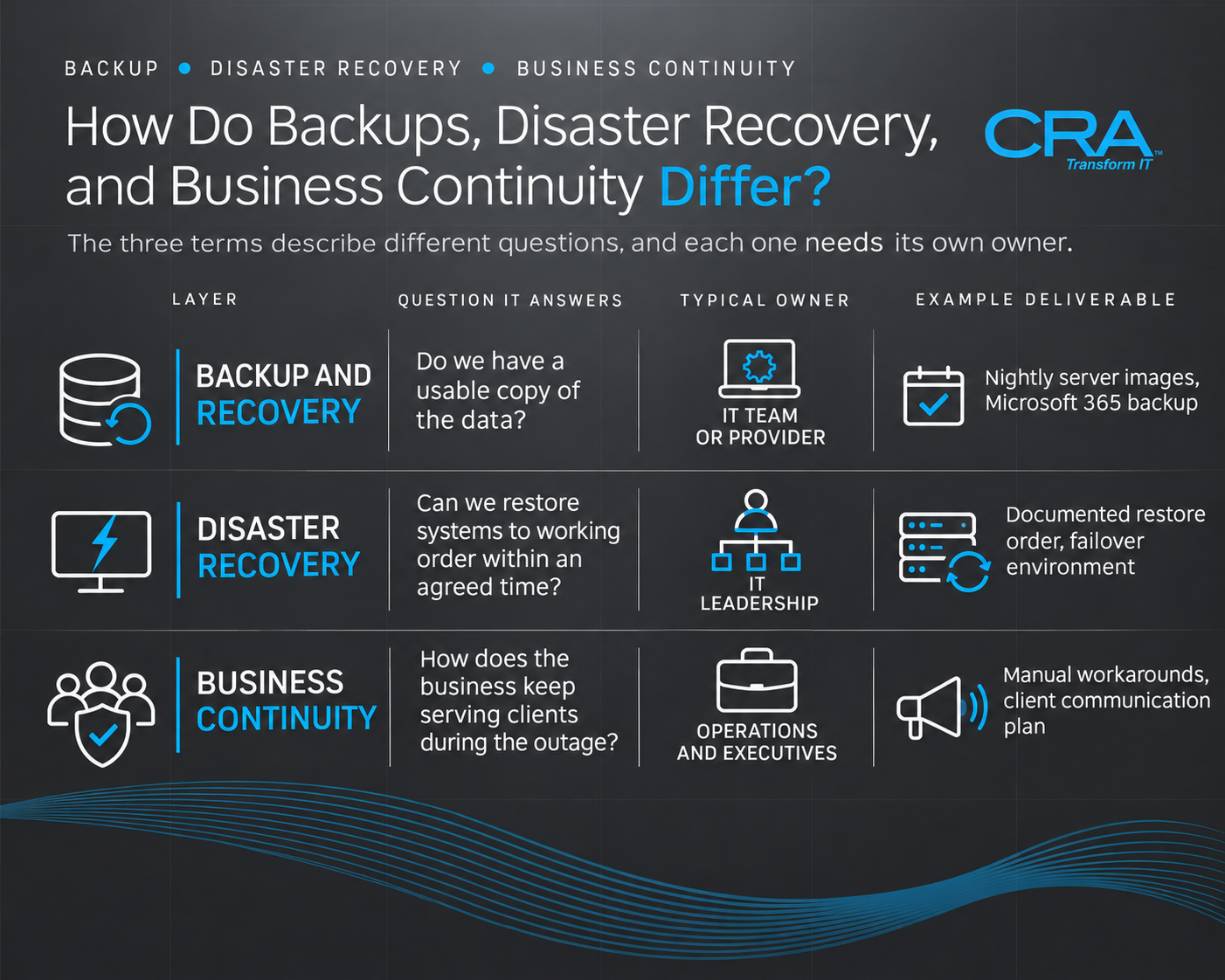
How Do Backups, Disaster Recovery, and Business Continuity Differ?
The three terms describe different questions, and each one needs its own owner:
NIST's contingency planning guidance treats the business continuity plan and disaster recovery plan as separate plan types that must connect to each other. Structured recovery planning bridges technical infrastructure with overall business operations.
In practice, modern backup and recovery workflows protect systems and files. The recovery plan restores operations, while the continuity plan keeps staff productive during an outage.
Why Successful Backups Do Not Guarantee Operational Recovery
A green checkmark in a backup console confirms that data was copied. It says nothing about whether you can use that data under pressure.
Recovery fails for reasons that never appear in a backup report:
- The application server restores, but its license server or domain controller does not.
- The restored database is consistent, but the integration that feeds it from your CRM was never documented.
- The backup is intact, but restoring 4 TB over your office internet connection takes days.
- The most recent copy was taken after malware was already present.
Data protection protects bytes and preserves files. Operational recovery restores a working process, which includes identity systems, network configuration, credentials, and the people who know the sequence.
Robust data backup solutions account for those technical interdependencies. Without them, even the most frequent backups leave staff waiting for complex manual rebuilds.
What Midsize Businesses Need Beyond Basic File Protection
Midsize organizations sit in an awkward spot. You run enough systems to create real dependency chains, yet you rarely have a dedicated recovery engineer on staff.
Beyond file-level copies, you need:
- Image-level backups of servers and virtual machines, so you can rebuild a full system.
- Cloud application backup for Microsoft 365 and SaaS platforms.
- An isolated copy that administrator credentials on your main network cannot delete.
- A documented restore order tied to business priorities.
- Scheduled restore tests with recorded results.
- Someone accountable for keeping all of this current as your systems change.
How Much Downtime and Data Loss Can Your Business Tolerate?
Business leaders, with IT support, should define how long each critical system can be down and how much recent data you can afford to lose. Those two numbers drive nearly every technical and budget decision that follows, so they belong to the people who carry the financial consequences.
Use a Business Impact Analysis to Prioritize Critical Operations
A business impact analysis (BIA) ranks your business processes by the damage an outage causes over time. NIST publishes a free Business Impact Analysis (BIA) template that adapts well to private companies.
Run the BIA as a working session with department heads. For each process, ask:
- What revenue, client, regulatory, or payroll impact begins after 4 hours, 1 day, and 1 week?
- Which applications, data sets, and people does this process depend on?
- Is there a manual workaround, and how long can staff sustain it?
Expect surprises. In many firms, the system leaders call "critical" turns out to have a two-day manual workaround, while an overlooked scheduling tool stops client delivery within hours.
Set a Recovery Time Objective for Each Critical System
Your recovery time objective (RTO) is the maximum acceptable time between an outage and the point when a system is usable again. Set it per system, because a single company-wide RTO either overspends on minor tools or underprotects essential ones.
Hypothetical example for illustration only: a 150-person professional services firm might set these targets.
Shorter RTOs require faster hardware, standby environments, or cloud failover, and each step down costs more.
Match Recovery Point Objectives to Acceptable Data Loss
The recovery point objective (RPO) sets how much data, measured in time, you can lose. An RPO of 24 hours means a nightly backup is acceptable; an RPO of 15 minutes requires frequent snapshots or continuous replication.
Translate RPO into work your staff would have to redo. If your finance team posts 300 transactions a day, a 24-hour RPO means re-entering a full day of activity from emails and bank portals. For a busy transactional database, that cost usually justifies hourly or more frequent recovery points.
Some platforms set the RPO for you. Microsoft 365 Backup, for instance, captures Exchange restore points every 10 minutes for the full prior year, while OneDrive and SharePoint shift from 10-minute points to weekly ones after 14 days.
Which Systems and Data Need Backup Coverage?
Every system that appears in your BIA needs backup coverage, including the cloud services teams assume are protected by default. The usual blind spots are SaaS data, employee laptops, and the configuration details that let restored systems talk to each other.
Microsoft 365, Email, and Other Cloud Applications
Cloud providers keep their platforms running; protecting your data inside them is your job. Microsoft states that security and compliance in its cloud is a shared responsibility in which customers protect their own data to the standards that apply to them.
Native retention windows are short. Under Microsoft's data handling standard, customer content a user or admin deletes is retained for at most 30 days in an active deletion scenario. If a departing employee's account is removed and nobody notices missing files for six weeks, that data is gone without a separate backup.
Check Teams coverage specifically. Microsoft 365 Backup currently protects Teams channel files stored in SharePoint, while team chats are not protected. Apply the same scrutiny to your CRM, accounting SaaS, and project management platforms.
Physical Servers, Virtual Machines, and Business Databases
On-premises and hosted servers need image-level backups that capture the operating system, applications, and configuration together. File-only backups force you to rebuild a server by hand before you can restore its data.
For databases (SQL Server, accounting platforms, practice management systems), use application-aware backups that capture a consistent state. A copy taken mid-transaction can restore without errors and still contain corrupted records.
Hypervisors deserve their own protection. Back up host configuration, and keep templates of your standard server builds so you can stand up replacement machines quickly.
Employee Devices, Shared Files, and Application Dependencies
Distributed staff save work to desktops, local downloads folders, and personal sync tools. Redirect key folders to OneDrive or a managed file share so automated backup captures them, and back up executive and finance laptops directly.
Dependencies cause the slowest recoveries. Document and protect:
- Active Directory or Entra ID configuration
- DNS, DHCP, and firewall settings
- License keys and installation media
- Service accounts and API credentials (stored in a secured vault)
- Integration scripts between applications
Without these, restored systems come back online and cannot find one another.
Should You Choose Local, Cloud, or Hybrid Recovery?
Most NYC midsize businesses are best served by a hybrid design: a local copy for fast everyday restores plus an offsite backup copy that survives a building-level event or network-wide attack. The exact mix follows from your RTOs and your office's physical risks.
Implementing reliable offsite backup storage shields vital records from localized physical disasters. It also forms a fundamental baseline for long-term disaster resilience.
Apply the 3-2-1 Backup Rule Without Sharing a Single Failure Point
The 3-2-1 rule calls for three copies of your data, on two different media types, with one copy offsite. It remains a sound baseline, and it fails when all three copies share a weakness.
Common shared failure points include:
- Every copy managed by the same administrator account
- Local backup appliance and production servers in the same basement room
- Primary and backup data with one cloud vendor under one account
CISA recommends considering a multi-cloud approach for cloud-to-cloud backups in case all accounts under one vendor are affected. At minimum, keep your offsite copy under separate credentials and separate administrative control.
Balance Local Restore Speed With Offsite Protection
Local backup appliances restore fastest. Pulling a 2 TB server image from a device on your LAN takes hours; pulling it from cloud storage over a 500 Mbps office connection takes considerably longer and competes with everyday traffic.
Use local copies for the frequent, small incidents: a deleted folder, a failed disk, a corrupted VM. Use cloud-based backup as the offsite copy that protects against fire, flood, theft, and ransomware that reaches your local network.
Ask your provider how a large cloud restore would be delivered. Some services ship data on encrypted drives or restore directly into a cloud environment, which avoids the bandwidth bottleneck.
When Cloud Failover Makes Sense Beyond Cloud Backup
Cloud backup stores copies. Cloud-based disaster recovery runs your systems in a cloud environment when your office or data center is unavailable.
Failover makes sense when an RTO is shorter than the time needed to replace hardware or reopen a building. If your billing system has an 8-hour RTO and your server room sits below grade in a flood-prone building, waiting for new equipment is unrealistic.
With replication services such as Azure Site Recovery, you pay continuously for protection and storage, while virtual machine compute charges apply only during test failover or actual failover. That model gives you standby capacity for disaster resilience without running duplicate servers year-round.
How Do You Protect Backups From Ransomware?
Protect backups by keeping at least one encrypted copy isolated from your production network and its administrator credentials, then verifying that the copy you restore is free of malware. Modern cybersecurity practices treat backup repositories as top-tier defensive assets.
Attackers target backups first because they remove your alternative to paying. Aligning your recovery plan with proven cybersecurity frameworks keeps unauthorized actors from tampering with critical archives.
Combine Encryption With Isolated or Immutable Copies
Encryption keeps stolen backup data unreadable. It does nothing to stop an attacker from deleting or encrypting the backup itself.
CISA advises maintaining offline, encrypted backups of critical data because many ransomware variants try to find and delete or encrypt accessible backups. Isolation options include:
- Immutable storage that locks backup files for a set retention period
- Logically air-gapped vaults in a separate cloud account
- Offline media rotated out of the network
CISA also cautions that immutable storage does not meet compliance criteria for certain regulations and that misconfiguration undermines it. Have your provider confirm retention locks are configured correctly and test them.
Separate Backup Access From Everyday Administrator Accounts
If the domain admin account that manages your file servers can also delete your backups, one stolen password ends both. Give backup systems dedicated accounts, protected with phishing-resistant multifactor authentication and excluded from your main directory where possible.
Apply least privilege to your IT providers too. CISA recommends auditing user and admin accounts quarterly, with priority on remote management accounts and third-party access granted to MSPs. Ask any managed IT partner how their own access to your backup console is controlled and logged.
Verify Clean Recovery Points Before Restoring Systems
Ransomware often sits in an environment for days or weeks before encrypting. Restoring the most recent backup can reinstall the attacker's foothold.
Before restoring after an attack:
- Work with your security team to establish when the compromise began.
- Scan candidate recovery points for known indicators.
- Restore into an isolated network segment first.
- Reset credentials before reconnecting restored systems.
Keep enough retention depth to step back far enough. A 7-day retention window offers little help against an intrusion that started three weeks earlier.
What Belongs in a Practical Disaster Recovery Plan?
A practical disaster recovery plan names who does what, in what order, under which NYC-specific conditions, and how you will know systems are ready for staff. Short, current, and accessible offline beats long and outdated.
Thorough disaster recovery planning ensures that teams execute tasks methodically under high stress. Formal recovery planning also minimizes conflicting responsibilities during a major operational incident.
Document Recovery Owners, Dependencies, and Restoration Order
Every critical system needs a named primary and backup owner, with phone numbers that work when email does not. Recovery stalls when the one person who knows the ERP admin password is on vacation.
Build the restoration order from dependencies upward:
- Network, firewall, and internet connectivity
- Identity (Active Directory, Entra ID)
- Core infrastructure (DNS, file servers)
- Databases
- Business applications
- User-facing access (VPN, remote desktop)
Store a printed copy and an offline digital copy. CISA advises keeping IT asset documentation secured with offline backups and physical hard copies on site.
Plan for NYC Power Outages, Flooding, and Building Access Restrictions
New York's physical risks shape your recovery design. NYC Emergency Management notes that floods cause more than $1 billion in property losses in the United States each year, and flooding here comes from storm surge, water main breaks, and sewer backups alike.
The risk is current. Businesses hit by the May 20, 2026 flash flooding event became eligible for SBA disaster loans, including up to $2,000,000 for physical losses.
Practical steps for New York City offices:
- Keep server and network equipment off basement and ground floors where possible.
- Confirm UPS runtime and whether your building's generator covers your floor.
- Assume the building may be closed for days after an incident, even if your suite is undamaged.
- Consider enrolling key staff in NYC's Corporate Emergency Access System, which authorizes essential employees to enter restricted areas after an emergency.
Coordinate Remote Work, Communications, and Temporary Operations
Your continuity plan has to answer how staff work while systems recover. Confirm that laptops, VPN, and cloud apps function with the office offline, and that employees know which tools to use.
Set up communication channels that do not depend on your own email: a call tree, a text alert service, or an external status page. Pre-draft client and vendor notices so leadership can approve them quickly.
Define temporary workarounds for critical processes, such as manual invoice logs or bank-portal payments, and note who authorizes them.
Define Failover, Validation, and the Return to Normal Operations
Write down the conditions that trigger failover and who can declare a disaster. Ambiguity here costs hours.
Each restored system needs a validation checklist completed by a business user, confirming that recent records appear, integrations run, and reports match expected totals. IT confirming the server is up does not confirm the application works.
Plan the return trip too. Failing back from a cloud environment requires syncing data changed during the outage, scheduling a cutover window, and confirming nothing was lost in transit.
How Can You Prove Recovery Will Work?
You prove recovery works by restoring real systems on a schedule, timing the results, and comparing them against your RTO and RPO targets. Anything short of that is an assumption.
Distinguish Backup Monitoring From Real Restore Testing
24/7 monitoring confirms that backup jobs ran, storage has capacity, and failures trigger alerts. That is necessary daily hygiene.
A test restore confirms that data comes back usable within the time you need. Monitoring would not catch a corrupted VM image, a missing driver, or a database that restores without its transaction logs. You need both, on separate schedules, with separate reports.
Test Files, Applications, and Full Recovery Scenarios
Build a tiered testing calendar:
Full scenario tests should include business users who validate results. A tabletop walkthrough of a flooded office scenario, followed by a partial live restore, reveals gaps in contact lists and decision authority that technical tests miss.
Compare Measured Recovery Results With RTO and RPO Targets
Record start and finish times for every test and compare them with your targets. If your billing system's RTO is 8 hours and the last test took 11, you have a documented gap and a decision to make: invest in faster recovery or accept a longer target.
Measure RPO the same way. Check the timestamp of the newest record in the restored system against the backup schedule.
Present these results to leadership in plain terms, such as "billing restored in 6 hours against an 8-hour target." That evidence makes budget conversations far easier.
Update the Plan After System Changes and Failed Tests
Recovery plans decay whenever your environment changes. Trigger a plan review after any new application, server migration, office move, or key staff departure.
NYC Emergency Management recommends reviewing business preparedness plans at least annually and updating them when staff or operations change. Treat failed tests as useful findings: fix the cause, update the runbook, and retest within 30 days.
What Determines Backup and Disaster Recovery Costs?
Costs are driven mainly by how much data you protect, how long you keep it, and how quickly you need it back. Testing, failover capacity, and the people who manage recovery add to the total, and each should appear in any quote you receive.
How Data Volume, Retention, and Recovery Targets Affect Pricing
Storage-based pricing scales with volume and retention. Microsoft 365 Backup was priced at $0.15 per GB per month for backup storage as of July 31, 2024. AWS Backup charges for storage, cross-Region transfer, restores, and backup evaluations, with no minimum fee.
Retention rules carry hidden costs. Backups moved to AWS cold storage must be kept at least 90 days, and AWS recommends keeping warm storage retention at least one week to avoid repeated full backups.
Shorter RTOs and RPOs raise costs fastest, because they require more frequent snapshots, faster storage, and standby environments.
Account for Testing, Cloud Failover, and Recovery Support
Many quotes cover storage and software and leave out the work that makes recovery reliable. Ask what is included for:
- Scheduled restore tests and written results
- Failover environment and test failover charges
- Plan documentation and annual updates
- Incident response hours during a real recovery
Azure Site Recovery shows how failover pricing combines components: each protected instance is free for its first 31 days, after which license, storage, transaction, and data transfer charges apply.
Compare Service Costs With the Business Impact of Downtime
Use your BIA to put a cost on downtime per system: lost billable hours, delayed invoicing, overtime, penalties, and client attrition. Then compare that figure with the annual cost of meeting each RTO.
Hypothetical illustration: if one day without your billing system delays $200,000 in invoicing and forces 40 staff onto manual work, a failover service that cuts recovery from three days to six hours has a clear business case. A rarely used archive server does not need the same investment.
How Do You Choose a Managed IT Recovery Partner?
Choose a recovery partner that can show tested restore results, accept clearly written responsibilities, and reach your offices in person when remote tools are not enough. Monitoring, secure backup administration, testing, and plan maintenance are continuous work, and accountability for them should be explicit.
Compare Internal Ownership With Ongoing Managed Accountability
An internal IT team knows your environment best, and it is usually stretched across help desk tickets, projects, and security. Recovery testing is the task that slips first.
A co-managed model often fits midsize firms: your staff keep business-application knowledge and decision authority, while a managed IT provider runs monitoring, backup administration, and the testing calendar. Whatever the split, document who owns each task in writing.
Ask for Tested Recovery Evidence and Clearly Defined Service Commitments
Ask prospective IT services providers for evidence, such as:
- A sample restore test report, with timings and validation steps
- Their process for verifying clean recovery points after ransomware
- How their own administrative access to your backups is secured and audited
- Written response times for recovery incidents, separate from routine IT support
- What happens during a regional event affecting many clients at once
Be cautious with universal promises such as guaranteed recovery in minutes for every system. Recovery time depends on your data, network, and targets, and a credible provider will tie commitments to them.
Confirm Onsite Support Across Manhattan, Brooklyn, Queens, and Long Island
Some recoveries need hands on hardware: replacing a failed appliance, moving equipment out of a flooded room, or rebuilding a network closet. Confirm the provider can dispatch technicians to each of your locations, whether you have a Manhattan headquarters, a Brooklyn operations site, a Queens warehouse, or staff on Long Island.
Ask how onsite response works when transit is disrupted or buildings restrict access, and whether engineers have worked in your building types before.
Evaluate Computer Resources of America Against Your Recovery Requirements
Computer Resources of America (CRA) is a NYC-headquartered managed services provider focused on midsize organizations, government agencies, non-profits, and financial services companies. CRA reports 30 years of delivering managed IT solutions and support across the Tri-State area, including business continuity planning and IT disaster recovery services.
CRA's managed services include 24/7 proactive monitoring and custom disaster recovery plans for critical data and applications, and its backup approach includes regular recovery testing.
Hold CRA to the same standard as any provider. Bring your BIA, your draft RTO and RPO targets, and the questions above to an assessment, and ask for a written plan showing how each target would be met and tested.
Make Tested Recovery an Ongoing Business Capability
Reliable recovery comes from a repeating cycle: define tolerances through a BIA, protect every critical system with isolated copies, restore on a schedule, and update the plan whenever your business changes. Business continuity and disaster resilience follow from that cycle, maintained year after year.
Start with three actions this quarter. Hold a BIA session with department heads to set per-system RTO and RPO targets. Confirm that at least one backup copy is isolated from everyday administrator accounts. Schedule one application-level test restore and record how long it takes.
If those steps show gaps you lack the capacity to close, request a recovery assessment from CRA and ask it to measure your current restore times against the targets your leadership sets.