Co-Managed IT Services in NYC: The 2026 NYC Guide
Co-managed IT gives your internal team a standing external partner that absorbs ticket overflow, covers absences, and supplies specialist depth. Your own people keep authority over priorities, architecture, and vendor decisions. For a New York business with 50 to 500 employees, that usually means your staff stops firefighting long enough to finish the projects leadership keeps asking about.
Co-managed IT services in NYC suit midsize companies that already employ capable IT staff but lack the hours, after-hours coverage, or niche skills to meet current demand, because the model adds capacity without replacing the people who hold your institutional knowledge.
The tension is familiar. Your team knows every quirk of your environment, yet a three-person department cannot run a help desk, patch hundreds of endpoints, staff a 2 a.m. incident, and plan a cloud migration at once. Once you see where ownership splits, you can judge whether a partner fits and what to ask on a discovery call.
How Does the Co-Managed IT Model Work?
A co-managed arrangement runs on a documented division of labor: your internal team sets direction and owns the environment, and the provider performs agreed functions inside that framework. Your staff retains decision rights. The partner supplies hours, tools, and expertise on a recurring basis.
What Does Your Internal Team Keep Control Of?
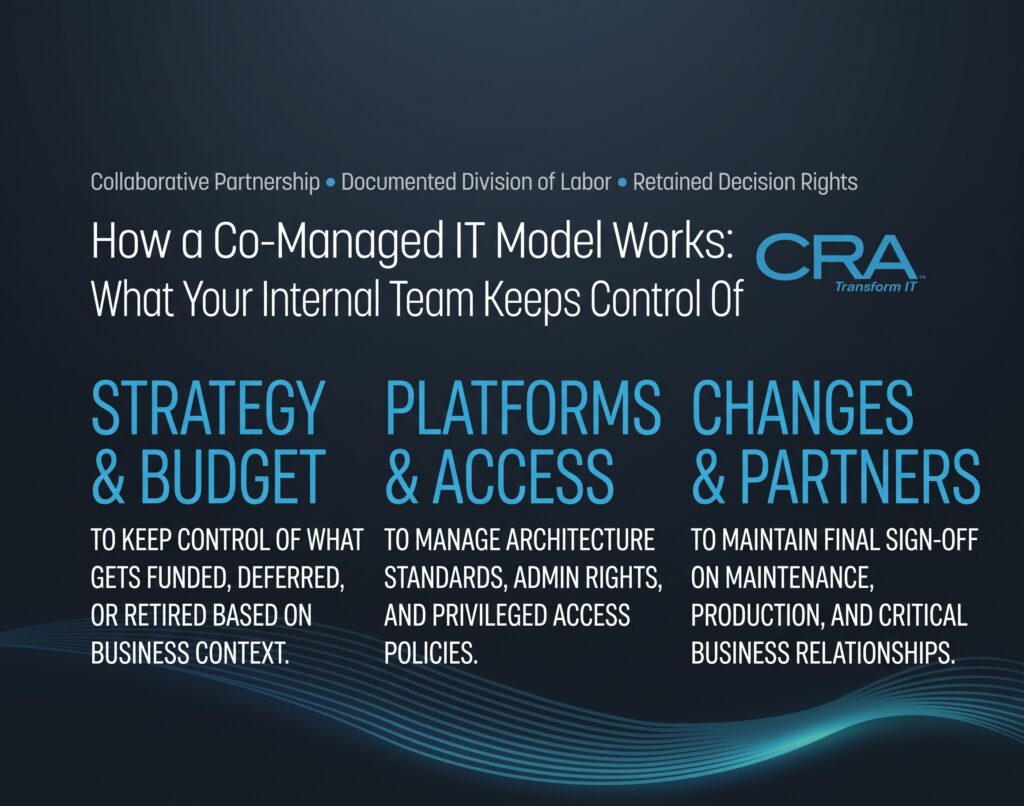
You keep the decisions that depend on business context. Those usually include:
- Strategy and budget: what gets funded, deferred, or retired.
- Architecture standards: approved platforms, configurations, and naming conventions.
- Change approval: final sign-off on production changes and maintenance windows.
- Privileged access policy: who holds admin rights, including the provider's accounts.
- Business relationships: department heads, executives, and key vendors.
Your team also stays the keeper of institutional knowledge. They know why a legacy application lives on one server, or which partner gets a VPN exception. That knowledge belongs in shared documentation, but the judgment behind it stays in-house.
How Does It Differ from Fully Managed IT?
Fully managed IT services hand the provider responsibility for nearly all IT management, and the provider often becomes your de facto IT department. Co-managed IT services assume you already have that department and want to extend it.
| Factor | Co-Managed IT | Fully Managed IT |
| Internal IT staff | Retained and in charge | Minimal or none |
| Strategic authority | Your IT leader | Shared or provider-led |
| Scope | Selected functions | Most or all functions |
| Tooling | Shared or blended | Usually provider's stack |
| Best fit | Teams needing capacity or depth | Firms without IT staff |
If your leaders want to keep shaping the roadmap, co-managed is the better fit. If nobody internally owns IT, a fully managed contract is more honest about who does the work.
When Does a Midsize Business Need Extra IT Capacity?
You need added capacity when IT operations show sustained strain that hiring one person will not fix quickly. The signals are a growing ticket queue, thin coverage when people are out, and recurring work that nobody on staff is trained to do well.
Ticket Backlogs and Stalled Strategic Work
Look at your ticket data first. If the open queue grows week over week, or your senior engineers spend most of their day on password resets and printer issues, IT support demand has outpaced headcount.
The cost shows up on the project list. A security hardening effort slides a quarter. The asset inventory stays half-finished. Routing Tier 1 overflow to a partner returns those blocks of focused time to your senior staff.
Coverage Gaps During Growth, Leave, and After-Hours Incidents
Small teams run without redundancy. One resignation, a parental leave, or a two-week vacation can leave a single person covering everything. Growth makes it worse: a new office, an acquisition, or a 30% jump in headcount adds endpoints faster than you can hire.
After-hours incidents expose the same gap. If your on-call plan amounts to "the director's phone," a partner with a staffed overnight rotation gives you defined escalation instead of goodwill.
Skills Gaps That Hiring Alone Cannot Quickly Fill
Some work needs depth you only use occasionally: firewall redesign, identity federation, SIEM tuning, or complex Microsoft 365 licensing. Hiring a full-time specialist for each is rarely justified, and recruiting in New York takes months.
A co-managed partner gives you access to engineers who handle those tasks across many environments. Treat their time as a bench you draw on for specific outcomes, with your team learning alongside them.
Who Owns Each Task and Decision?
Ownership has to be written down before the first ticket moves. Most friction in co-managed relationships comes from unclear handoffs, so settle responsibilities, approvals, and shared tooling up front as part of your IT management and vendor management discipline.
Define Responsibilities, Approvals, and Escalation Paths
Build a RACI matrix (Responsible, Accountable, Consulted, Informed) for each recurring function. A short excerpt might look like this:
| Task | Internal IT | Partner |
| Tier 1 tickets | Informed | Responsible |
| Production changes | Accountable | Responsible |
| Patch scheduling | Accountable | Responsible |
| Vendor contracts | Accountable, Responsible | Consulted |
| Security incident response | Accountable | Responsible for triage |
Then define escalation in time and severity terms. For example, a P1 outage pages the partner's on-call engineer immediately and your IT lead within 15 minutes. A P3 issue waits for business hours. Name individuals and backups, not just roles.
Security responsibilities need the same precision. CISA's joint advisory recommends that your contract specify whether the MSP or the customer owns responsibilities such as hardening, detection, and incident response.
Share Ticketing, Documentation, and Reporting
Run one ticket queue that both teams see, or integrate two systems so tickets sync both ways. Parallel queues hide work and produce duplicate effort.
Documentation should live in a shared knowledge base your company owns: network diagrams, runbooks, credentials vaulting, and change history. Agree on reporting too. A monthly review should cover:
- Ticket volume by category and tier
- First-response and resolution times against targets
- Patch compliance percentage
- Open risks and recommended actions
Those numbers let you measure whether the partnership is earning its fee.
What Can an External Team Handle Day to Day?
A partner's daily work splits into reactive support, where they absorb overflow and escalations, and proactive operations, where they keep systems monitored, patched, and physically serviced. You decide which pieces go out and which stay with your staff.
Help Desk Overflow and Tier 2 or Tier 3 Escalations
Many teams start by sending Tier 1 overflow (account lockouts, device setup, basic application issues) to the partner during peak hours or all day. Your staff then handles requests that need local context.
Escalation coverage is the other common pattern. Tier 2 covers deeper troubleshooting such as group policy or mailbox issues. Tier 3 involves engineering-level work on servers, networks, or cloud tenants. If your team handles Tier 1 well but stalls on complex problems, buy Tier 3 depth instead of help desk seats.
Insist that the partner follows your scripts and tone with end users. Employees should not feel a handoff.
Monitoring, Patching, and On-Site Support
Remote monitoring and management (RMM) tools let the partner watch server health, disk space, backups, and network devices continuously and act on alerts before users notice. Patching follows your approved schedule, with test groups before broad deployment.
On-site support fills the gaps remote tools cannot: hardware swaps, cabling, conference room AV, and new-hire desk setup. For Manhattan offices, confirm realistic dispatch times given building access rules and freight elevator schedules. That detail decides whether "on-site" means same day.
How Can the Partnership Strengthen Security and Resilience?
A co-managed partner improves your cybersecurity posture by adding continuous monitoring, structured compliance support, and tested recovery. It also adds a privileged third party to your network, so you have to govern that access as carefully as you govern your own admins.
Round-the-Clock Monitoring and Incident Escalation
Security operations work best when someone watches alerts at all hours. A partner with a security operations center (SOC) can triage endpoint detection and SIEM alerts overnight, contain obvious threats, and escalate the rest to your team under the agreed paths.
Logging retention deserves explicit terms. International cybersecurity authorities note that incidents can go undetected for months and recommend that organizations store their most important logs for at least six months. The same guidance calls for MFA on every MSP account that touches your environment, treated as privileged.
Ask the provider to show a sample escalation from alert to resolution, including who called whom and when.
Compliance Support and Clear Security Ownership
Partners help with control mapping, evidence collection, and policy drafting for frameworks your industry requires. Accountability for compliance stays with your organization, so the RACI must say who maintains each control.
Treat the provider itself as a risk to manage. CISA's Cybersecurity Performance Goals 2.0 recommend that MSP risks be identified, assessed, and monitored across the relationship, and that contracts state how and when the provider notifies you of incidents. For broader third-party governance, NIST's SP 800-161 Rev. 1 supply chain risk guidance offers a structured approach to assessing service providers.
Backup Testing and Recovery Planning
Backups count only if restores work. CISA's performance goals recommend storing backups offsite and offline and testing backup and recovery at least once per year. Many teams test critical systems quarterly.
A partner can run those restore tests, document recovery time actuals, and maintain your disaster recovery runbook. Keep hard copies of incident response and recovery plans, since ransomware can lock you out of the systems where those plans live. Review the plan together after every drill and record what changed.
How Does Added Capacity Support Long-Term Projects?
Extra capacity turns stalled initiatives into scheduled work, because the partner either runs the project or takes routine load off the staff who will. Digital transformation efforts stall less often when someone owns the daily queue.
Cloud Migrations and Microsoft 365 Administration
Office 365 and Microsoft 365 migrations involve mailbox moves, SharePoint and OneDrive restructuring, Teams governance, and conditional access policies. A partner that has done dozens of tenant migrations knows where cutovers break, such as shared mailbox permissions or legacy authentication dependencies.
After migration, ongoing administration covers licensing optimization, security defaults, and retention policies. Your team keeps ownership of tenant design decisions.
Infrastructure Upgrades and Office Expansions
Firewall refreshes, Wi-Fi redesigns, server retirement, and switch replacements need planning hours plus physical labor. Office expansions add carrier coordination, structured cabling, and day-one readiness for staff.
A partner with local technicians can staff an after-hours cutover in Midtown while your team handles stakeholder communication. Set clear acceptance criteria before any project closes.
Technology Roadmaps and Vendor Coordination
A virtual CIO or senior consultant from the partner can help draft a 12 to 36 month roadmap, but your IT leader should own it and present it to leadership.
Vendor management is another useful handoff. The partner can open carrier tickets, chase ISP outages, and manage software renewals on your behalf, while contract negotiation and final approval stay internal.
What Does Your Internal IT Team Gain?
Your staff gains sustainable workload and room for higher-value work, while keeping the authority they built. Done well, co-managed IT makes internal roles more senior instead of smaller.
Less Burnout Without Losing Authority
Constant interruptions and solo on-call duty wear down good people. Moving overnight alerts and repetitive tickets to a partner gives your team predictable hours and real time off.
Authority stays intact because the partner works through your approvals. Your engineers become reviewers and decision-makers for the work the provider performs. That role helps with retention.
More Time for Business Priorities and Strategic Growth
Recovered hours go to work only insiders can do well: sitting with finance on an ERP selection, improving onboarding, or automating a manual workflow for operations. Track the shift by logging what percentage of internal time goes to project work before and six months after the engagement starts.
How Should You Evaluate an NYC Provider?
Evaluate a provider on three things: physical reach across your locations, credible specialist depth, and how their engineers behave alongside yours. Ask for evidence on each during discovery.
Verify Local On-Site Reach and After-Hours Coverage
Map your sites, including all five boroughs, Westchester, Long Island, and offices in New Jersey such as Jersey City or Newark. Ask the provider where their technicians are based and what dispatch time they commit to for each location.
For after-hours coverage, ask whether overnight staff are employees or a subcontracted service, and test it. A pre-contract call to the support line at an odd hour tells you a lot.
Check Specialist Credentials and Platform Experience
Ask which certifications engineers hold and match them to your stack. A Microsoft Partner claim needs specifics. Microsoft's current program has six Solutions Partner designation pathways under three badges, including Modern Work and Security, and it no longer offers Silver or Gold memberships. A provider still citing "Gold Partner" status is using outdated language.
Eligibility rests on a partner capability score covering performance, skilling, and customer success. Specializations go further: Microsoft describes them as validating deep technical experience in specific scenarios, and they require an aligned designation first. Request references from clients with a similar environment.
Test How the Provider Will Work with Your Team
Run a short pilot or scoped project before a long commitment. Watch how they document, whether they follow your change process, and how they handle disagreement.
A practical evaluation checklist:
- Will they work in your ticketing system or integrate with it?
- Who is your named account lead and technical escalation contact?
- How do they onboard to your environment, and how long does it take?
- Can they show a sample monthly report?
- How do they handle a recommendation your team rejects?
What Should You Clarify Before Signing?
Clarify exactly what the monthly fee covers, how the provider performs and is measured, and how you leave. Co-managed IT services contracts vary more than fully managed IT services agreements, because scope is custom by design.
Monthly Scope, Project Fees, and Support Limits
Get the included services listed by function, user count, and device count. Ask how they bill overages: per ticket, per hour, or through a block of hours.
Separate recurring work from projects. Migrations, office moves, and major upgrades normally carry separate statements of work. Confirm whether after-hours emergency calls are included or billed at premium rates, and whether on-site visits count against a cap.
Service Levels, Tool Access, and Exit Terms
Service level agreements should define response and resolution targets by priority, plus remedies when targets are missed. Add security incident notification timelines.
Tool access needs clarity. If the provider deploys its RMM, EDR, or backup platforms, confirm your team gets admin visibility and that the provider will not reuse admin credentials across clients. For exit terms, require a transition period, full documentation handover, credential transfer, and removal of provider agents and accounts within a set number of days.
Build a Stronger IT Team Without Replacing It
Co-managed IT works when your internal leaders keep authority and the partner adds hours, coverage, and specialist depth inside a documented framework. The gains come from clear ownership: a RACI matrix, shared ticketing, defined escalation, and monthly metrics both sides can see.
Before your first discovery call, pull 90 days of ticket data, list the projects that slipped, and map every office the provider would need to reach across New York and New Jersey. Bring the contract questions on scope, SLAs, tool access, and exit terms. With that preparation, you can compare providers on evidence and pick a partner that strengthens the team you have already built.