
Managed IT Services vs. In-House IT: The 2026 NYC Guide
Quick Answer: Choosing between managed IT services and in-house IT is not a technology decision. It is a business decision shaped by three factors: your risk tolerance, your budget, and your growth trajectory. For most Manhattan firms with 20–100 employees, managed IT services cost less than a single in-house hire while delivering 24/7 coverage and a team of specialists. A fully loaded NYC IT employee costs roughly 143,000–225,000+ per year. Managed IT for a 50-person firm typically runs 72,000–90,000. In-house IT makes sense at around 250+ users, or when you need daily on-site support for specialized systems. Firms with an existing IT lead often get the best of both through co-managed IT.
For most Manhattan firms with 20 to 250 employees, a managed service provider (MSP) delivers broader coverage than a single internal hire for comparable money. In-house IT earns its place when you depend on specialized systems, need someone physically present every day, or can fund a team large enough to cover nights, vacations, and departures.
If you run a 20- to 100-person finance, legal, real estate, or healthcare firm in Manhattan, managed IT services or a co-managed arrangement will give you more specialist depth and after-hours coverage than one in-house hire. For Manhattan firms, the stakes are higher than almost anywhere else in the country. Salaries are steeper, office space costs more per square foot, and clients expect immediate responsiveness.
The stakes are concrete: your clients email at midnight and your deal teams work weekends. A ransomware event on a Friday night costs billable hours, and it can trigger strict regulatory notice obligations. The choice between managed IT services vs. in-house support ultimately comes down to where your risk concentrates and who answers when something breaks.
How Do the Two IT Models Work?
The fundamental difference between the two models is who employs the people doing the work and how their responsibilities are defined. An internal IT department works under your direction with no contract boundary. A managed service provider works within a written scope and service agreement.
What Does an Internal IT Team Handle?
An in-house IT team covers whatever you assign it. In a 40-person firm, that usually means one or two people handling:
- Laptops, phones, user accounts, and employee onboarding/offboarding
- Network equipment, Wi-Fi, printers, and conference room technology
- Microsoft 365 or Google Workspace administration
- Line-of-business applications (practice management, document management, EHR systems)
- Vendor coordination with your ISP, phone carrier, and software publishers
- Security tools, backups, and patching—to the extent time allows
The major advantage is context. Your internal employee knows your workflows and your quirks. They know which managing partner wants changes handled a certain way, which application breaks after an update, and where every cable runs.
The limitation is capacity. One generalist carries all of that knowledge, and IT management becomes whatever they can fit into a 40- to 50-hour week. When the same employee is responsible for the help desk, cloud administration, cybersecurity, backups, and strategic projects, something eventually competes for their attention.
What Does a Managed Service Provider Handle?
A managed IT services provider takes responsibility for a defined portion of your technology environment for a recurring monthly fee. A comprehensive fully managed engagement typically includes:
- Remote monitoring and management of endpoints, servers, and network devices
- Help desk support by phone, email, or portal
- Patch management and endpoint protection
- Backup administration and recovery testing
- Microsoft 365 and cloud administration
- Vendor management
- Strategic planning and virtual CIO (vCIO) services
The distinction that matters most is the contract. Outsourced IT covers what the agreement says it is responsible for, according to the response times and procedures defined in that agreement. Anything outside the scope may become a project, change order, or additional charge.
The service agreement is not paperwork surrounding the product. It is the product.
What Does IT Actually Cost in Manhattan?
In Manhattan, a single fully loaded IT hire lands in roughly the same range as a full managed engagement for a 30-person firm. The comparison changes dramatically once you add after-hours coverage, specialist security work, and the real estate an on-premises setup consumes.
| Service Level | Typical Scope | Approximate Monthly Price Per User |
|---|---|---|
| Basic | Automated monitoring, patching, basic antivirus | $75–$95 |
| Standard | Unlimited help desk, endpoint security, cloud administration | $120–$150 |
| Premium | Compliance support, SOC monitoring, and vCIO strategy | $170–$210 |
*(These numbers are examples taken from industry estimates)
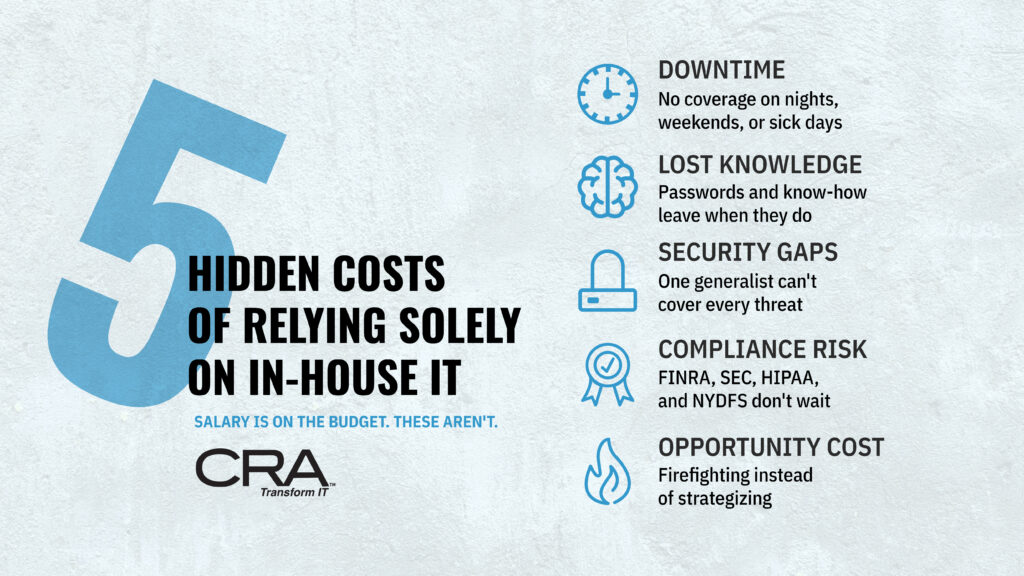
5 Hidden Costs of Relying Solely on In-House IT
Salary and benefits are visible on the budget. These costs usually aren't, and they're often what makes a single-person IT department more expensive than it looks.
1. Downtime During Coverage Gaps
In-house IT works only when your IT person is available. Vacations, sick days, nights, and weekends leave your environment unmonitored. For a Manhattan firm, one lost business day can mean missed client deadlines, idle billable staff, and reputational damage that costs far more than a year of 24/7 coverage. Because downtime never appears as a line item, it is easy to underestimate until it happens.
2. Knowledge Walking Out the Door
When an internal IT employee resigns, they often take undocumented passwords, configurations, vendor contacts, and institutional knowledge with them, usually with two weeks' notice. In a tight NYC labor market, the seat may stay empty for months. You pay recruiting fees and onboarding time, and you also pay for the period when no one fully understands how your systems work.
3. Security Exposure from Limited Expertise and Tooling
A single IT generalist can't be an expert in cybersecurity, networking, cloud, and help desk support at once, and SMB budgets rarely cover enterprise-grade EDR, SIEM, or 24/7 threat monitoring. The result is a wider attack surface and slower detection. The cost of that gap only becomes visible after a breach, through ransomware recovery, forensic investigation, client notification, and possibly higher cyber insurance premiums or denied claims.
4. Compliance Risk and Audit Burden
FINRA, SEC, HIPAA, and NYDFS (23 NYCRR 500) requirements change regularly and demand documented policies, access controls, audit logs, and incident response plans. Keeping up is a specialized job. When one internal person is also resetting passwords and fixing printers, compliance work tends to slip. That can lead to audit findings, remediation projects, failed client security questionnaires, and regulatory penalties.
5. Opportunity Cost: Firefighting Instead of Strategy
An in-house IT person buried in daily tickets has little time for the projects that move the business forward, such as cloud migrations, automation, process improvements, or technology planning for growth. Your firm pays senior-level salaries for mostly reactive work, and strategic initiatives stall. The cost is the competitive advantage you never gain.
The Math: A 50-Person Manhattan Firm
To make the comparison tangible, consider a hypothetical 50-user organization.
| Cost Category | In-House Generalist (1 Employee) | Managed IT (Standard Tier) |
|---|---|---|
| Labor / Service Fee | ~$130,000 | $72,000–$90,000 |
| Recruiting (One cycle) | ~$5,475 | None |
| Server / Storage Space | ~$7,600 | Reduced if cloud-hosted |
| After-Hours Coverage | Not included | Defined by SLA |
| Specialist Security Depth | Limited to one person | Provider team |
| Approximate Annual Total | ~$143,000+ (before tools) |
$72,000–$90,000 (plus projects) |
The Like-for-Like Coverage Reality: Cost is only half the decision. To give your in-house model the same night, weekend, and vacation coverage as an MSP SLA, you would need a second hire or an on-call contract. That pushes the internal figure well past $250,000. Small and mid-sized businesses rarely budget for that second person until an outage forces the conversation.
Where Do Coverage Gaps Create Business Risk?
Coverage gaps form wherever one person, one shift, or one contract clause becomes the only line of defense. A firm with a single IT employee has a gap every evening, every weekend, and every vacation week. A firm with a poorly scoped MSP contract has gaps wherever "monitoring" stops short of action.
What Happens When Your Only IT Employee Is Unavailable?
Your IT coverage leaves the building with your IT person. When they are on a flight, out sick, or serving notice, password resets wait, critical alerts go unread, and a failing backup job goes unnoticed.
The bigger exposure is knowledge. Firewall credentials, vendor contacts, and the reasons behind configuration choices often live in one head. Before any other decision, test your exposure by asking your current IT lead for a written runbook containing:
- Admin credentials stored in a secure password vault
- Network diagrams and critical-system documentation
- Vendor contact lists and escalation paths
- Backup restore procedures
If producing that documentation takes weeks, the exercise has already demonstrated how dependent the business is on individual knowledge.
Does 24/7 Monitoring Mean 24/7 Help Desk Access?
No. These are separate services, and providers price them separately.
- 24/7 Monitoring means automated software watches your network around the clock, and a technician triages critical alerts (e.g., a server goes offline).
- 24/7 Help Desk Support means a live person answers when your associate cannot open a deal file at 11 p.m.
Many MSP agreements include the first but limit the second to business hours, billing after-hours user calls hourly. "24/7 support" frequently carries limits. If your attorneys, analysts, or executives work late, read the SLA line-by-line to confirm which hours include live human help desk support and at what rate.
Who Responds When Systems Fail?
Incident response needs a named owner, a phone tree, and a tested plan before the failure. CISA recommends that organizations maintain formal incident response plans and drill them annually at minimum, involving both leadership and legal counsel.
For backup and disaster recovery, verify three things regardless of your IT model:
- Frequency: Automated backups run on a schedule matched to how much data loss you can tolerate.
- Isolation: Backup copies are encrypted and stored off-network (immutable), so ransomware cannot reach them.
- Proof: Someone performs actual restore tests and documents the results. A backup that has never been restored is an assumption, not proof of recoverability.
Business continuity also means deciding how your firm operates if email or the document-management system is down for an entire day. That answer should not be invented during an outage.
How Do Security Expertise and Compliance Compare?
Security now spans several distinct disciplines, and regulated Manhattan firms face written obligations for each. An MSP gives you access to more specialists, but it does not transfer your regulatory responsibility.
Can One Generalist Cover Every Security Discipline?
Rarely, and asking one person to do it is a staffing problem disguised as a budget win. A credible cybersecurity program today includes:
- Endpoint detection and response (EDR) on every laptop and server
- Threat detection backed by a security operations center (SOC) that reviews alerts around the clock
- Patch management for operating systems and third-party applications
- Network security, remote access controls, and phishing-resistant MFA
- Logging, data retention, and periodic access reviews
The threat is not abstract. The FBI reported more than $2.7 billion in losses from business email compromise (BEC) alone in 2024. A capable generalist can manage endpoint protection and patching. But staffing a SOC with 24/7 eyes on alerts is beyond what any single employee can provide—which is where specialized providers add the most value.
What Should Regulated Firms Verify?
Compliance support from a provider helps you operate controls and produce evidence. It cannot make you compliant. Any provider that promises blanket compliance deserves skepticism. What you should verify depends on your regulator:
- Broker-Dealers (FINRA): FINRA expects written supervisory procedures for outsourced activities, including Rule 3110 (supervision) and Rule 4370 (business continuity). Best practices include involving vendors in incident response testing and revoking access immediately when a contract ends.
- Investment Advisers & Funds (SEC Regulation S-P): The amended rule requires a written incident response program and notice to affected individuals no later than 30 days after becoming aware of unauthorized access to customer data. The compliance windows for all entities (large and small) have now closed as of June 2026. Your MSP's detection and escalation speed feeds that 30-day clock directly.
- Healthcare (HIPAA): A Managed Services Provider maintaining systems containing ePHI functions as a business associate. Your Business Associate Agreement (BAA) must obligate the provider to report any security incidents it becomes aware of.
- Financial Services (NYDFS): Covered organizations must meet strict MFA, access control, and CISO requirements under the NYDFS Cybersecurity Regulation (23 NYCRR 500).
In every case, ask the provider which controls it operates, which controls remain yours, and exactly what documentation it will hand your examiner.
How Does Each Model Scale with Growth?
An MSP scales by adjusting seat counts and scope. In-house IT scales through hiring. The operational friction between these two approaches becomes obvious the moment a firm expands its footprint, adds headcount, or takes on a second location.
Adding Users, Offices, and After-Hours Coverage
With an MSP, adding a user is simply a seat adjustment on next month’s invoice. Furthermore, provider pricing reflects economies of scale as firms grow:
- 50–100 Users: Typically unlocks 7% to 12% off baseline small-business per-user rates.
- 100–250 Users: Unlocks 12% to 18% off standard per-user tiers.
In-house scaling, by contrast, is "lumpy." Going from 60 to 120 employees often doubles ticket volume overnight, while recruiting a second qualified engineer in the competitive NYC market routinely takes 60 to 90 days.
Geographic expansion creates physical constraints. A second office in Brooklyn, Westchester, or New Jersey introduces travel demands that a single internal technician cannot absorb without leaving the Manhattan headquarters unstaffed. After-hours support compounds the friction: one employee cannot sustainably cover nights, weekends, and holidays indefinitely, and an on-call rotation split between just two people quickly leads to employee burnout and turnover.
Expanding Cloud and Network Responsibilities
Growth inevitably accelerates infrastructure complexity. Managing enterprise cloud environments across Microsoft 365, Azure, or AWS involves:
- Identity & Access Management: Implementing strict Conditional Access policies, phishing-resistant MFA, and privileged identity management.
- Configuration Hardening: Regularly auditing tenant security configurations against benchmarks like CISA’s Secure Cloud Business Applications (SCuBA) tool.
- Multi-Site Networking: Deploying SD-WAN or encrypted site-to-site VPNs, segmented guest networks, and centrally orchestrated firewall policies.
An internal generalist must learn these architectures on the fly, building competence one deployment at a time. A mature MSP manages dozens of comparable environments daily, bringing validated deployment templates, automated compliance monitoring, and immediate lessons learned across a broader client base.
When Does Co-Managed IT Make Sense?
Co-managed IT is the hybrid alternative. It pairs an internal IT director or small in-house team with an external MSP.
This model is ideal for firms that already have capable internal technical leadership but refuse to let that individual become an unscalable single point of failure. It frees internal leaders from daily ticket triage so they can focus on strategic, revenue-aligned projects.
Financially, co-managed IT typically prices 20% to 40% below fully managed rates on a per-user basis because the internal team absorbs first-touch user support and context-heavy administrative tasks.
Dividing Responsibilities: Who Owns What?
A successful co-managed relationship requires clean operational separation based on where internal context or external scale matters most:
| Responsibility Area | Internal IT Director / Team | Managed Service Provider (MSP) |
|---|---|---|
| Strategy & Budget | Owns: IT roadmaps, capital allocation, board reporting | Advises: Provides virtual CIO insights, lifecycle metrics |
| User Relationships | Owns: White-glove VIP support, department-level workflows | Supports: Overflow help desk, routine escalations |
| Line-of-Business Apps | Owns: Practice management, legal document platforms, EHR | Supports: Infrastructure hosting, OS/database stability |
| 24/7 Monitoring & SOC | Oversees: Reviews security dashboards and alerts | Operates: 24/7/365 threat monitoring, alert triage, EDR |
| Maintenance & Hygiene | Approves: Maintenance windows and change requests | Executes: Patch deployment, third-party software updates |
| Backups & DR | Defines: RPO/RTO parameters and business impact tiers | Executes & Tests: Automated backups, off-site replication, restore drills |
| After-Hours Coverage | Escalation Only: Emergency business-impact decisions | Operates: Live night, weekend, and holiday user support |
| Project Surge Capacity | Leads: Sets business requirements and timelines | Deploys: Senior engineers for migrations and rollouts |
Preventing Co-Managed Gaps
The primary failure mode in a hybrid model is the handoff. Prevent friction by deploying five operational safeguards:
- A Single Shared Ticketing Queue: Both teams must work out of an integrated PSA (Professional Services Automation) tool to ensure mutual visibility over active tickets, escalations, and SLA timers.
- Formal Change Control: Enforce written rules detailing who can authorize firewall changes, administrative permission elevations, or system restarts, backed by audit-ready change logs.
- Joint Incident Response Testing: Drill security incidents and disaster recovery scenarios together at least once a year.
- Centralized, Living Documentation: Keep runbooks, IP schemes, circuit IDs, and administrative passwords in a shared, multi-tenant credential vault updated by both sides.
- A Shared Operating Principle: If nobody can definitively answer who patches or backs up a specific server, assume nobody is doing it.
Managed IT vs. In-House IT: The 10-Factor Decision Matrix
Use this matrix to evaluate how each operating model performs against your firm’s structural priorities:
| Decision Factor | In-House IT Generalist | Fully Managed MSP | Co-Managed IT (Hybrid) |
|---|---|---|---|
| 1. Business & Workflow Context | Deep: Immediate grasp of firm culture, VIP preferences, and internal quirks. | Builds Over Time: Standardized onboarding; deepens via dedicated account teams. | Deep: Internal IT lead preserves firm context and executive relationships. |
| 2. Daily On-Site Presence | Continuous: Physical desk presence for hands-on, hardware-level fixes. | Scheduled / Dispatched: Rapid remote response; on-site visits contracted or dispatched. | Continuous: Internal staff handles daily floor walk-ups; MSP handles back-end. |
| 3. Specialist Technical Depth | Limited: Bounded by the skill set of one or two generalists. | Comprehensive: Access to dedicated cloud architects, network, and systems engineers. | Comprehensive: Supplements internal leadership with outside technical specialists. |
| 4. After-Hours & Weekend Coverage | High Risk: Requires on-call rotations that cause employee burnout and turnover. | Contractual: 24/7/365 live triage and support governed by strict SLAs. | Contractual: MSP absorbs off-hours tickets, protecting internal staff work-life balance. |
| 5. Cybersecurity Specialization | Basic: Can manage patching and antivirus; lacks 24/7 SOC capabilities. | Advanced: Enterprise EDR, SIEM, 24/7 alert triage, and threat hunting. | Shared: Internal team sets policy; MSP operates monitoring and threat response. |
| 6. Hiring, Turnover & Management Burden | High: Ongoing recruiting, benefits administration, training, and retention risk. | Zero: Provider absorbs all staffing, certification, and turnover dynamics. | Low: Manage a single relationship and key technical hire rather than a whole department. |
| 7. Operational Scalability | Lumpy & Slow: Growth requires hiring cycles, desk space, and compensation bumps. | Elastic: Add or remove seats, locations, and licenses month-to-month. | Elastic: MSP absorbs sudden capacity surges and major infrastructure migrations. |
| 8. Governance & Accountability | Direct Authority: Task priorities adjusted informally on the fly. | Contractual: Performance measured via ticket reports, SLA metrics, and QBRs. | Hybrid: Direct daily control combined with enforceable partner SLAs. |
| 9. Single Point of Failure (SPOF) | Severe Risk: Vacations, illness, or resignation halts technology operations. | Negligible: Institutional knowledge documented in enterprise PSA/RMM systems. | Negligible: Documentation shared in dual-access runbooks and password vaults. |
| 10. Ideal Strategic Deployment | Firms with proprietary hardware, complex labs, or 100+ users justifying a team. | 20–100 person firms requiring enterprise-grade security and fixed-cost coverage. | 40–150 person firms with a strong internal IT director who needs operational backup. |
Nine Questions to Ask Before Signing an MSP Agreement
Before entering into a managed services agreement, run prospective providers through this vetting sequence. Vague answers to questions about after-hours availability, incident escalation, or termination terms are immediate warning signs.
- Which hours include live human help desk support, and what do after-hours calls cost?
Clarify whether night and weekend calls route to an automated ticketing queue or a live technician, and confirm the specific hourly bill rate if off-hours support falls outside the baseline agreement. - What are your specific response and resolution targets by priority level?
Demand defined response and resolution windows tied directly to business impact (e.g., Critical, High, Medium, Low), and ask whether the contract includes financial credit remedies if the provider misses those thresholds. - Who staffs your Security Operations Center (SOC), and is the function internal or subcontracted?
Determine whether alerts are reviewed by the provider's dedicated employees or outsourced to an overseas third party with variable vetting standards. - Which services are excluded from the monthly fee and billed separately?
Request an explicit itemization of out-of-scope services, specifically covering user onboarding fees, office relocations, hardware staging, major cloud migrations, and on-site dispatch fees. - How frequently do you test backup restores, and do you deliver documented proof?
A backup schedule without verified recovery testing is unproven. Confirm whether file-level, database-level, and bare-metal restore drills occur quarterly or semiannually, and verify that written reports are provided. - How do you escalate a suspected security incident, and how quickly will we be notified?
Under regulations like SEC Regulation S-P and NYDFS 23 NYCRR 500, legal notification clocks begin running quickly upon discovery. The provider's escalation protocol must feed into your firm's incident response plan within hours—not days. - What happens at contract termination?
The agreement must specify that all administrative credentials, network architecture diagrams, software licenses, domain registrations, and configuration backups remain your property and will be transferred promptly without hostage fees. - How quickly can a technician physically reach our Manhattan office when remote support fails?
A failed core switch, physical firewall failure, or down executive boardroom setup cannot be fixed remotely. Demand a contractual guaranteed on-site response time for your specific Midtown or Downtown location. - What evidence and audit trails do you provide to satisfy regulatory examiners?
Ask to review sample compliance reports for your industry (FINRA, SEC, HIPAA, NYDFS) to verify that the provider can deliver evidence of patching, user access reviews, and multi-factor authentication enforcement.
The Bottom Line for Manhattan Businesses
For Manhattan firms, the choice between managed IT and in-house IT is an exercise in operational risk allocation:
- An internal employee delivers deep day-to-day cultural context, informal administrative agility, and immediate on-site desk presence. However, that model concentrates institutional knowledge into a single point of failure and leaves nights, weekends, vacations, and specialized cybersecurity disciplines uncovered.
- A managed service provider delivers multi-tiered engineering depth, 24/7 eyes on network threats, scalable cloud governance, and enforceable SLAs at a predictable monthly cost—at the expense of relying on contractual governance rather than direct employee oversight.
- A co-managed model combines both: retaining internal business knowledge and executive alignment while offloading routine ticket queues, overnight monitoring, and deep infrastructure engineering to an external partner.
Before choosing an operating model, quantify three variables:
- The true fully loaded cost of your current IT setup (including space, tooling, benefits, and recruiting overhead).
- Your actual coverage and compliance gaps across off-hours support, incident response, and regulatory readiness.
- Your planned 24-month headcount and technical trajectory, ensuring your model can scale without forcing sudden staffing crises.
Get a Clearer Picture of Your IT Model
The best technology decision starts with baseline data rather than surface assumptions. An independent Manhattan IT infrastructure and security assessment identifies coverage gaps, evaluates regulatory audit posture, and calculates the true operational cost of your existing approach.
A comprehensive assessment examines:
- Current infrastructure health, single points of failure, and security tooling
- FINRA, SEC, HIPAA, or NYDFS compliance and audit readiness
- Fully loaded cost modeling comparing in-house, co-managed, and managed alternatives
- Backup integrity, immutable storage status, and disaster recovery RTO/RPO metrics
- Incident response readiness and administrative credential governance
Whether your firm requires fully managed IT, a co-managed partner, or a structured internal department, the objective remains constant: build a technology function that is accountable, resilient, compliant, and positioned to support your firm's growth.
Frequently Asked Questions
Is managed IT cheaper than hiring an internal IT employee?
For firms with 20 to 100 users, yes. A mid-level NYC IT professional costs roughly $143,000 to $225,000+ per year once base salary, 31.3% benefit loads, recruiting fees, specialized software licenses, and Manhattan office space are factored in. Comprehensive managed IT for a 50-person firm typically costs between $72,000 and $90,000 annually while providing a full multidisciplinary engineering team and 24/7 coverage.
At what company size does in-house IT make sense?
Internal IT generally becomes economically and operationally practical around 100+ employees, or when an organization operates proprietary physical machinery, specialized laboratory environments, or complex on-site workflows that demand daily full-time physical management. At that scale, an organization can typically justify funding a multi-person department with internal redundancy.
Is co-managed IT the same as outsourced IT?
No. Fully managed IT places primary responsibility for the entire IT environment with the external service provider. Co-managed IT splits responsibilities between an internal technical director and the MSP. The internal director retains governance, line-of-business applications, and strategic direction, while the MSP supplies 24/7 threat monitoring, help desk surge capacity, and advanced infrastructure engineering.
Does an MSP take legal responsibility for regulatory compliance?
No. Outsourcing technology operations does not outsource regulatory accountability. An MSP operates technical controls, implements safeguards, and generates audit-ready documentation, but the covered firm remains legally responsible to regulators (such as FINRA, the SEC, HHS, or NYDFS) for maintaining compliance and supervising third-party service providers.
Does 24/7 managed IT mean I can call a technician at midnight?
Not necessarily. 24/7 monitoring means automated tools watch systems continuously and trigger alerts when infrastructure fails. 24/7 help desk support means live technicians answer calls from users working late. Review the specific SLA to verify whether midnight user support is included in the base agreement or billed as an after-hours surcharge.
What should I look for in an MSP contract?
Scrutinize priority tier definitions, guaranteed response and resolution times, exclusions from the recurring fee, after-hours billing rates, backup restore testing cadences, SOC staffing details, and clear contract termination provisions ensuring immediate return of all passwords, documentation, and data.
Can an MSP provide on-site support in Manhattan?
Yes, but response parameters vary widely. Some providers rely strictly on remote help desks and dispatch field technicians only after protracted triage. Require an explicit contractual commitment specifying guaranteed on-site arrival times for business-critical hardware and network failures.
What is the biggest risk of a one-person IT department?
Single-person dependency. If one individual manages your environment, critical knowledge—such as root passwords, configuration logic, vendor agreements, and incident response steps—often lives solely in their memory. When that employee takes vacation, falls ill, or resigns, the business is left vulnerable to outages and security events without internal support.
Should a Manhattan law or financial-services firm outsource IT?
Regulated, security-conscious firms should focus on capabilities rather than labels. If an internal team cannot provide 24/7 SOC monitoring, immutable backups, formal vendor risk management, and tested incident response procedures that meet SEC, FINRA, or NYDFS guidelines, partnering with a specialized MSP or adopting a co-managed model is often the lower-risk operational decision.
How should I compare competing MSP proposals?
Normalize every proposal to the same operational baseline. Compare total user and device counts, included software licenses (EDR, email security, backup storage), live help desk coverage hours, guaranteed response targets, project hourly billing rates, compliance audit assistance, and exit terms. Evaluating monthly base fees alone often conceals significant exclusions and project add-ons.