NYC Law Firm Cloud Migration: Best Practices & Top Providers for 2026
Let's start with the joke every IT consultant has made at least once: the cloud is just someone else's computer.
It's a joke because it's true, and it stops being funny the moment you're the managing partner deciding whether privileged client documents, attorney email, and every matter file your firm has touched since the Bloomberg administration should live in a data center you will never visit, owned by a company you've never met, in a state you may not be licensed in.
For a long time, that was a question firms could put off. It isn't anymore.
Here's my read after talking to enough legal IT people to develop a caffeine problem: for most New York City firms, migrating critical systems — email, document management, practice management — to the cloud is the correct call. But only when it arrives wrapped in legal-grade governance. That means real vendor due diligence, matter-level access controls, recovery objectives you've written down and actually tested, and an attorney sponsor with enough standing in the firm to make binding decisions.
The technology stopped being the hard part years ago. What stalls these projects is the firm.
The Numbers Everyone Cites, And What They Actually Tell You
Back in 2019, legal practice surveys found 78% of firms were already storing some client data in the cloud, with another 8% planning to. Cybersecurity anxiety was trending down. Attorneys remained genuinely split on whether practice management belonged off-premises.
That data is old. Treat it as a fossil, not a forecast.
What it's useful for is marking the crossing point. Somewhere around then, the argument stopped being should we use the cloud at all and became which crown jewels move, and when. That's still the argument. It's just quieter now.
Key Takeaways
- Your clients are the forcing function. Corporate clients now expect hosted systems with documented security controls. That expectation is pushing firms cloud-ward faster than any internal preference ever did.
- Feasibility is settled. Email, document management, and practice management all have mature cloud platforms. What's left to debate is sequencing.
- Controls are what make it defensible. Encryption, ethical walls, access logging, data residency, and tested disaster recovery targets. Not vibes.
Why Your Clients' Cloud Standards Are Raising the Bar
Your largest clients moved their own sensitive data into hosted environments a long time ago. Their vendor security questionnaires reflect that, and those questionnaires are getting longer.
Which creates an awkward situation: the firm running a server closet down the hall from the copier is frequently the least modern link in a sophisticated client's supply chain. General counsel have noticed. They mention it.
How Enterprise Clients Normalized Hosted Sensitive Data
Banks, insurers, health systems, public companies — the entire New York client base that pays your best rates runs core operations on hosted platforms. When a client's own patient records or trading data sit in a cloud tenant with a dedicated security team behind them, the argument that your copy of that data is safer on a six-year-old box in the office doesn't survive contact with a procurement officer.
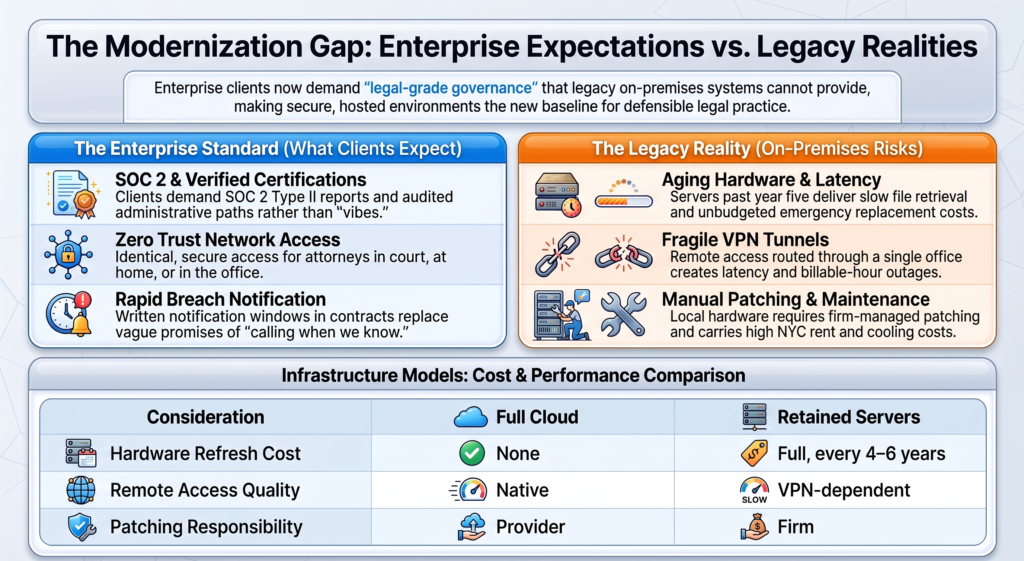
What clients want is proof. SOC 2 reports. Named certifications for regulated work. Written breach notification windows. These flow down through engagement letters and outside counsel guidelines and land, eventually, in your IT contracts.
Use Big Providers. Don't Outsource Accountability.
A hyperscale provider gives you physical security, redundant power, and a patching cadence no midsize firm can realistically match.
It does not give you a defensible configuration.
Those are two different things, and the second one is permanently yours. Conditional access rules, data loss prevention policies, retention settings, and the question of who at your IT provider can open a client document — all firm decisions. All yours.
Guidance on moving legal work into hosted systems frames this as reasonable care under Model Rule 1.6(c) and ABA Formal Opinion 477R, which asks lawyers to actually understand what they're using and how it's configured. Not to become engineers. Just to know.
Confidentiality, Privilege, and the Question You Should Ask
Privilege isn't broken by a file's location. It's put at risk by weak access controls, unlogged administrative access, and nobody in the building knowing where a copy of a matter ended up.
So ask any provider the direct version of the question: who at your company can open our documents, and is every access event recorded?
The answer you want involves just-in-time access, named engineers, and firm approval before anyone reads client content. The answer you don't want is a pause.
Client Collaboration Now Requires a Connected Environment
Client communication has moved to shared workspaces, secure links, and real-time review. A firm tethered to office-bound file shares generates friction the client feels on every single deal.
An attorney needs the same document system in a courthouse hallway that they have at their desk. That's the whole standard.
Secure Access Beyond the Office
A partner in a Midtown conference room, an associate at a deposition in Brooklyn, and a paralegal at their kitchen table in Astoria all need identical access to the same matter file.
When that access routes through a VPN tunnel back to one office, latency and outages become billable-hour problems. Real ones.
One New York firm swapped its legacy VPN for Zero Trust Network Access paired with an Azure-hosted practice management system. Result: consistent performance in the office, at home, and in court. Not glamorous. Just correct.
Document Sharing That Doesn't Involve a 40 MB Attachment
Cloud document management systems handle version control, check-in and check-out, and expiring share links natively. Clients get a portal instead of an email thread containing six nearly identical drafts named FINAL_v3_REVISED_USE THIS ONE.docx.
Microsoft 365 dominates in legal because it connects to everything firms already run, and its information protection and eDiscovery capabilities are genuinely hard to replicate by bolting separate products together. The legal SaaS ecosystem — billing, intake, matter tracking — largely assumes that connection already exists.
Hybrid Work Without the Fragile Remote Access
Hybrid work in New York is permanent. Stop planning around its reversal.
Remote desktop sessions bolted onto an aging server remain the weakest part of many firm networks. A hybrid cloud setup can legitimately keep one or two workloads local while everything else runs hosted — but that split needs an actual reason behind it.
Firms that skip the reason end up maintaining two environments, two backup schemes, and two sets of problems. Ask me how I know.
You're Already a Cloud Firm. The Question Is Narrower Than It Feels.
Your firm already runs on the cloud: email, e-signature, legal research, e-filing. That ship sailed, and you were on it.
The real question is which remaining systems move, and in what order.
From Email to DMS to Practice Management
Email and productivity go first. Well-worn path, contained risk.
Document management follows, and it carries decades of privileged work product with it.
Practice management and time and billing come last, because they contain historical financial records that must retain integrity for both ethics and tax purposes.
Each of these is a separate project with its own vendor criteria. Treating all three as one migration is the single most reliable way to lose control of a timeline.
Where iManage and Microsoft 365 Fit
Microsoft 365 is the foundation most firms build on. iManage Cloud and NetDocuments are the mature cloud-native DMS options, and moving from an on-premises DMS to either one is rarely simple.
Version histories, matter associations, ethical walls, access logs — all of it has to arrive intact.
A DMS migration handled like an email migration is the most common serious mistake in legal cloud projects. A bad cutover can quietly break privilege protections the firm spent years constructing, and you may not find out until someone asks a conflicts question.
Migrating Data Without Torching Billable Hours
Plan for parallel operation. Run at least one full billing cycle in both systems before retiring the old one. Keep the legacy DMS readable through a defined overlap period.
Timelines are firm-specific, but here's a benchmark worth anchoring to: for firms of roughly 10 to 50 attorneys, a full migration covering email, DMS, and practice management commonly runs 8 to 16 weeks from kickoff to cutover.
Larger firms take longer, and not proportionally. Change management scales worse than headcount.
The Feature Gap Closed. The Server Bill Didn't.
Whatever advantage on-premises systems once held on features has mostly evaporated. The cost of keeping servers alive has not.
Aging hardware in a New York office carries rent per square foot, cooling, maintenance contracts, and an emergency replacement bill that appears in the quarter nobody budgeted for it.
What You Gain by Retiring Old Hardware
Servers past year five deliver slow file retrieval and recurring outages, both of which attorneys will describe to you in vivid terms.
One New York City firm consolidated during an office move and reported zero downtime plus a 25% reduction in infrastructure costs after shifting 80% of workloads to a compliant Azure environment.
Patching, capacity planning, hardware refresh cycles: no longer your problem. Configuration and governance: still very much your problem.
Cloud vs. Hybrid vs. Keeping the Servers
Hybrid earns its place when a practice-critical application has no cloud version, or when a specialized system genuinely requires local latency. Absent one of those two conditions, the split is just extra work wearing a strategy costume.
What IT Support Should Look Like After the Migration
Migration ends. Support doesn't.
Your MSP or internal team should own tenant configuration reviews, access recertification, patch verification, and network support for the office connection that now carries literally everything.
Evaluate disaster recovery preparedness on a schedule, not on a hunch. And ask how breach notification works — specifically, how fast you'll hear. A written time window beats "we'll call you when we know more," which is what you'll get on the worst day of your year.
How Secure Multi-Tenant Cloud Services Protect Legal Data
Multi-tenancy anxieties have mature answers now: tenant isolation, encryption with controlled key access, audited administrative paths.
What separates a defensible setup from a risky one isn't whether those controls exist. It's whether your firm verified them instead of assuming them.
Encryption and Authentication Controls That Matter
Look for AES-256 encryption at rest, TLS 1.2 or higher in transit, and a clear statement of who holds the keys.
Request a current SOC 2 Type II report. Then read the exceptions section, which is the only part anyone should care about and the part nobody reads.
Multi-factor authentication belongs on every account, administrative ones included, with conditional access rules that weigh device health and location. Role-based permissions should map to job function. Sensitivity labels should follow documents out the door when they leave the tenant.
Ethical Walls Need Technical Enforcement
An ethical wall that lives in a policy memo is not an ethical wall. It's a wish.
Define them before migration. Retrofitting information barriers after thousands of documents have already been filed causes real operational disruption and real partner frustration.
Matter-level access controls answer one simple question: who can open this file? Every access should be logged and reviewable the moment a conflict question surfaces.
Data Residency, Backups, and Recovery Objectives
Know which region holds your data, and whether the provider can move it without telling you. For firms serving regulated New York clients, residency commitments increasingly show up in outside counsel guidelines.
A comprehensive disaster recovery strategy requires measurable targets. Set a recovery point objective and a recovery time objective in writing. Then actually test a restore, which is the step everyone skips.
ABA Model Rules and state bar guidance expect lawyers to understand these safeguards. A New York law firm that can't articulate how much data a failure would cost hasn't finished the work — it's just finished the project plan.
A Managed Path Forward
Moving critical systems into the cloud works when the firm treats it as a governance project that happens to involve technology, rather than a technology project that happens to involve lawyers.
The controls protecting data security and data integrity are decisions people make, then document, then verify. All three verbs are load-bearing.
Here's the sequence:
- Start with an attorney sponsor who has real standing inside the firm. Not a volunteer. Someone with authority.
- Email first.
- Document management second, with dedicated planning and a parallel run.
- Practice management last, with a full billing cycle in both systems.
Write down your disaster recovery objectives, your ethical wall configuration, and your exit terms before you sign anything.
And ask your prospective provider three questions: How many law firms do you support? Which DMS platforms have you actually migrated? What happens to our data if this relationship ends?
The answers tell you whether you're buying a secure cloud environment or a problem you'll inherit in year three.
Once the firm has settled on the sequence and the security controls, the last decision is who actually executes it. That choice matters more than most managing partners expect, because a migration partner who has never touched a document management system will learn on your matter files.
Below are three NYC-based providers currently doing this work well. I've listed what each one is actually good at, not what their homepage says.
The 3 Best Cloud Migration Providers for NYC Law Firms
1. Computer Resources of America (CRA)
Primary focus: Full-service managed IT and cybersecurity for New York City professional services firms, with a heavy legal concentration.
Cloud migration specialty: Enterprise-grade, phased migrations of critical legal systems — email, document management, and practice management — sequenced in that order, with parallel operation built into the plan rather than bolted on when something goes wrong.
Why an NYC firm should consider them: CRA is the most comprehensive option on this list, and the one I'd point a managing partner toward first if the firm is moving genuinely sensitive systems and cannot tolerate downtime.
What separates them is that they treat migration as a governance exercise. They handle complex iManage and NetDocuments integrations, which is the part of a legal cloud project where things quietly break — version histories, matter associations, access logs. They also enforce ethical walls technically rather than documenting them in a policy nobody reads, and they define the walls before migration, when it's still cheap to do.
They run both hybrid and full-cloud migrations, and they're honest about when hybrid is legitimate versus when it's just two environments and twice the problems. Their security posture is built for firms answering client vendor questionnaires, which means SOC 2 documentation, conditional access configuration, and breach notification terms you can actually point to in an outside counsel guideline response.
The practical argument: they understand that a 60-hour week doesn't pause for a cutover. Migrations get scheduled around billing cycles and court calendars, not around the vendor's convenience.
Best fit: Small to midsize NYC firms moving privileged data into the cloud for the first time, or firms with an aging on-premises DMS that needs to migrate intact.
2. Tabush Group
Primary focus: Private cloud and Desktop as a Service (DaaS) for the New York legal market.
Cloud migration specialty: Moving firms off local hardware entirely into Boxtop, their proprietary hosted desktop environment, plus Edge, a co-managed offering for firms that want to keep one internal IT person without also keeping a server room.
Why an NYC firm should consider them: Tabush has been working with NYC law firms for roughly 25 years, which is long enough to have seen every bad migration and most of the good ones.
Their model is different from a conventional Microsoft 365 migration. Instead of moving individual workloads to the cloud, Boxtop moves the entire desktop — applications, files, settings — into a centralized virtual workspace. Attorneys log in from a laptop at home, a machine in the Midtown office, or a borrowed computer at a deposition and get an identical environment.
That's genuinely useful for firms still running a legacy application with no cloud version, since the app runs in the hosted desktop rather than needing to be replaced or awkwardly retained on-prem.
The Edge co-managed tier is the underrated piece. Plenty of firms have one competent internal IT person they don't want to lose but can't reasonably ask to manage cloud infrastructure and security at the same time. Edge splits that load.
Best fit: Firms that want to eliminate local PCs and servers completely, or firms with legacy application dependencies that make a clean SaaS migration impractical.
3. ELMIDA Solutions
Primary focus: A boutique MSP built specifically for New York City law firms.
Cloud migration specialty: Native Microsoft ecosystem deployments — Microsoft 365, Entra ID for identity, and Intune for device management — configured for legal from day one.
Why an NYC firm should consider them: ELMIDA is the narrowest option here, and that's the point. They're not trying to support every platform. If your migration roadmap is built on Microsoft 365, they know that stack deeply enough to configure the parts most providers skip: sensitivity labels that follow documents out of the tenant, conditional access rules that evaluate device health, retention policies that match your records schedule instead of the default.
Their pricing is flat-rate, which matters more than it sounds. Hourly IT billing creates an incentive problem during a migration, and firms that have lived through a project with an open-ended invoice tend to become evangelists for predictable pricing.
The limitation is the flip side of the strength. If your firm depends on a complex legacy application or a heavily customized on-premises DMS, ELMIDA is a harder fit than CRA or Tabush.
Best fit: Boutique and midsize firms without legacy application baggage that want a tightly secured, native Microsoft environment and a bill they can forecast.
How to Choose Between Them
Ask all three the same questions from the section above: how many law firms do you support, which DMS platforms have you actually migrated, and what happens to our data if this relationship ends.
Then ask one more.
Ask each provider for a referral from another local law firm. The ones who have a real answer are the ones who have done enough of these to be worth hiring.